Low Cost CNC Machine Guide for Beginners
A low cost CNC machine can cut signs, parts and prototypes from wood, acrylic and soft metal once you match its work area, spindle and frame to the projects you plan to make.

On this page
Top picks at a glance
As an Amazon Associate I earn from qualifying purchases.
- 1
 FoxAlien XE-Ultra 8080 CNC Router Machine with NEMA 23View on Amazon
- 2
 Low Profile CNC Vise for CNC Router MachineView on Amazon
- 3
 FoxAlien Masuter Pro 3-Axis CNC Router MachineView on Amazon
- 4
 Twotrees TTC450 Pro All-Metal CNC Router Machine with NEMA 57View on Amazon
A low cost cnc machine turns a spare corner of a workshop into a small parts shop: signs, plaques, brackets, inlays and prototypes cut from wood, acrylic, MDF and soft metal, from files you design on a computer. The trick is matching the machine to the work you plan to do, because a router that is too small for your panels or too weak for your material will frustrate you. This guide walks through that match, using the figures the listings themselves state.
Other machines to compare
 FoxAlien XE-Ultra 8080 CNC Router Machine with NEMA 23Check price on Amazon
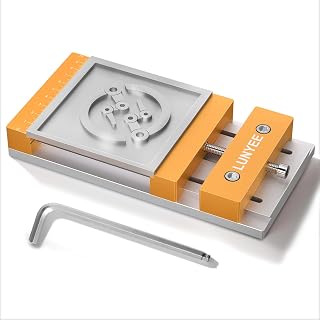 Low Profile CNC Vise for CNC Router MachineCheck price on Amazon
 FoxAlien Masuter Pro 3-Axis CNC Router MachineCheck price on Amazon
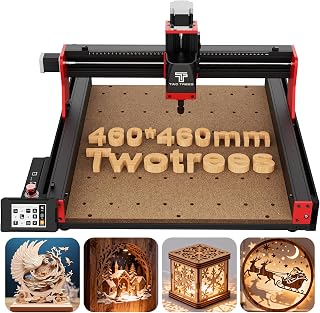 Twotrees TTC450 Pro All-Metal CNC Router Machine with NEMA 57Check price on Amazon
LaserEngraveHQ earns a commission from purchases made through these links, at no extra cost to you. Read our affiliate disclosure.
This guide lists no prices, because listing prices change often. Compare the work area, spindle power and frame details each listing states.
Step 1: Decide what you will cut
Start with the material and the project, not the machine. The listings in this guide cover wood, acrylic, MDF, plastic, nylon and PCB, plus soft metals such as aluminum, brass and copper, and the ACMER Ascarva 3 S (on Amazon) listing adds RenShape, plywood and PC board. Signs, decorative panels, small parts and prototypes are the projects those listings describe.
Wood and MDF suit almost every desktop router here, while aluminum and brass ask for a rigid frame, a slower feed and a bit that suits metal. Pick the material you will cut most often. The ideas for CNC router projects show what each material turns into.
Step 2: Size a low cost cnc machine to your projects
Work area decides the largest panel you can cut without moving it. The CNCTOPBAOS 1610 PRO lists 7.08×3.93×1.77 inches, or 18x10x4.5cm, while the LUNYEE 3018 Pro Ultra (on Amazon) lists 300 × 180 × 80mm, or 11.8″ x 7.1″ x 3.1″. At the larger end, the Axiscreat 6060 (on Amazon) lists 23.6 × 23.6 × 2.95 inch, or 600 × 600 × 75 mm, and the FoxAlien Masuter Pro MAX lists 600x600mm, or 23.6” x 23.6”, with a 100mm Z-axis pass height, or 3.94”. The WolfPawn listing goes further still, with 1000×1000×110mm of working travel.
Measure the largest piece you plan to cut, then allow room for clamps around its edges. For help thinking through sizes, see the guide to choosing a desktop CNC router and the CNC router hub.
Step 3: Pick the spindle for your material
Spindle power on the machines that ship with a spindle runs from 120W on the CNCTOPBAOS 1610 PRO, through 500W on the LUNYEE 3018 Pro Ultra, the FoxAlien Masuter Pro MAX and the ACMER Ascarva 3 S, to 710W on the Axiscreat 6060. The 1610 PRO spindle lists a top speed of 10000r/min, the Ascarva 3 S lists up to 12,000 RPM, the Genmitsu router lists 6500-30000 RPM across 6 speeds, and the Axiscreat lists 6000-30000 RPM across 6 preset speeds.
Higher power suits deeper cuts and harder material, but a 120W or 500W spindle still handles wood, acrylic, MDF and PCB well when the bit and the feed suit the job. The Masuter Pro MAX uses a 500W brushless spindle, which the listing describes as quieter and longer lived than a brushed spindle, while the Genmitsu router (on Amazon) uses an ER11 collet with a 1/8” collet and a 65mm diameter body that fits most CNC engraving machines as an upgrade. The FoxAlien XE-Ultra 8080 (on Amazon) ships without a spindle and supports a 65mm router or a 1.5kW VFD spindle. See spindle versus router for CNC and 300W versus 500W CNC spindles for a closer look.
Step 4: Check the frame, rails and motion
A rigid frame keeps cuts clean. The LUNYEE 3018 Pro Ultra lists an HG15 X-axis linear guide, a reinforced 4040 Y-axis profile and an all-metal body, while the FoxAlien XE-Ultra 8080 lists 16mm ball screws on the X and Y axes, 12mm ball screws on the Z axis, HG-15 linear rails on all axes and a 46×80mm aluminum frame. The WolfPawn listing lists linear guides and ball screws on all axes, and the Axiscreat 6060 lists belt-driven X and Y axes with a linear rail Z axis.
The XE-Ultra 8080 lists closed-loop stepper motors with 2.6 N.m of torque, step-loss protection and speeds up to 5,000mm/min, plus industrial inductive limit switches with a 0.5ms response. The LUNYEE lists limit switches on the X, Y and Z axes, the ACMER lists six limit switches and an emergency stop button, and the Axiscreat lists an automatic tool setter. Read the linear rails versus V-wheels and ball screw versus lead screw guides before comparing frames.
Step 5: Choose control and software
Most machines here run on GRBL control, but the way you send it work varies. The CNCTOPBAOS 1610 PRO with an offline controller lets you run a job from an SD card without a computer connected, and the Axiscreat 6060 ships with a 4.3-inch touchscreen offline controller, plus control from a PC application, a smartphone or a tablet. The LUNYEE 3018 Pro Ultra runs through GRBL software or its included offline controller, and the ACMER Ascarva 3 S connects by USB to Windows, macOS and Linux, working with Candle, UGS and Easel and with .nc and .gcode files.
Pick the control style that fits your bench: an offline controller frees the computer during a long carve, while a USB link suits a shop with the computer beside the machine. The Axiscreat listing notes setup in 20 minutes with its pre-assembled modular structure. If you are new to the workflow, the easiest software for CNC routers and 3018 CNC setup guides walk through the first run.
Step 6: Set up safely and run a first carve
Give the machine a flat, stable bench with space around it for the full travel of each axis. Clamp the material to the table before you start, and confirm the bit clears the clamps at every point in the file. The WolfPawn listing notes a spindle speed adjustment knob on its upgraded controller, and the Genmitsu router ships with a 3.5m power cord, or 11.48 ft, plus an extension connector, so plan the cord route before you place the machine.
Wear eye and hearing protection, and clear chips and dust as you work. The CNCTOPBAOS 1610 PRO listing includes a 4G USB flash drive with its instructions and GRBL software. Start with a simple shape in scrap material, watch the full carve, and adjust the settings after you see how the machine behaves. The CNC router maintenance guide and feeds and speeds for beginners cover what to check between jobs.
Common mistakes to avoid
- Buying the largest work area before you know which projects you will cut.
- Picking a spindle by power alone and ignoring the frame that carries it.
- Skipping limit switches and an emergency stop when comparing listings.
- Starting with a complex design instead of a simple shape in scrap material.
- Forgetting clamps, bits and dust control when you plan the bench space.
Low cost cnc machine: the short version
- Decide the material and the project first.
- Match the work area to the largest piece you will cut.
- Pick a spindle that suits that material, from 120W to 710W where one is included.
- Check the frame, rails, limit switches and emergency stop.
- Choose offline control or a USB link to suit your bench.
- Set up safely, clamp the material and start with a simple shape.
After that, repeat: cut, check the result, adjust the settings and add a new project.
FAQ: lasers and CNC
What work area should a first low cost cnc machine have?
Match it to the largest piece you plan to cut. A 300 × 180 × 78mm bed, like the ACMER Ascarva 3 S lists, covers signs, small parts and prototypes, while a 600 × 600 × 75 mm bed, like the Axiscreat 6060 lists, covers larger panels. The WolfPawn listing, at 1000×1000×110mm, suits oversized wood crafts and signage.
Can a low cost cnc machine cut aluminum?
Yes, within limits. The LUNYEE 3018 Pro Ultra listing states that its 500W spindle handles soft metals such as aluminum, brass and copper with the appropriate bits and settings, and the ACMER Ascarva 3 S listing states suitable soft metals. A rigid frame, a bit that suits metal and a slower feed give the cleanest result.
What spindle power suits a first machine?
For wood, acrylic, MDF and PCB, a 120W spindle like the one on the CNCTOPBAOS 1610 PRO is enough to start. A 500W spindle, like the ones on the LUNYEE 3018 Pro Ultra and the ACMER Ascarva 3 S, adds power for soft metal. A 710W spindle, like the one on the Axiscreat 6060, suits deeper cuts and heavier work.
Does the machine need a computer connected while it carves?
Not always. The Axiscreat 6060 ships with a 4.3-inch touchscreen offline controller, the LUNYEE 3018 Pro Ultra includes an offline controller, and the CNCTOPBAOS 1610 PRO with an offline controller reads G-code files from an SD card. The ACMER Ascarva 3 S instead connects by USB to a computer running Windows, macOS or Linux.
What is worth checking before buying a low cost cnc machine?
Check the work area, the spindle power and speed, the frame and rails, and whether the listing states limit switches and an emergency stop. Two of the listings here state a 1-year manufacturer warranty: the FoxAlien Masuter Pro MAX and the FoxAlien XE-Ultra 8080.
Related: the CNC router hub, best CNC router under 1000 and best desktop CNC for beginners. Also see the cost of a CNC machine. Also see the CNC router projects for beginners.