Cost of PLA Filament: What to Expect Per Spool
What sets the price of a spool of PLA filament, and how to compare spool sizes, blends and finishes on equal terms.

On this page
Top picks at a glance
As an Amazon Associate I earn from qualifying purchases.
- 1
 SUNLU PLA 3D Printer Filament9.8/10View on Amazon
- 2
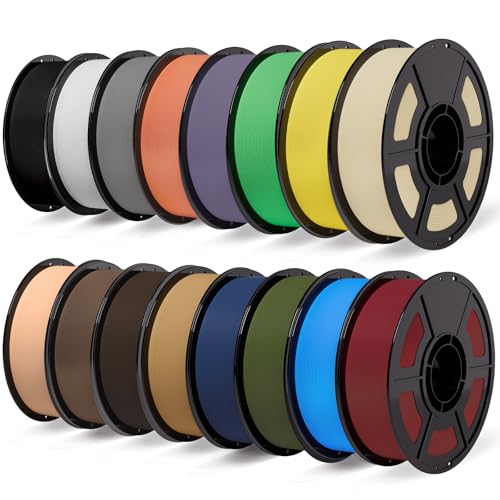 iSANMATE 16KG Matte PLA Filament Bundle 1.75MM 30-300mm/s for9.7/10View on Amazon
- 3
 SUNLU Silk PLA+ Filament 1.75mm9.7/10View on Amazon
The cost of PLA filament comes down to the spool: how much filament it holds, whether it is plain PLA or a tougher PLA+ blend, and whether the colour and finish are standard or specialty. A small spool holds less filament than a large spool, a bundle of small spools spreads the filament across many colours, and a specialty dual-colour silk spool is a different product from a plain spool of the same weight. This guide explains each driver, using the spool sizes and print settings that filament makers publish, so you can compare listings on equal terms.
LaserEngraveHQ earns a commission from purchases made through these links, at no extra cost to you.
LaserEngraveHQ has no verified price list for PLA filament, so this guide gives no dollar figures. Prices vary by seller and change often; the sections below explain what drives the cost, with the spool sizes and settings makers publish.
What sets the cost of a spool
These things set what a spool costs. Weight matters most: filament is sold by weight, so the fair way to compare two listings is by the weight each spool holds, not by the number of spools in the box. Material comes next: plain PLA is the baseline, while PLA+ blends claim upgraded durability and fine shaping, and specialty finishes such as dual-colour silk are a different product from plain PLA, so compare them on the blend and the finish as well as the weight. Colour range matters too: a pack that covers many colours suits small projects and 3D pens, where each print uses a little filament. Packaging and support round out the list: vacuum-sealed spools with desiccant keep filament dry in transit, and makers that publish full print settings make the first print easier.
Spool size and bundles
Filament makers sell PLA in several spool sizes, and the size on the label is the weight of filament on the spool. RepRapper sells a pack of 4 spools of 250g, with dual-colour filament in matte and silk finishes. UJOY3D sells a 16 spool bundle of PLA+, with each spool weighing 0.25kg and the whole bundle totalling 4kg (8.8 lbs). A bundle suits a maker who prints small items in many colours, since each spool holds a small amount and the colours cover 16 popular shades. A single large spool suits a maker who prints the same colour in volume. When you compare a bundle with a single spool, compare the total weight on the label, not the spool count.
PLA, PLA+ and specialty finishes
Plain PLA is the standard filament for everyday prints. PLA+ is a tougher blend: UJOY3D describes its Elite PLA+ as an optimized high-speed formula with upgraded durability, fine shaping and wide uses, made from 100% virgin new raw material with no recycled impurities, and lists models, ornaments, functional parts and household supplies among its uses. Dual-colour PLA is a specialty finish: RepRapper makes it by dual extrusion, so two colours run along the whole spool, in matte and silk versions such as Matte Red/Blue and Silk Purple/Green. Silk PLA has a shining luster and prints highly detailed parts, per the maker. Specialty finishes and PLA+ blends are different products from plain PLA. Check the label for the blend and the finish before you compare prices: a silk dual-colour spool and a plain spool of the same weight are different products.
Print settings that affect success and waste
Settings do not change the price on the label, but they change how much filament ends up as finished prints instead of failed ones. RepRapper lists a nozzle temperature between 180-220°C, a bed temperature between 40-60°C, and a print speed between 40-100 mm/s. UJOY3D lists a nozzle temperature of 205-220°C, with 210°C for the first layer, a bed temperature of 55-65°C, and a print speed range of 200-400 mm/s. Both makers list 1.75mm diameter, and UJOY3D states ±0.03mm accuracy. A spool with tight accuracy and published settings wastes less filament on failed prints, so check the accuracy and the settings the maker publishes before you buy. Dry the filament before printing if the maker says so: RepRapper advises drying at 50-60°C for 6-8 hours before printing each time.
Storage and drying
PLA absorbs moisture, and damp filament prints badly. UJOY3D ships each spool individually vacuum sealed with desiccant, which keeps filament dry in transit and storage. RepRapper advises drying at 50-60°C for 6-8 hours before printing each time. Store spools sealed and dry, and dry a spool that has sat open before you print with it. A spool ruined by moisture is filament paid for and never printed, so dry storage is part of the cost, not an afterthought. See the guide on how to store 3D filament and whether PLA filament needs to be dried.
How to compare spools before you buy
Compare listings on the same figures, in this order:
- Diameter: 1.75mm for most FDM printers; check that your printer takes it.
- Weight per spool: check the weight on the label, whether it is given in grams or kilograms, and compare spools of the same weight.
- Total weight: for a bundle, use the total weight the maker states, such as 4kg for a 16 spool bundle.
- Blend and finish: plain PLA, PLA+ or dual-colour silk, and the colours in the pack.
- Accuracy: ±0.03mm is the figure UJOY3D states.
- Settings: nozzle and bed temperatures and print speed the maker publishes.
- Packaging: vacuum-sealed spools with desiccant keep filament dry.
For a fuller picture of filament types, see what is the best 3D printing filament.
Cost of PLA filament: the short version
- Compare by weight on the label, not by spool count.
- PLA+ and specialty finishes are different products from plain PLA; compare them on blend and finish as well as weight.
- Bundles suit many colours in small amounts; single spools suit a single colour in volume.
- Published settings and tight accuracy waste less filament.
- Store spools sealed and dry, and dry before printing.
FAQ: lasers and CNC
How much does PLA filament cost per spool?
It depends on the weight on the spool, the blend and the finish. A 250g spool holds less filament than a larger spool of the same filament, and a PLA+ or dual-colour silk spool is a different product from a plain PLA spool of the same weight. Compare the weight on the label before you compare the price.
Is PLA+ more expensive than plain PLA?
UJOY3D positions its Elite PLA+ above regular PLA: it describes it as a high-speed formula with upgraded durability, made from 100% virgin raw material. Compare spools of the same weight, and check the blend on the label.
Does a bundle of small spools save money?
It can, if you use the colours. A 16 spool bundle of 0.25kg spools totals 4kg, and the colours cover 16 popular shades, which suits small projects in many colours. If you print a single colour in volume, a single spool of that colour is the simpler buy.
What diameter PLA filament do most printers use?
1.75mm. The RepRapper pack and the UJOY3D bundle (on Amazon) are both 1.75mm, and UJOY3D states ±0.03mm accuracy. Check your printer manual before ordering a different diameter.
How should PLA filament be stored?
Sealed and dry. UJOY3D ships each spool individually vacuum sealed with desiccant, and RepRapper advises drying at 50-60°C for 6-8 hours before printing each time. See whether PLA filament needs to be dried.
What print settings does PLA need?
It varies by maker. RepRapper lists a nozzle temperature between 180-220°C, a bed temperature between 40-60°C and a print speed between 40-100 mm/s. UJOY3D lists 205-220°C at the nozzle, with 210°C for the first layer, 55-65°C at the bed and 200-400 mm/s. Start with the settings your filament maker publishes.
Related: cost of pla filament, best 3D printing filament, how long 3D filament lasts and how to change 3D printer filament.