3D Scanner for Beginners: A First Scan-to-Print Guide
A 3d scanner for beginners turns a real object into a printable mesh, and the four scanners here cover marker-free tracking, stated accuracy and one-click export.

On this page
Top picks at a glance
As an Amazon Associate I earn from qualifying purchases.
- 1
 Creality Pika 3D Scanner9.7/10View on Amazon
- 2
 Revopoint RANGE 3 Handheld 3D Scanner for 3D9.6/10View on Amazon
- 3
 EINSTAR 2 Wireless 3D Scanner9.5/10View on Amazon
- 4
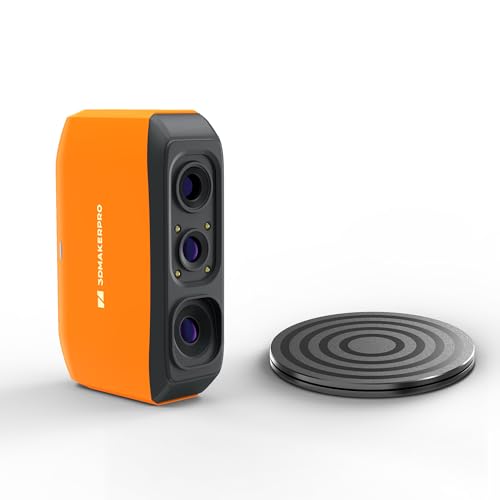 3DMakerpro Fox Series Handheld 3D Scanner with AI9.4/10View on Amazon
A broken bracket, a worn knob, a small keepsake on the desk: a 3d scanner for beginners turns the object on the desk into a digital model that a printer can build. The scanner reads the shape, the software builds the mesh, and the printer takes it from there. This guide explains what to look for in a first scanner, then compares four handheld models on the accuracy, speed and tracking the makers state.
LaserEngraveHQ earns a commission from purchases made through these links, at no extra cost to you. Read our affiliate disclosure.
Accuracy and speed figures in this guide come from the makers, so compare the four scanners on the same terms before buying.
Creality Pika 3D Scanner
A dual-light handheld scanner with 7-line blue laser and infrared modes, 0.03mm accuracy, up to 110 fps and a 3-inch touchscreen.
Pros
- 0.03mm accuracy with marker-free blue laser mode
- Up to 110 fps on a PC link
- 3-inch touchscreen with Wi-Fi 6 and an 8-core 2.0GHz processor
- Class 1 eye-safe infrared light scans full bodies in 1 minute
Cons
- No warranty term is stated
- Phone scanning runs slower than the PC link
- Infrared mode is for large scenes, not tiny detail
- Export is limited to STL, OBJ, PLY and ASC
Revopoint RANGE 3 Handheld 3D Scanner for 3D
A wireless handheld scanner with VCSEL infrared light, 0.05 mm accuracy, up to 30 FPS and a 4 × 4 × 4 m scanning volume.
Pros
- 0.05 mm accuracy with VCSEL infrared structured light
- Up to 30 FPS with a 687 × 672 mm single-frame capture
- Rated to 100,000 lux for outdoor scanning
- About 220 g with Wi-Fi 6 wireless scanning
Cons
- Color tracking needs a PC with a dedicated GPU
- Mobile kit is sold separately
- Single-frame capture needs 1,000 mm distance for the full 687 × 672 mm area
- Volumetric accuracy is 0.05 mm plus 1 mm per metre scanned
EINSTAR 2 Wireless 3D Scanner
A wireless scanner with 17 parallel blue laser lines, VCSEL infrared light, up to 90 fps and a swappable battery for up to 3 hours of scanning.
Pros
- 17 parallel blue laser lines for small-object detail
- Up to 90 fps in blue laser mode
- Swappable battery gives up to 3 hours of scanning
- Laser HD mode works up to 110,000 Lux outdoors
Cons
- No warranty term is stated
- Infrared scanning runs at up to 20 fps, slower than laser mode
- Marker sizes are limited to 3mm, 6mm and 12mm
- A cable connection is the fallback if Wi-Fi interference occurs
3DMakerpro Fox Series Handheld 3D Scanner with AI
An entry-level handheld scanner with AI visual tracking, 10FPS fast scanning and 0.07mm accuracy for 3D printing.
Pros
- 0.07mm accuracy for 3D printing
- AI visual tracking for real-time object recognition
- Handheld and lightweight for scanning from any angle
- Suits product design, reverse engineering, art and education
Cons
- 10FPS is the slowest stated speed here
- Medium-format design, so large objects need more passes
- Entry-level positioning with fewer stated features than the other scanners here
- Orange is the only color stated
How a 3d scanner for beginners turns an object into a printable model
A handheld scanner moves around the object and records its shape as a cloud of points, then the software joins those points into a mesh and exports a file the printer can read. Marker-free tracking follows the shape itself, so there is nothing to stick on the object first. Two makers here state export formats: the Creality Pika lists STL, OBJ, PLY and ASC, and the Revopoint RANGE 3 (on Amazon) also lists 3MF, GLTF, FBX and Splat.
What to check before you buy
Accuracy comes first: the accuracy figures stated here are 0.03mm, 0.05 mm and 0.07mm, so read the figure against the size of the parts you print. Speed matters next, with stated frame rates from 10 FPS to 110 fps. Light handling matters outdoors: one scanner is rated to 100,000 lux and another lists Laser HD mode up to 110,000 Lux. Battery life matters away from a desk: one scanner lists a swappable battery with up to 3 hours of scanning. Weight matters for long sessions: one scanner weighs about 220 g.
- Accuracy: stated in millimetres; finer figures suit small parts.
- Tracking: marker-free tracking needs nothing stuck to the object.
- Light: check how the maker rates outdoor light handling.
- Export: check the file formats match the printer software.
The gear: 4 handheld 3D scanners for a first scan
The four scanners below cover the steps above: each one handles the capture, and the cards show the accuracy, speed and tracking the makers state.
How to run a first scan
- Pick a small object with a matte surface and steady light.
- Move the scanner slowly around it and watch the preview fill in.
- Check the mesh for holes, then fill them in the software.
- Export the file and open it in the printer software before printing.
FAQ: lasers and CNC
Are markers needed to scan?
Not always. The Creality Pika scans marker-free in blue laser mode, and the EINSTAR 2 supports 3mm, 6mm and 12mm markers for work that needs them.
What accuracy suits 3D printing?
It depends on the size of the parts. The accuracy figures stated here are 0.03mm, 0.05 mm and 0.07mm, so match the figure to the smallest detail the print must keep.
Can these scanners work outdoors?
Yes, with a scanner that states outdoor light handling. The Revopoint RANGE 3 is rated to 100,000 lux, and the EINSTAR 2 lists Laser HD mode up to 110,000 Lux and IR Rapid mode up to 70,000 Lux.
Can these scanners capture a full body?
Some can. The Creality Pika scans full human bodies in 1 minute with Class 1 eye-safe infrared light, and the Revopoint RANGE 3 lists body scanning among its uses.
Is a PC needed to scan?
Not always. The Creality Pika has a built-in 3-inch touchscreen and Wi-Fi 6, and the Revopoint RANGE 3 also lists Wi-Fi 6 wireless scanning, and the EINSTAR 2 lists wireless scanning over Wi-Fi. The Pika works with Windows, macOS, Android and iOS.
What file formats do the scanners export?
The Creality Pika exports STL, OBJ, PLY and ASC. The Revopoint RANGE 3 exports PLY, OBJ, STL, ASC, 3MF, GLTF, FBX and Splat.
Related: the best 3D scanner guide, handheld vs desktop 3D scanner and magnetic markers for 3D scanner. Also see the photogrammetry vs 3D scanner.