Diode vs Infrared Laser Engraver: Which One Should You Buy?
A practical comparison of diode and infrared laser engravers, covering beam wavelengths, material compatibility, cutting limits and workshop setup.

On this page
Top picks at a glance
As an Amazon Associate I earn from qualifying purchases.
- 1
 xTool F2 Ultra 60W MOPA & 40W Diode Dual Laser Engraver 100+9.6/10View on Amazon
- 2
 xTool S1 40W Laser Cutter and Laser Engraver for Tumblers9.7/10View on Amazon
- 3
 LaserPecker LP5 Smart Dual 20W Fiber + Diode Laser Engraver9.5/10View on Amazon
- 4
 WECREAT Vision 20WView on Amazon
- 5
 Acmer S2 20W Laser EngraverView on Amazon
- 6
 LONGER RAY5 Mini Laser EngraverView on Amazon
- 7
 xTool F1 Ultra 20W Fiber & Diode Dual Laser Engraver 16MPView on Amazon
- 8
 xTool F2 5W IR & 15W Diode Dual Laser EngraverView on Amazon
- 9
 12 Colors Laser Marking Paper for CO2 Diode Engraver GlassView on Amazon
If you want to personalize wooden signs, leather patches, slate coasters or mark metal jewelry and brass tags, choosing between a diode vs infrared laser engraver comes down to material compatibility. A diode laser engraver uses a visible blue beam that cuts and engraves organic materials like wood, leather and dark acrylic, but reflects off highly reflective bare metals like brass and raw aluminum. An infrared laser engraver produces an infrared beam that bare metals and dense plastics absorb efficiently, enabling high-contrast marking on raw stainless steel, brass and aluminum. Choosing the right machine depends on whether you prioritize cutting wood blanks and craft goods or marking bare metal parts.
Other machines to compare
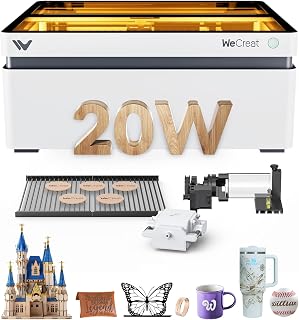 WECREAT Vision 20WCheck price on Amazon
 Acmer S2 20W Laser EngraverCheck price on Amazon
 LONGER RAY5 Mini Laser EngraverCheck price on Amazon
 xTool F1 Ultra 20W Fiber & Diode Dual Laser Engraver 16MPCheck price on Amazon
 xTool F2 5W IR & 15W Diode Dual Laser EngraverCheck price on Amazon
 12 Colors Laser Marking Paper for CO2 Diode Engraver GlassCheck price on Amazon
LaserEngraveHQ earns a commission from purchases made through these links, at no extra cost to you. Read our affiliate disclosure.
While marketing claims sometimes imply an entry diode machine can cut thick metal sheets, a diode beam cannot cut heavy metal plate. In published specifications, diode lasers cannot cut structural metal, and while high-power units can mark bare stainless steel or cut thin foil at slow speeds, reflective metals like bare brass and raw aluminum require an infrared beam or specialized coatings. Always check stated optical output rather than electrical input.
Step 1: Understand how diode and infrared beam wavelengths differ
The primary difference between a diode laser and an infrared laser is how their beam wavelengths interact with materials. Diode laser modules emit a visible blue beam. Organic materials and dark polymers, including wood, leather, paper and dark acrylic, absorb this blue light readily. When the beam strikes the workpiece, the energy converts quickly into heat, vaporizing or charring the surface to create crisp engravings and clean cuts.
Bare metals interact with light differently. Reflective metals like raw brass, aluminum, copper, silver and gold reflect blue diode light. In contrast, an infrared laser engraver emits an infrared wavelength that bare metals and dense industrial polymers absorb efficiently. Instead of reflecting away, the infrared energy penetrates the metal surface layer, enabling sharp marks without chemical sprays. Our how to choose a laser engraver guide explains beam types in detail.
Step 2: Compare material compatibility for organics and metals
Material selection defines which machine belongs in your workshop. A diode laser handles everyday craft blanks. WIZMAKER lists its Wand 12W diode engraver for wood, bamboo, leather, MDF, fabric, coated metals and dark opaque acrylic. Artilume rates its 7W diode machine for engraving wood, leather, dark acrylic, paper and coated metal across a 200x150mm working area. For natural craft blanks, a diode unit covers almost every project.
For metal marking, results diverge. A diode laser marks coated or anodized metals by vaporizing the top coating to reveal the metal beneath. High-power units can also produce surface marks on bare stainless steel through heat oxidation: Longer rates its RAY5 20W diode machine for color metal engraving on stainless steel using a 0.08×0.1mm spot. However, reflective bare metals like brass and raw aluminum bounce diode light away. LaserPecker notes in its LP1 Plus listing that metal engraving is not supported on that 2.4 pounds entry machine with its 200 mm lens focus distance.
Infrared lasers excel on bare metals. An infrared beam engraves directly into bare brass, raw aluminum, titanium, silver and gold without sprays. If your business focuses on metal engraving, read our guide on the best laser engraver for metal and our comparison of fiber vs diode laser for metal. For diode users exploring metal projects, see can a diode laser engrave metal and how to engrave stainless steel with a diode laser.
Step 3: Evaluate cutting capability versus marking detail
If cutting flat sheet stock is part of your workflow, benchtop diode lasers provide substantial cutting capability, whereas entry infrared lasers are strictly marking tools. WECREAT lists its Vision 20W diode machine as capable of cutting 10mm wood or 8mm opaque black acrylic in a single pass at a rated speed of 600mm/s. Longer lists the RAY5 20W with claims of cutting 25mm wood, 35mm acrylic and 0.05mm stainless steel foil across a 400x365mm work area, though workshop cutting on diode machines is typically focused on thinner sheets such as 4mm to 10mm stock. Moderate diode units also cut well: WIZMAKER states its Wand 12W cuts wood up to 8mm, and Artilume states its 7W unit cuts thin basswood up to 4mm with multiple passes.
Entry infrared lasers (like 3W infrared modules) do not cut wood, leather or acrylic sheets. Infrared energy either transmits through clear plastics or scorches wood surface fibers without achieving clean, deep cuts. They are designed for precision surface marking and fine metal etching.
For fine detail, Creality equips the Falcon Pro 10W with a 6-lens array focusing down to a 0.06mm spot. WECREAT specifies 0.01mm accuracy on its 20W unit, while Longer rates the RAY5 at up to 10000mm/min engraving speed and 24000mm/min motion speed. For wood cutting, see our best laser engraver for wood guide, or explore the best laser engraver for beginners list.
Step 4: Check optical output power and electrical draw
A common point of confusion is optical output power versus electrical draw. Only optical output power determines cutting depth and engraving speed; electrical draw simply measures power pulled from the wall outlet.
Product listings sometimes highlight high electrical draw figures. For instance, the Creality Falcon Pro 10W listing states 72000mW output power in its title, yet the machine is built around a 10W optical output laser diode module. In contrast, xTool specifies the M2 with 10W optical power (10000mW output), and WECREAT lists the Vision 20W with 20,000mW optical output. Always confirm optical laser wattage before buying. Read our guide on optical power vs electrical power and our 10W vs 20W laser engraver comparison.
With infrared lasers, optical power needs differ. Because bare metals absorb infrared wavelengths readily, an infrared unit with 3W optical output can mark bare metal parts effectively, whereas even a 20W blue diode laser cannot mark raw brass or aluminum without special coatings.
Step 5: Set up workshop ventilation and eye safety
Laser safety protocols must match the beam operating in your shop. Enclosed desktop machines like the WECREAT Vision 20W and xTool M2 carry Class 1 safety ratings. WECREAT states its enclosure filters 99% of laser light and halts immediately if the lid opens. Open-frame machines like the WIZMAKER Wand 12W operate as Class 4 lasers and include active safety sensors like tilt detection and flame monitoring.
Eye protection requires strict attention to wavelength. Eyewear protects your vision only if the listing states a certified optical density (OD) and wavelength coverage matching your machine. Goggles for blue diode light offer zero protection against infrared beams. If you operate an infrared laser, you must wear eyewear rated for infrared wavelengths. Read our laser safety glasses guide to pick the right pair.
Ventilation is equally critical. Fumes from wood, leather and plastics must be vented outdoors or filtered through a unit from our fume extractor guide. Furthermore, never process materials containing chlorine or toxic polymers. Materials such as PVC, vinyl, PVC-based faux leather, polycarbonate and ABS must never be laser cut or engraved, as they release corrosive fumes. See our guide on materials you should never laser cut.
Step 6: Decide whether a dual-source machine fits your workflow
Makers who want to engrave both organic giftware and bare metal jewelry often face buying two separate machines. Multi-source platforms solve this: xTool designs the M2 laser engraver to switch between a 10W diode laser head and an optional 3W IR infrared module on a single enclosed frame. This allows a creator to cut plywood blanks or engrave leather patches with the diode head, then swap to the 3W infrared module to engrave bare metal jewelry, brass tokens or serial plates.
For high daily volume, standalone machines remain the benchmark: a dedicated diode provides large cutting areas, while a dedicated fiber machine offers rapid metal marking speeds. However, for a home workshop exploring new product lines, a dual-source setup offers flexibility without taking up double the bench space. See our guide on best laser engraver for small business and explore standalone metal marking systems in our best fiber laser engraver review.
Common mistakes to avoid
- Expecting a blue diode laser to engrave bare brass, copper or raw aluminum without marking sprays.
- Expecting an entry infrared laser module to cut sheets of plywood, acrylic or leather.
- Wearing blue diode safety glasses while operating an infrared laser beam.
- Judging machine capability by electrical wall draw rather than certified optical output wattage.
- Attempting to process hazardous materials like PVC, vinyl, polycarbonate or ABS.
Diode vs infrared laser engraver: the short version
- Choose a diode laser if you make signs, cut thin wood blanks, engrave leather, or etch slate coasters.
- Choose an infrared laser if you personalize bare metal jewelry, brass tags, raw aluminum plates, or industrial plastic components.
- Consider a modular dual-source machine like the xTool M2 if you need both a 10W diode and a 3W IR beam in one workspace.
- Base buying decisions on stated optical laser wattage, ignoring misleading electrical input claims.
- Verify that safety eyewear matches the exact wavelength and optical density of the active laser beam.
FAQ: lasers and CNC
What can a diode laser engrave?
A diode laser engraves wood, bamboo, leather, dark acrylic, paper, cardboard, slate, stone and coated metals. High-power models like 20W units can also produce surface marks on bare stainless steel through heat oxidation. However, blue diode lasers cannot engrave clear acrylic, bare brass, copper, silver, gold or raw aluminum without surface pretreatment.
Can a diode laser engrave stone?
Yes, a diode laser engraves stone effectively. Dark slate coasters, river rocks and polished granite absorb blue diode light readily. The focused beam fractures the mineral surface, creating permanent light gray or white marks suitable for personalized gifts and home decor.
Can a diode laser engrave aluminum?
A diode laser can engrave coated or anodized aluminum because the beam vaporizes the surface coating to expose the metal beneath. However, bare, unanodized aluminum reflects blue diode light, meaning a diode laser cannot mark raw aluminum directly. Marking bare aluminum requires an infrared laser or marking spray.
How does a diode laser cutter work?
A diode laser cutter uses semiconductor diodes to generate a concentrated beam of visible blue light. Internal optical lenses focus the beam down to a narrow spot, such as 0.06mm or 0.08×0.1mm. When directed onto organic materials, the optical energy heats and vaporizes the material along the programmed cut path.
Is diode laser engraving permanent?
Yes, diode laser engraving is permanent. The process physically chars, etches or vaporizes the surface material through thermal energy. On wood, leather, slate and coated metals, the engraved markings will not peel, smear, wash off or fade over time.
Related: the laser engraver hub, best laser engraver for metal, best laser engraver for wood, and best fiber laser engraver. Also see our guides on how to choose a laser engraver and fiber vs diode laser for metal.



