Best DIY 3D Printers for Makers
A practical guide to choosing and building the best DIY 3D printer kit, from build size and filament to assembly tools and first projects.

On this page
Top picks at a glance
As an Amazon Associate I earn from qualifying purchases.
- 1
 SUNLU High Speed PLA Filament Bundle9.8/10View on Amazon
- 2
 FLASHFORGE Rapid PLA Filament 1.75mm Ruby Red9.8/10View on Amazon
- 3
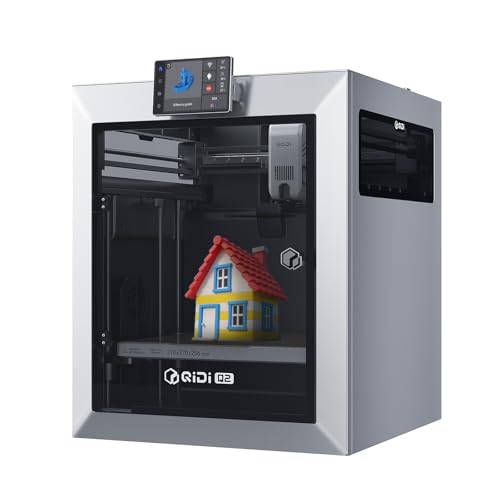 QIDI Q2 3D Printer9.8/10View on Amazon
Best DIY 3D printer kits appeal to makers who want to build the machine itself before printing a single part. A self-assembly kit arrives as parts to assemble, not as a finished printer, and the build teaches how the frame, motion parts and wiring work together. This guide explains what a DIY kit is, how to judge build size and included parts, which tools the assembly needs and which projects to print first, using figures the makers state.
LaserEngraveHQ earns a commission from purchases made through these links, at no extra cost to you. Read our affiliate disclosure.
We do not have verified print-speed figures for these kits, so this guide gives no speed ranking and no print-time claims. Compare kits by the figures the maker states: print size, machine size, included filament, warranty and support.
What a DIY 3D printer kit is
A full DIY 3D printer kit is a printer sold as parts to assemble, with a guide that walks through the frame, the motion parts and the wiring. The Original Prusa MK4S Kit (on Amazon) is one such kit: it is a self-assembly FDM printer with a step-by-step guide, input shaping for clean output, automatic calibration and an open-source, upgradeable design. A kit like this suits a maker who wants to learn the machine while building it. At the other end, the Creality SPARKX i7 PrintEase Kit arrives 95% pre-assembled, so it covers core parts and upgrades for the SPARKX I7 rather than a full build from scratch. Check whether the kit you are looking at is a full printer or an upgrade kit before ordering.
Match the build size to your projects
Print size decides what fits on the bed. The Prusa MK4S Kit lists a print size of 9.84 x 8.3 x 8.6 in, so match the print size to the largest part you plan to print in one piece. Measure the bench too: the same kit measures 19.6 x 15.7 x 21.6 in as a machine, so it needs a stable surface with room around it for the filament and for access. A bigger bed also suits batch printing, where several small parts print in one run. If the parts you plan are small, a smaller machine leaves more bench free. Our what 3D printer should I get guide walks through size and type, and the best 3D printer for helmets page shows what full-size prints need.
What comes in the box
A kit is more than the frame. The Prusa MK4S Kit includes a sample of Prusament PLA filament and lifetime technical assistance, with a 1 year manufacturer warranty. That sample lets the first prints start without a separate filament order. The Creality PrintEase Kit (on Amazon) covers core parts for the SPARKX I7 in one package, with standardized interfaces and clear instructions. Look for the small parts too: a VGBUY M3 screw kit (on Amazon) holds 220 M3 screws in lengths from 6mm to 25mm plus 220 M3 hex nuts, and a Preciva threaded insert kit (on Amazon) holds 130 threaded inserts, 130 bolts and 100 nuts with a 60W digital soldering iron. Those fasteners turn printed parts into assemblies that screw together. See our 3D printer parts diagram to learn the main components before the build.
Filament, heat and the workshop
Filament choice shapes what the printer can make. PLA is the usual starting filament, and the Preciva insert kit states compatibility with PLA, ABS and nylon for heat-set inserts. Heat-set inserts need a soldering iron: the Preciva iron adjusts from 200 to 500°C, which the maker also states as 392 to 932°F, and its split tip design swaps between sizes without unscrewing the sleeve. Give the printer a ventilated spot with a stable bench, keep the workspace clear of loose filament and paper, and keep a fire extinguisher within reach. Our best 3D printing filament guide compares filament types, and how to change 3D printer filament covers swaps between materials.
First projects to print
A DIY printer earns its bench space on small, useful parts. Print a lamp shade for the 3DZWMAN tricolor LED lamp kit, which runs on 5V USB power at 4W with 3 switchable colors from 3000K to 6000K and 10 adjustable brightness levels, or print the housing for the 60-switch Lattixyz clicker kit (on Amazon), whose switches are rated for up to 50 million clicks and come with 15 metal keychain rings and 1 switch puller. Magnets add function to prints: the SYFNHIEON set holds 350 pieces in 6 sizes, and one 10×2mm magnet grips about 6-7 sheets of A4 paper, which suits closures and holding notes and photos in place. The 4-piece DIY model hardware kit covers a lamp, a marble run with 14 colored marbles, a creative clock and a card shuffler, with 40 M2.68mm screws, 12 MR128ZZ ball bearings and 10 OD242.5mm O-rings in the box. Start with one project, print it, and use what it teaches on the next one.
Common mistakes to avoid
- Buying a kit without checking whether it is a full printer or an upgrade kit.
- Choosing a print size that is smaller than the parts you want to make.
- Skipping the bench measurement and finding the machine does not fit.
- Ordering no fasteners and finding printed parts have nothing to screw into.
- Printing a first project that is too large to finish in one run.
Best DIY 3D printer: the short version
- Pick a kit type: a full self-assembly kit or a mostly pre-assembled upgrade kit.
- Check the print size against the parts you plan to make.
- Measure the bench against the machine size.
- Confirm what the box holds: filament sample, fasteners, warranty and support.
- Print a small project first, then scale up.
FAQ: lasers and CNC
What is the best DIY 3D printer for a beginner?
A kit with a step-by-step guide, automatic calibration and an open-source design is a strong start. The Original Prusa MK4S Kit states all three, with a print size of 9.84 x 8.3 x 8.6 in and a sample of Prusament PLA filament in the box. Check the print size and the included parts before ordering.
How big a print can a DIY 3D printer make?
It depends on the kit. The Prusa MK4S Kit lists a print size of 9.84 x 8.3 x 8.6 in. Match the print size to the largest part you plan to make.
Do DIY 3D printer kits include filament?
Some do. The Prusa MK4S Kit includes a sample of Prusament PLA filament, so the first prints can start without a separate order. Other kits list no filament, so check the box contents before ordering.
What tools do I need to assemble a DIY 3D printer kit?
Fasteners and a heat-set insert tool help join printed parts into assemblies, not assemble the printer itself. The VGBUY kit holds 220 M3 screws and 220 M3 hex nuts, and the Preciva kit holds 130 threaded inserts, 130 bolts and 100 nuts with a 60W digital soldering iron that adjusts from 200 to 500°C. Follow the kit guide for the tools the build itself needs.
Can I print parts for other projects with a DIY 3D printer?
Yes. Makers print lamp shades for 5V LED kits, housings for clicker switches, and parts for a marble run, a creative clock and a card shuffler. The DIY model hardware kit covers all four projects: the marble run brings 14 marbles, and the card shuffler brings 40 screws, 12 ball bearings and 10 O-rings.
How much space does a DIY 3D printer need?
Measure the machine, not just the print size. The Prusa MK4S Kit measures 19.6 x 15.7 x 21.6 in as a machine, so it needs a stable bench with room around it for filament and access.
Related: the 3D printer hub, best 3D printer for helmets and best 3D printing filament. Also see our 3D printer repair guide. Also see our multi color 3D printer for beginners guide.