3D Printing Pen for Beginners: How to Choose One
A beginner guide to choosing a 3D printing pen: temperature, speed, filament and 3 starter pens compared.

On this page
Top picks at a glance
As an Amazon Associate I earn from qualifying purchases.
- 1
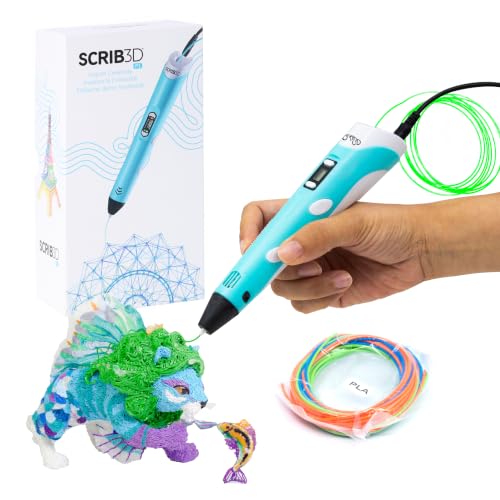 SCRIB3D P1 3D Printing Pen with Display9.6/10View on Amazon
- 2
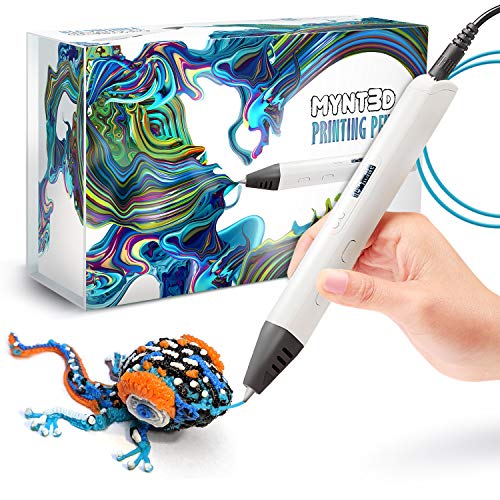 MYNT3D Professional Printing 3D Pen with OLED9.5/10View on Amazon
- 3
 SCRIB3D P1 3D Printing Pen with 3 Starter Colors9.5/10View on Amazon
A 3d printing pen for beginners is a handheld pen that melts plastic filament so you can draw shapes by hand instead of sending a file to a printer. Look for a pen with a display, a temperature control that covers PLA, and a speed control you can adjust while you draw. The steps below show what to check before you buy.
LaserEngraveHQ earns a commission from purchases made through these links, at no extra cost to you. Read our affiliate disclosure.
SCRIB3D P1 3D Printing Pen with Display
A 3D pen with a display, a stepless speed slider and a ceramic nozzle, with PLA listed at 160-210 C and ABS at 210-235 C, and a kit with 3 PLA starter colors, 30 feet, a stencil book and a power adapter.
Pros
- Display and stepless speed slider for control while drawing
- PLA and ABS temperatures listed, 160-210 C for PLA
- Kit includes 3 PLA starter colors, 30 feet, plus stencil book and guide
- Ceramic nozzle with anti-clogging design and 2 minute auto sleep
Cons
- Warm-up takes about 2-3 mins before drawing starts
- Only 3 starter colors of PLA included
- No ABS filament included, though ABS temperatures are listed
- Wired power adapter; the pen plugs in while you draw
MYNT3D Professional Printing 3D Pen with OLED
A 3D pen with a large OLED display, temperature adjustable in 1 degree increments from 140 to 230 C, an adjustable feed, and a kit of 3 PLA colors and an A/C adapter.
Pros
- OLED display shows the temperature while drawing
- Temperature adjustable in 1 degree increments from 140 to 230 C
- Adjustable feed regulates speed and flow
- Kit includes 3 PLA colors and an A/C adapter, with a 1 year limited warranty
Cons
- No stepless speed slider is stated
- No auto sleep function is stated
- No stencil book or project guide is stated
- Only 3 PLA colors included
SCRIB3D P1 3D Printing Pen with 3 Starter Colors
The SCRIB3D P1 pen in a bundle with 3 starter colors, 30 feet, plus an extra 328 feet of filament in 20 assorted colors, with a stepless speed slider and a ceramic nozzle.
Pros
- Same P1 pen with stepless speed slider and ceramic nozzle
- Adds 328 feet of filament in 20 assorted colors
- 3 starter colors, 30 feet, included with the pen
- Detailed manual and intuitive controls stated
Cons
- No temperature range is stated in this listing
- No warm-up time is stated in this listing
- No warranty term is stated
- Only one pen color listed
What a 3d printing pen for beginners should do
A pen for a new maker heats filament to a steady temperature and feeds it at a speed you control, and where the pen has a display it shows that temperature while you draw. The SCRIB3D P1 listing describes a stepless speed slider for slow, detailed work and faster infill, and the MYNT3D listing describes an adjustable feed that regulates speed and flow.
Step 1: Match the temperature to the filament
Start with PLA, and pick a pen that reaches the range PLA needs. The SCRIB3D P1 listing gives PLA at 160-210 C and ABS at 210-235 C, while the MYNT3D listing gives the pen’s own range of 140 to 230 C in 1 degree increments. The SCRIB3D P1 has a display, and the MYNT3D has a large OLED display that shows the temperature of the material while you draw.
Pick the pen whose listed range covers the filament you plan to use. If the listing gives no temperature range, as the refill bundle listing does not, you cannot check the match from the listing alone.
Step 2: Learn the warm-up and feed
Every pen here plugs in and heats before it draws. The SCRIB3D P1 listing describes the routine: plug the adapter into the back of the pen, wait for the red light that turns on to indicate warm-up, about 2-3 mins, then double click the forward button to feed filament through the back of the pen. Click forward to stop once the filament reaches the nozzle, press and hold the forward button or double click for a continuous flow, and press and hold the reverse button to retract it.
The MYNT3D listing describes the same idea in fewer words: an adjustable feed lets you regulate speed and flow while you draw. Slow down for detailed lines and speed up for infill. The 2 minute auto sleep function on the SCRIB3D P1 stops the pen after doodling stops.
Step 3: Draw your opening lines
Use the stencil book and project guide in the SCRIB3D P1 kit for your opening shapes. The kit includes 3 starter colors of PLA, 30 feet, so you can change colors while you learn. If a line cools in the wrong place, clean it up with the tools in our tools to clean up 3D prints guide.
The pens: 3 starter kits compared
The temperature and feed steps above are where the pen itself matters, so the 3 pens below are ranked by how clearly each listing states those controls, the filament it includes, and its safety and warranty terms.
Common mistakes to avoid
- Buying a pen whose listing states no temperature range, then finding it cannot reach the filament you bought.
- Feeding filament before the 2-3 minute warm-up finishes.
- Choosing the biggest filament bundle before checking what the listing states about temperature and warranty.
The short version
- Pick PLA and a pen whose listed temperature range covers it.
- Check for a display and a speed control you can adjust while drawing.
- Wait for the warm-up light, feed the filament, and draw slowly at first.
FAQ: lasers and CNC
What filament should a beginner start with?
PLA. Every kit here includes PLA starter colors, and the SCRIB3D P1 listing calls PLA versatile and easy to use for first-time and advanced users.
What temperature should I use for PLA?
Follow the listing for the pen you buy. The SCRIB3D P1 listing gives PLA at 160-210 C. The MYNT3D listing gives the pen’s adjustable range, 140 to 230 C in 1 degree increments, without a PLA-specific figure. The refill bundle listing states no temperature range.
How long does a 3d printing pen take to warm up?
The SCRIB3D P1 listing says warm-up takes about 2-3 mins, with a red light that turns on to indicate warm-up. The other listings state no warm-up time.
Do I need a 3D printer to use a 3D pen?
No. A 3D pen is a handheld tool: you plug it in, heat it up and draw with filament, with no printer involved.
What comes in the box with a beginner pen?
It depends on the kit. The SCRIB3D P1 kit includes the pen, 3 starter colors of PLA, a stencil book and project guide, a step-by-step manual and a power adapter. The MYNT3D kit includes 3 colors of PLA filament and an A/C adapter. The refill bundle adds 328 feet of filament in 20 assorted colors.
Related: the best FDM 3D printing filament, best PLA filament for 3D printers and tools to clean up 3D prints guides, and our is a 3D printer worth it guide.