Best 3D Printer for Large Objects (2026): 4 Compared
Four CoreXY 3D printers compared by build volume and rated speed for large objects, from a 350 mm cube build area to multicolor toolhead systems.

On this page
Top picks at a glance
As an Amazon Associate I earn from qualifying purchases.
- 1
 Best for Large ObjectsAnycubic Kobra S1 Max9.7/10View on Amazon
- 2
 Best MulticolorELEGOO Centauri Carbon 29.6/10View on Amazon
- 3
 Toolhead Changer OptionFLASHFORGE Creator 59.5/10View on Amazon
- 4
 App Control OptionELEGOO Centauri 2 Combo9.6/10View on Amazon
Large prints fail in a particular way: the model fits the slicer, then outgrows the machine, and the job ends up split, glued or shrunk. The best 3d printer for large objects is the one whose stated build volume holds the whole part with room to spare. This guide compares four CoreXY printers by build volume, rated speed, nozzle temperature, stated materials and warranty, using only what each maker publishes.
LaserEngraveHQ earns a commission from purchases made through these links, at no extra cost to you. Read our affiliate disclosure.
Quick picks
- Best for Large Objects Anycubic Kobra S1 Max: 350 mm cube build volume, heated chamber, one-year warranty Check price on Amazon
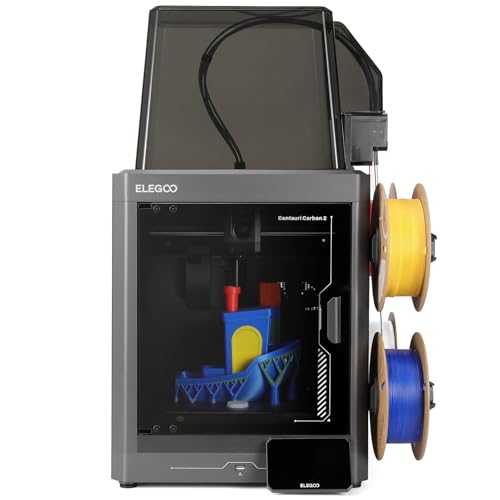
- Best Multicolor ELEGOO Centauri Carbon 2: 256 mm cube build volume with 4-color CANVAS system Check price on Amazon
- Toolhead Changer Option FLASHFORGE Creator 5: 4-toolhead changer, 600mm/s rated speed, auto calibration Check price on Amazon
- App Control Option ELEGOO Centauri 2 Combo: 4-color printing, 350°C nozzle, remote control with APP Check price on Amazon
Machines on the list
Anycubic Kobra S1 Max FDM 3D Printer Only
A fully-enclosed CoreXY printer with a 350 x 350 x 350 mm build volume and heated chamber.
Pros
- 350 x 350 x 350 mm build volume for large models
- Rated speed up to 600mm/s with 20000mm/s² acceleration
- 350°C hotend, 120°C heated bed and 65°C heated chamber
- One-year warranty stated
Cons
- Largest build here needs the most bench space
- Default speed is 300mm/s, below the 600mm/s maximum
- No multicolor system is stated
- No safety certification is stated
ELEGOO Centauri Carbon 2 Combo 3D Printer
A CoreXY printer with a 256 x 256 x 256 mm build volume and 4-color printing system.
Pros
- 256 x 256 x 256 mm build volume stated
- 4-color printing with CANVAS color switching
- Rated speed up to 500 mm/s stated
- 350°C nozzle stated
Cons
- Build volume is smaller than the 350 mm pick
- Rated speed is below the 600mm/s picks
- No heated chamber is stated
- No safety certification is stated
ELEGOO Centauri 2 Combo 3D Printer
A 4-color CoreXY printer with a 500mm/s top speed, full auto calibration, 22 sensors and app control.
Pros
- 4-color CANVAS printing with independent motors, instant color switching and RFID filament recognition
- 500mm/s top speed with 20,000mm/s² acceleration on a rigid aluminum frame
- 22 intelligent sensors monitor every print, with full auto calibration and smart pre-print checks
- 5-inch touchscreen, magnetic printhead cover and remote control through the ELEGOO Matrix app
Cons
- No warranty term is stated
- No build volume is stated
- Stands 23.23 in tall, so it needs a shelf with headroom
- Belt tensioning is semi-automatic, not fully automatic
FLASHFORGE Creator 5 4-Toolhead Changer 3D
A 4-toolhead 3D printer with 7-second FlashSwap changes, multi-color and multi-material printing, up to 80% less filament waste, and 600mm/s CoreXY speed.
Pros
- 4 independent toolheads, no color mixing
- 7-second tool changes with preheating
- Up to 80% less filament waste
- Prints PLA, PETG, TPU, PETG-CF and support materials
Cons
- No safety feature is stated
- No build volume is stated
- No heated chamber is stated
- No camera is listed
Specs compared
| Printer | HQ Score | Build volume | Rated speed | Nozzle | Warranty |
|---|---|---|---|---|---|
| Anycubic Kobra S1 Max | 9.7/10 | 350 x 350 x 350 mm | Up to 600mm/s | 350°C | 1 year |
| ELEGOO Centauri Carbon 2 | 9.6/10 | 256 x 256 x 256 mm | Up to 500 mm/s | 350°C | Lifetime technical support |
| FLASHFORGE Creator 5 | 9.5/10 | Not stated | 600mm/s | Not stated | Not stated |
| ELEGOO Centauri 2 Combo | 9.6/10 | Not stated | 500mm/s | 350°C | Not stated |
Size and performance figures are the brand’s ratings quoted from listings on 21 November 2026.
How to choose the best 3d printer for large objects
Build volume sets the ceiling
Start with the largest single piece you plan to print, then compare it with the stated build volume on all three axes. The Anycubic Kobra S1 Max states 350 x 350 x 350 mm, the largest build area here, while the ELEGOO Centauri Carbon 2 Combo states 256x256x256mm. The FLASHFORGE Creator 5 and ELEGOO Centauri 2 Combo state no build volume, so a buyer who needs a confirmed size for large objects has two stated options here. Measure the part in the slicer before ordering, and keep supports and brims inside the same stated volume. For more large-format background, see the large 3D printer for beginners guide.
Rated speed and acceleration
Rated speeds here run from 500mm/s to 600mm/s, and rated figures describe the maximum the maker states, not the speed of every print. The Anycubic states speeds up to 600mm/s with a default speed of 300mm/s and acceleration up to 20000mm/s². The ELEGOO Centauri Carbon 2 Combo states speeds up to 500 mm/s and acceleration of 20,000 mm/s². The FLASHFORGE Creator 5 states 600mm/s and the ELEGOO Centauri 2 Combo states 500mm/s. Large objects spend long stretches at steady speed, so compare the stated default and maximum figures together where both are given.
| Printer | Build volume | Rated speed | Colors |
|---|---|---|---|
| Anycubic Kobra S1 Max | 350 x 350 x 350 mm | Up to 600mm/s | Not stated |
| ELEGOO Centauri Carbon 2 | 256 x 256 x 256 mm | Up to 500 mm/s | 4-color CANVAS |
| FLASHFORGE Creator 5 | Not stated | 600mm/s | Multi-color, 4 toolheads |
| ELEGOO Centauri 2 Combo | Not stated | 500mm/s | 4-color printing |
Temperatures and materials
Nozzle and chamber temperatures decide which stated materials stay in play for big parts. The Anycubic states a 350°C hotend, a 120°C heated bed and a 65°C heated chamber, with PLA, PETG, TPU, ABS, ASA and PVA named as compatible materials. The ELEGOO Centauri Carbon 2 Combo and Centauri 2 Combo each state a 350°C nozzle, with no heated chamber stated. The FLASHFORGE Creator 5 states no nozzle temperature. For selling printed goods, see the best 3D printer for selling products guide, and for color work see is multicolor 3D printing worth it.
Multicolor systems and tool changes
Color systems differ in how they change filament or toolheads. The ELEGOO Centauri Carbon 2 Combo states 4-color printing with CANVAS instant color switching, auto refill and tangle detection. The FLASHFORGE Creator 5 states a 4-toolhead changer with 7s FlashSwap changes, a near-zero waste system and clean support removal. The ELEGOO Centauri 2 Combo states 4-color printing with remote control by APP. The Anycubic states no multicolor system. On large objects, color changes add time and material handling, so match the system to whether the part needs color at all.
Warranty and support lines
The Anycubic states a one-year warranty with lifetime technical support, and the ELEGOO Centauri Carbon 2 Combo states lifetime technical support. The other two printers state neither. Support lines and warranty terms are different promises, so read them as separate figures when a large print ties up the machine for long stretches. Noise figures are stated only for the Anycubic, below 48dB in Standard Mode and as low as 45dB in Silent Mode, which matters when a big print runs in a shared room.
Project Match
- Single-piece large models and functional parts: Anycubic Kobra S1 Max, 350 x 350 x 350 mm build volume.
- 4-color models within a stated cube: ELEGOO Centauri Carbon 2 Combo, 256x256x256mm build volume.
- Multi-material prints with tool changes: FLASHFORGE Creator 5, build volume not stated.
- 4-color prints with app control: ELEGOO Centauri 2 Combo, build volume not stated.
How the scores add up
Each machine is scored on performance, build, value, safety and warranty, with the weights published on our How We Pick page. For 3D printers, safety means stated certifications, enclosure details and protections the maker actually states; none of the four printers here states a safety certification, so that line scores zero for every pick. Two of the four state a warranty term. A spec the maker does not publish scores nothing.
| Product | HQ Score | Perf. /35 | Build /25 | Value /25 | Safety /10 | Warranty /5 |
|---|---|---|---|---|---|---|
| Anycubic Kobra S1 Max | 9.7 | 33 | 21 | 20 | n/a | 3 |
| ELEGOO Centauri Carbon 2 | 9.6 | 28 | 20 | 20 | n/a | 2 |
We translate weighted points into a score with 9.2 as its floor and 9.8 as its cap; the straight-line conversion keeps the ranking exactly. With no power and no stated safety feature, the safety row shows n/a and the score comes from 90 points.
FAQ: lasers and CNC
Which printer here has the largest build volume?
The Anycubic Kobra S1 Max states 350 x 350 x 350 mm. The ELEGOO Centauri Carbon 2 Combo states 256x256x256mm, and the other two printers state no build volume.
What rated speeds do these printers state?
The Anycubic and FLASHFORGE printers state 600mm/s, and the two ELEGOO printers state 500mm/s. The Anycubic also states a default speed of 300mm/s.
Which printers state multicolor printing?
The ELEGOO Centauri Carbon 2 Combo and Centauri 2 Combo state 4-color printing, and the FLASHFORGE Creator 5 states multi-color printing with a 4-toolhead changer. The Anycubic states no multicolor system.
Which printer states a warranty term?
The Anycubic states a one-year warranty with lifetime technical support. The ELEGOO Centauri Carbon 2 Combo states lifetime technical support, and the other two state neither.
Related: best 3D printer for selling products, large 3D printer for beginners, is multicolor 3D printing worth it and the 3D printer hub.