UV vs Diode Laser Engraver: Which One Should You Buy?
A practical comparison of UV and diode laser engravers to help you choose the right beam technology for your materials, workshop space and project goals.

On this page
Top picks at a glance
As an Amazon Associate I earn from qualifying purchases.
- 1
 xTool F2 Ultra 60W MOPA & 40W Diode Dual Laser Engraver 100+9.6/10View on Amazon
- 2
 LaserPecker LP5 Smart Dual 20W Fiber + Diode Laser Engraver9.5/10View on Amazon
- 3
 Creality Falcon2 Pro S 40W Enclosed Diode Laser Cutter and9.4/10View on Amazon
- 4
 Genmitsu Kintix 10000mW Laser Engraver for BatchView on Amazon
- 5
 Acmer S2 20W Laser EngraverView on Amazon
- 6
 Longer Honeycomb Working TableView on Amazon
- 7
 LONGER RAY5 Mini Laser EngraverView on Amazon
- 8
 xTool SafetyPro AP2 Smoke Purifier for Laser EngraverView on Amazon
- 9
 xTool F1 Ultra 20W Fiber & Diode Dual Laser Engraver 16MPView on Amazon
When setting up a workshop to produce custom signs, leather patches, personalized tumblers, or glassware, choosing between a uv vs diode laser engraver comes down to material compatibility, detail resolution, and whether you need to cut parts. A diode laser is the practical choice for makers working primarily with wood, dark acrylic, and leather who need both engraving and sheet cutting capability. A UV laser is the dedicated tool for creators who require ultra-fine cold marking on heat-sensitive materials like clear glass and delicate plastics, as well as fine marking on metals without burning or thermal distortion. The sections below walk through each difference step by step so you can match the right beam technology to your workshop projects.
Other machines to compare
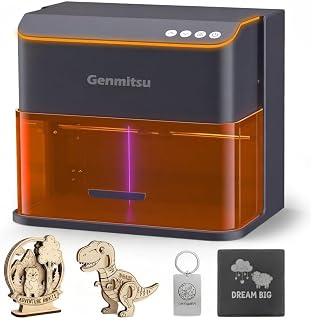 Genmitsu Kintix 10000mW Laser Engraver for BatchCheck price on Amazon
 Acmer S2 20W Laser EngraverCheck price on Amazon
 Longer Honeycomb Working TableCheck price on Amazon
 LONGER RAY5 Mini Laser EngraverCheck price on Amazon
 xTool SafetyPro AP2 Smoke Purifier for Laser EngraverCheck price on Amazon
 xTool F1 Ultra 20W Fiber & Diode Dual Laser Engraver 16MPCheck price on Amazon
LaserEngraveHQ earns a commission from purchases made through these links, at no extra cost to you. Read our affiliate disclosure.
UV lasers and diode lasers operate at completely different wavelengths and equipment tiers. A diode laser is an accessible tool for wood, dark acrylic, and leather crafts, whereas a UV laser is a specialized cold marking system designed for glass, delicate plastics, and micro detail.
Step 1: Understand beam wavelength and cold marking vs heat
The primary difference between these machines begins at the photon level. Ultraviolet lasers produce a high-energy beam in the ultraviolet spectrum, whereas diode lasers emit visible blue light. Because ultraviolet photons carry higher energy, they break chemical bonds in the substrate directly. Makers refer to this photochemical process as cold marking because it alters the surface without generating significant heat.
In contrast, a diode laser relies on photothermal processing. The blue beam heats the target material until it burns, chars, or vaporizes. This thermal mechanism works well when creating rich contrast on organic surfaces like basswood or veg-tan leather. However, that heat creates a heat-affected zone around the cut line. On sensitive substrates, excess heat causes melted borders, scorched edges, and surface distortion. An ultraviolet beam bypasses this issue by altering material bonds photochemically rather than burning through heat, leaving clean edges without charring.
Step 2: Compare material compatibility across plastics, glass and wood
Material compatibility separates these beam types in daily workshop production. Ultraviolet lasers excel on substrates that transmit blue light or cannot tolerate thermal stress. Glass is a prime example: an ultraviolet beam marks glass through clean surface ablation rather than heat, producing smooth, frosted logos without the chipping or splintering caused by thermal shock. Delicate plastics, including white acrylic, silicone, and heat-sensitive films, absorb ultraviolet light cleanly without melting or warping. Furthermore, bare metals such as brass, copper, and gold absorb ultraviolet energy directly without requiring topical coatings, as Genmitsu notes in its Kintix listing.
Diode lasers dominate organic craft materials. Blue diode light is readily absorbed by dark wood, veg-tan leather, slate coasters, dark opaque acrylic, and paper. However, diode lasers struggle on transparent, white, and reflective items. Clear acrylic allows the blue diode beam to pass straight through without absorbing, while opaque white acrylic reflects the visible blue beam. Bare reflective metals also reflect visible blue light; for bare stainless steel, lower-power diode machines often require pre-treating the blank with a specialized laser marking spray, as Genmitsu notes for its Kintix. To explore material limits further, see our diode laser metal engraving guide and our article on cutting acrylic with a diode laser.
Regardless of machine choice, workshop safety requires knowing which materials must never enter a laser bed. Never cut or engrave PVC, vinyl, PVC-based faux leather, polycarbonate, or ABS. When exposed to any laser beam, these materials release toxic fumes and corrosive gases that damage equipment and workshop air.
Step 3: Compare engraving precision, spot size and detail
Engraving precision is another major point of comparison. Both diode and ultraviolet engravers exist in gantry and galvanometer configurations, but optical beam physics create distinct resolution limits. Because shorter ultraviolet wavelengths focus to a significantly tighter focal spot, an ultraviolet laser produces microscopic beam definition. This enables razor-sharp detail on tiny surfaces, including miniature barcodes, micro-text on electronics, fine jewelry engraving, and intricate serial plates.
For diode engravers, spot size and mechanical resolution vary across machine designs. Stepper-driven gantry units deliver reliable positioning for decorative plaques, signs, and craft blanks. For example, WIZMAKER lists a 0.1mm repeatable positioning accuracy for its Wand diode engraver, and Artilume lists 0.01mm accuracy on its 200x150mm frame. Galvanometer diode systems like Genmitsu’s Kintix scan across a 200x100mm area for fast batch marking. While diode precision is well suited for craft projects, it cannot match the sub-millimeter definition of a cold ultraviolet beam on glass, silicone, or miniature tags.
Step 4: Compare cutting capability and optical power limits
Cutting capability is where diode lasers hold a clear advantage over ultraviolet units. Diode engravers are designed to cut sheet goods as well as engrave them, delivering substantial optical output power for workshop fabrication. For instance, Artilume lists a 7W diode laser that cuts up to 4mm basswood with multiple passes. WIZMAKER equips its Wand with a 12W diode laser capable of cutting wood up to 8mm under suitable settings. On multi-source machines, LaserPecker lists a 10W diode module cutting 8mm wood and 5mm acrylic across a 160x300mm workspace, though diode cutting on acrylic is restricted to dark opaque colors because clear sheets transmit the blue beam. When comparing diode models, always separate optical output power from electrical input draw: optical power represents usable beam energy delivered to your workpiece, whereas electrical wattage only indicates power drawn from the wall outlet.
Ultraviolet lasers are strictly marking and engraving tools. The cold ablation mechanism removes microscopic surface layers rather than vaporizing deep kerfs through thick material. Using an ultraviolet laser to cut wood or acrylic sheet stock is impractical and inefficient. If your workshop products require cutting out puzzle pieces, layered signs, or boxes, a diode machine or a CO2 laser is necessary. For a comparison of cutting capabilities across systems, read our diode vs CO2 laser comparison.
Step 5: Set up workshop safety and match the machine to your projects
Safety setups and equipment costs dictate how each laser fits into your workspace. Both beam types produce hazardous optical radiation and airborne particulates. Diode lasers emit visible blue radiation, requiring protective eyewear certified for blue wavelengths with verified optical density (OD). Ultraviolet lasers emit invisible ultraviolet radiation, requiring dedicated eyewear certified for ultraviolet protection. Never rely on unrated orange acrylic shields or sunglasses; eyewear protects only when its documentation states an optical density and wavelength range matching the laser.
Laser housing design also affects workshop safety. For example, xTool lists its M2 with a 10W diode output (10000mW) inside a Class 1 fully enclosed housing with safety monitoring. Genmitsu also lists its Kintix 10W galvo unit as an enclosed Class 1 machine with an auto emergency stop. Enclosed Class 1 machines contain the beam within a protective barrier, whereas open-frame Class 4 units require controlled workshop spaces, protective curtains, and mandatory safety glasses for operators. For guidance on machine ratings, consult our guide to laser classes. In addition, always vent exhaust outside or install a multi-stage filter, as explained in our laser fume extractor guide.
Matching the machine to your budget and project catalog is the final decision. Diode lasers represent an accessible entry point for craft makers producing custom signs, leather patches, and wood gifts. You can compare starter machines in our best laser engraver for beginners roundup and explore commercial options in our best laser engraver for small business guide. Ultraviolet lasers require a larger investment, making them sensible for studios with regular client demand for etched drinkware, silicone components, and delicate industrial markings. To explore standalone ultraviolet equipment, review our guide to the best UV laser engraver.
Common mistakes to avoid
- Attempting to cut workshop sheet wood or acrylic with an ultraviolet laser.
- Expecting a diode laser to engrave clear glass or cut clear acrylic directly.
- Operating an open-frame diode laser without certified eye protection and active exhaust ventilation.
- Assuming unrated orange acrylic shields replace certified optical safety glasses.
- Attempting to process hazardous materials such as PVC, vinyl, or ABS that release corrosive gases.
UV vs diode laser engraver: the short version
- Choose a diode laser if your primary work involves cutting craft wood, engraving dark acrylic, or making custom leather goods on an accessible workshop budget.
- Choose an ultraviolet laser if your product line centers on fine marking on glass drinkware, heat-sensitive white plastics, silicone, or specialized metal items.
- Do not rely on an ultraviolet laser for sheet cutting; reserve cutting tasks for high-power diode or CO2 machines.
- Install certified wavelength-matched eyewear and dedicated ventilation before running either beam type in your workspace.
- Start with the machine that covers your primary material catalog today, and add specialized beam sources as customer demand grows.
Both beam technologies hold clear roles in modern workshop production: diode systems offer practical cutting and organic engraving, while ultraviolet machines deliver precision cold marking on delicate substrates.
FAQ: lasers and CNC
Can a diode laser engrave glass as cleanly as a UV laser?
A diode laser cannot engrave clear glass directly because visible blue light passes straight through transparent glass without absorbing. To mark glass with a diode beam, makers must apply a dark coating such as washable tempera paint, laser marking spray, or black paper. Even with coatings, thermal shock from the diode beam can produce uneven micro-fractures and rough edges. In contrast, an ultraviolet laser cold-marks glass directly with frosted, chip-free detail. For setup tips on diode machines, see our guide on how to engrave glass with a diode laser.
Can a UV laser cut wood or acrylic?
An ultraviolet laser is not built for cutting workshop sheet materials. The photochemical cold marking mechanism removes microscopic surface layers rather than vaporizing deep channels through dense stock. Attempting to cut craft plywood or acrylic with a UV laser is impractical and inefficient. For cutting sheet goods, a diode laser or CO2 laser is the appropriate tool.
Can a diode laser mark bare metal?
Bare reflective metals like brass, copper, and raw aluminum reflect blue diode light and will not mark directly. For bare stainless steel, lower-power diode machines generally require a pre-applied laser marking spray or paste to achieve high-contrast marks, as Genmitsu notes for its 10W Kintix. In contrast, ultraviolet lasers can mark certain bare metals directly because metal surfaces absorb shorter ultraviolet wavelengths more effectively than visible blue light.
What safety gear is required for UV vs diode laser engravers?
Both laser types require dedicated safety precautions. Diode lasers emit visible blue radiation, requiring safety glasses certified for blue wavelengths with appropriate optical density (OD). Ultraviolet lasers emit invisible ultraviolet radiation, requiring eyewear certified specifically for ultraviolet protection. In addition, both machines generate fine smoke and fumes that require active outdoor exhaust or a multi-stage fume extractor.
Which laser should a beginner choose for a home workshop?
Beginners and craft sellers almost always start with a diode laser engraver. Diode machines provide an accessible entry cost, straightforward software setup, and the versatility to both engrave and cut wood, leather, slate, and craft blanks. An ultraviolet laser represents a specialized investment once a shop has steady client orders for custom glassware, delicate plastics, or jewelry.
Why is UV laser marking called cold marking?
Ultraviolet marking is called cold marking because high-energy ultraviolet photons break molecular chemical bonds directly on the substrate surface without generating significant heat. Because minimal thermal energy transfers into the surrounding area, delicate plastics do not warp, melt, or scorch, and fine glass items maintain smooth, clean contours.
Related: the laser engraver hub, the diode laser engravers category, and our guide on how to choose a laser engraver. Also see our comparison of UV vs fiber laser systems and our guide to the best laser engraver for wood.



