Laser Engraver vs Laser Cutter: Which One Should You Buy?
A practical guide to laser engraver vs laser cutter differences, covering optical power, cutting depth, beam sources, air assist, and workshop safety.

On this page
Top picks at a glance
As an Amazon Associate I earn from qualifying purchases.
- 1
 xTool S1 40W Laser Cutter and Laser Engraver for Tumblers9.7/10View on Amazon
- 2
 OMTech 100W CO2 Laser Engraver with 4 Way Pass Through Air9.7/10View on Amazon
- 3
 ATOMSTACK Swift 12W Laser Engraver Cutter for Wood & Metal9.7/10View on Amazon
- 4
 Creality 10W Laser EngraverView on Amazon
- 5
 Longer Ray5 Laser Engraver and CutterView on Amazon
- 6
 ORTUR Laser Master 2 S2 LU2-10A Laser Engraver LaserView on Amazon
- 7
 Twotrees TTS-10 Pro Laser EngraverView on Amazon
- 8
 Twotrees TTS-20 Max 20000mW Laser Engraver and Cutter MachineView on Amazon
- 9
 Twotrees TTS-55 Pro Laser Engraver 5500mW Laser EngravingView on Amazon
The difference between a laser engraver vs laser cutter comes down to depth, optical power, and beam focus: laser engravers vaporize shallow surface layers to create text, graphics, and decorative patterns, while laser cutters concentrate higher continuous energy to penetrate completely through sheet materials. While many modern machines perform both operations, a machine optimized for engraving prioritizes high travel speeds and a tiny focal spot, whereas a dedicated laser cutter requires higher optical wattage, robust air assist, and effective exhaust ventilation to slice cleanly through stock.
Other machines to compare
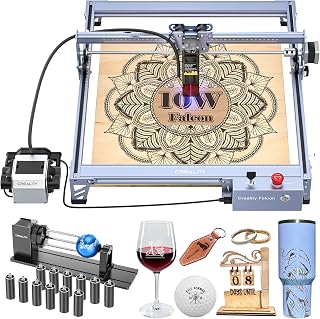 Creality 10W Laser EngraverCheck price on Amazon
 Longer Ray5 Laser Engraver and CutterCheck price on Amazon
 ORTUR Laser Master 2 S2 LU2-10A Laser Engraver LaserCheck price on Amazon
 Twotrees TTS-10 Pro Laser EngraverCheck price on Amazon
 Twotrees TTS-20 Max 20000mW Laser Engraver and Cutter MachineCheck price on Amazon
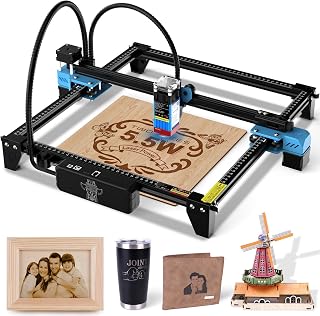 Twotrees TTS-55 Pro Laser Engraver 5500mW Laser EngravingCheck price on Amazon
LaserEngraveHQ earns a commission from purchases made through these links, at no extra cost to you. Read our affiliate disclosure.
An engraver removes thin layers from the surface without piercing through the stock, whereas a cutter delivers enough energy to burn or melt through the entire material thickness. Many desktop machines can do both, but their laser source and wattage dictate what they can cut.
Laser engraver vs laser cutter: key differences explained
Although the terms are often used interchangeably, engraving and cutting apply optical energy differently. Engraving is a raster process: the laser head sweeps across the workpiece at high speed, pulsing the beam to vaporize microscopic depths of material. This creates high-contrast images, logos, and lettering without cutting through the stock.
Cutting is a vector process: the laser head traces continuous paths, concentrating optical energy to sever sheet goods cleanly. If the beam lacks sufficient optical wattage or moves too quickly, it chars the edge without piercing through the underside.
Travel speed also sets them apart. Engraving relies on rapid scanning speeds to finish detailed artwork quickly. For example, the ATOMSTACK Swift 12W listing specifies rated speeds up to 400mm/s (24,000mm/min) across a 300 x 300 mm bed, while the Longer Ray5 listing specifies a maximum engraving speed of 24,000mm/min. Cutting demands slower, steadier movement so the beam can melt or vaporize through the full thickness.
Laser power and optical wattage
Optical output power determines whether a machine functions primarily as an engraver or a capable cutter. Buyers should distinguish optical output from electrical input power, as budget listings often advertise high electrical wattage that does not reflect cutting performance at the workpiece.
Low-power diode units focus on surface engraving. The Creality Falcon Pro 10W listing specifies a 10W optical output (while listing 72000mW electrical input) with a 0.06mm focal spot, which creates crisp marks on wood, leather, and dark acrylic, but limits cutting to thin sheets. The Longer Ray5 Mini listing specifies a 5.5W diode laser with a 0.04×0.04mm spot and a 130×130mm work area. These low-wattage units produce sharp graphic details with minimal scorch, but attempting to cut thick stock requires excessive passes that burn the material.
Higher-power diode units expand cutting capacity on organic materials. The Longer Ray5 listing specifies a 40W laser module that performs single-pass cutting on 20mm pine wood and up to 40mm wood with multiple passes. The Artilume T1-P listing notes that a 3W diode is limited to cutting materials thinner than 2 mm (0.08 inches), while stepping up to a 7W diode allows cuts up to 4mm basswood. Our how to choose a laser engraver guide explains how to match optical wattage to your projects.
For heavy cutting tasks, enclosed CO2 machines deliver greater power. The xTool P2S listing specifies a 55W CO2 laser tube that cuts 20mm acrylic and 18mm black walnut in a single pass at rated speeds up to 600mm/s. See our diode vs CO2 laser guide for a direct comparison of beam types.
Beam sources and material compatibility
A machine’s laser source dictates which materials absorb the beam energy rather than reflecting or transmitting it.
Diode lasers emit visible blue light that organic materials such as wood, leather, slate, and dark acrylic absorb readily. However, blue diode beams pass straight through clear acrylic and transparent glass without marking. Bare metal also reflects diode beams unless treated with a specialized marking spray.
CO2 lasers produce a long infrared wavelength that organic materials, clear glass, and all colors of acrylic absorb efficiently. A desktop CO2 unit cuts smoothly through thick acrylic with polished edges. Read what is a CO2 laser engraver for operating details, or browse the best CO2 laser cutter for home use.
Fiber lasers emit an infrared wavelength tailored for bare metals and rigid plastics. They operate primarily as high-speed marking tools rather than sheet cutters. Learn more in what is a fiber laser engraver and our best fiber laser engraver guide.
Safety warning: Never process PVC, vinyl, PVC-based faux leather, polycarbonate, or ABS in any laser machine. Processing these plastics releases corrosive hydrochloric acid fumes and hazardous particulates that damage optics, corrode metal components, and create safety risks.
Air assist and workbed requirements for cutting
Surface engraving requires only minimal airflow to keep the optical lens free of soot. Through-cutting, however, requires dedicated air assist. An air pump delivers a concentrated stream of pressurized air directly into the kerf at the focal point.
This air stream clears molten resin and charred debris, prevents combustion flames, and blows vaporized particulates out through the bottom of the cut. Without air assist, trapped smoke ignites along the cut line, scorching the surface and leaving heavy char. Compare pump options in our best laser air assist guide.
The work surface underneath the stock is equally important. Engraving can be performed on a solid flat surface, but cutting over a flat metal plate reflects beam energy upward into the back of the material, causing severe flash burns. Placing sheet stock on an elevated support from our honeycomb bed for laser cutter guide lets smoke and heat vent downward, preserving a clean underside.
Ventilation, enclosures and workshop safety
Because cutting vaporizes material through its entire thickness, it generates significantly more smoke, odor, and airborne particulates than surface marking. Effective ventilation is required to keep workspace air clean.
Open-frame diode engravers require a separate tent enclosure or a dedicated workshop space. Enclosed units feature integrated exhaust systems. For example, the xTool P2S listing includes an enclosed body with a 233.3 CFM exhaust fan to vent smoke outdoors. If venting outdoors is impractical, route exhaust through a multi-stage filter from our best fume extractor for laser engraver guide.
Laser safety protocols must match the machine class. Open units are Class 4 lasers requiring certified safety glasses whenever powered. Protective eyewear must state an optical density (OD) value and a wavelength band matching the laser source; tinted orange covers without certified specifications do not guarantee protection. See how to choose laser safety glasses. For home or shared spaces, an enclosed model from our laser engraver with enclosure guide adds safety interlocks that shut off the beam if opened.
Fire safety is critical whenever cutting organic sheet goods. Never leave an active job unattended, and keep a suitable fire extinguisher within reach at your workstation.
Which machine should you buy for your projects?
Choosing between a laser engraver and a laser cutter depends on your primary project goals and material requirements.
If your focus is personalizing wooden blanks, branding leather goods, etching slate coasters, or customizing coated drinkware, a compact diode engraver offers high detail at an accessible investment level. Explore starter models in our laser engraver for beginners guide and top wood options in our best laser engraver for wood guide.
If your work centers on cutting layered wood signage, architectural models, or acrylic displays, prioritize a high-power diode or an enclosed CO2 cutter with air assist. Compare production setups in our best laser engraver for small business guide.
Laser engraver vs laser cutter: the short version
- Laser engravers remove thin surface layers, while laser cutters concentrate optical energy to penetrate through the full stock thickness.
- Engraving relies on rapid raster scanning and fine beam spots, whereas cutting demands steady vector tracking and higher optical wattage.
- Diode lasers excel at engraving wood, leather, and dark acrylic, with cutting restricted to thin sheet goods.
- CO2 lasers provide the optical power and infrared wavelength necessary to cut thicker wood, dark acrylic, and clear acrylic.
- Clean cutting requires dedicated air assist to purge vaporized debris and prevent edge scorching.
- Both processes produce smoke and particulates that demand proper exhaust ventilation and continuous fire monitoring.
FAQ: lasers and CNC
Can a laser engraver also cut materials?
Yes, many laser engravers can cut thin organic materials such as paper, leather, and craft wood. However, their lower optical power requires slow speeds or multiple passes, which can produce charred edges on thicker stock.
Can a laser cutter do fine engraving?
Yes, a laser cutter can engrave detailed graphics by lowering its beam power and increasing its traverse speed. However, large cutting heads with longer focal lengths may produce slightly larger spot sizes than dedicated fine-detail engraving modules.
What laser power is needed to cut wood?
Cutting capability depends on optical output and wood density. The Creality Falcon Pro 10W listing handles thin craft materials, while the Longer Ray5 listing specifies a 40W module capable of single-pass cuts on 20mm pine wood. The xTool P2S listing specifies a 55W CO2 tube that cuts 18mm black walnut in a single pass.
Why can a diode laser not cut clear acrylic?
Standard diode lasers emit visible blue light that passes straight through clear acrylic without being absorbed. CO2 lasers emit a long infrared wavelength that clear acrylic absorbs readily, allowing clean cuts with polished edges.
Do I need air assist for engraving?
Air assist is not strictly required for light surface engraving, though a gentle air flow helps keep the focus lens clean. For through-cutting, however, high-pressure air assist is essential to suppress flames and blow molten debris out of the kerf.
Which is better for a small home workshop?
A diode engraver is compact, lightweight, and quiet for hobbyist engraving on wood and leather. If your work involves cutting thicker boards or clear acrylic, an enclosed CO2 cutter with dedicated fume extraction provides the needed power and enclosure safety.
Related: the laser engraver hub, best laser engraver for small business, and best laser engraver for wood. Also see our guides on how to choose a laser engraver and diode vs CO2 laser.



