Inline Fan vs Booster Fan for Laser: Which One Should You Buy?
A detailed comparison of inline fans and booster fans for laser ventilation, covering static pressure, airflow output, duct resistance, and workshop safety.

On this page
Top picks at a glance
As an Amazon Associate I earn from qualifying purchases.
- 1
 VIVOSUN P6 6" Inline Fan &Speed Control 345 CFM Exhaust Fan9.7/10View on Amazon
- 2
 VIVOSUN R8 8" Inline Fan9.6/10View on Amazon
- 3
 Hon&Guan 8 Inch Inline Booster Duct Fan with Speed Controller9.5/10View on Amazon
- 4
 Hon&Guan 6 Inch Inline Booster Duct Fan with Speed ControllerView on Amazon
- 5
 VIVOSUN R6 6" Inline FanView on Amazon
- 6
 VIVOSUN G6 6" 388 CFM Inline Fan &Smart ControllerView on Amazon
- 7
 VIVOSUN G4 4" 195 CFM Inline Fan &Smart ControllerView on Amazon
- 8
 VEVOR Inline Duct FanView on Amazon
- 9
 Hon&Guan 4 Inch Inline Duct Fan with Upgrade ControllerView on Amazon
When cutting acrylic signs, engraving leather patches, or batching powder-coated tumblers, clearing smoke from your enclosure is critical. An inline fan vs booster fan for laser exhaust comes down to static pressure: you should buy a dedicated mixed-flow inline fan because basic axial booster fans lack the pressure to move fumes through restricted ducting and filters. A mixed-flow impeller draws air against resistance, while an axial propeller stalls when facing duct friction, elbows, or filters. Below is how static pressure works, how to size your fan, and how to set up safe workshop ventilation.
Other machines to compare
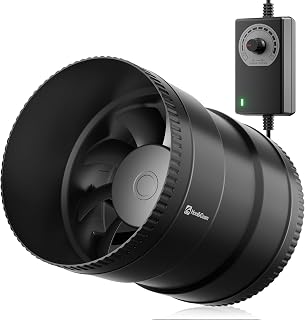 Hon&Guan 6 Inch Inline Booster Duct Fan with Speed ControllerCheck price on Amazon
 VIVOSUN R6 6" Inline FanCheck price on Amazon
 VIVOSUN G6 6" 388 CFM Inline Fan &Smart ControllerCheck price on Amazon
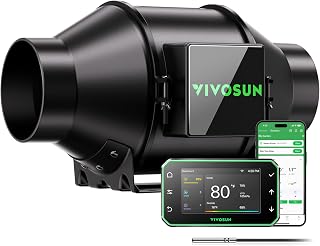 VIVOSUN G4 4" 195 CFM Inline Fan &Smart ControllerCheck price on Amazon
 VEVOR Inline Duct FanCheck price on Amazon
 Hon&Guan 4 Inch Inline Duct Fan with Upgrade ControllerCheck price on Amazon
LaserEngraveHQ earns a commission from purchases made through these links, at no extra cost to you. Read our affiliate disclosure.
Laser exhaust setups must overcome friction from flexible ducting, exterior dampers, and filtration media. An axial propeller fan designed for open HVAC ducts cannot overcome static pressure resistance.
Step 1: Understand static pressure and fan mechanics
Laser cutting vaporizes dense wood, acrylic, and leather, producing concentrated smoke that must exit your workspace immediately. Moving fumes through an exhaust port, flexible ducting, and an exterior vent requires overcoming airflow resistance. This internal drag is static pressure resistance, the backpressure a fan must overcome to maintain airflow velocity.
A basic duct booster fan uses flat axial propeller blades moving air parallel to the shaft. Axial propellers function in open spaces with minimal resistance, but their pressure capability drops rapidly under restriction. When facing duct friction or a closed damper, air slips backward over the blades, causing flow to collapse. For axial mechanics, read our inline fan vs axial fan for laser guide.
A dedicated inline exhaust fan uses a mixed-flow or centrifugal impeller that draws air in axially, compresses it inward, and discharges it at higher pressure. Impeller engineering matters more than listing titles alone, as some mixed-flow units include booster in their name. Hon&Guan lists static pressure metrics for its duct fans: its 6-inch model develops 142 Pa of air pressure while moving 345 CFM at 19.2W, and its 8-inch model develops 171 Pa of air pressure while delivering 623 CFM at 44W. That pressure capability keeps exhaust moving through resistance that stalls an axial propeller.
Step 2: Calculate duct resistance and airflow loss
Every element in your ventilation line adds resistance that reduces cubic feet per minute. Makers asking do laser engravers need ventilation often assume matching a fan diameter to an open port is enough, but real duct runs impose drag:
- Flexible duct ridges: Corrugated ducting contains internal spiral ridges that create turbulent air pockets along walls, producing far more friction than smooth pipe.
- Duct run length: Friction accumulates with every additional foot of ducting between your enclosure and the outdoor exhaust port.
- Bends and elbows: Forcing fast air around sharp bends causes turbulence and wall impact, creating backpressure.
- Exterior dampers: Outdoor wall caps use weighted louvers or spring-loaded dampers to block wind, which the exhaust discharge must push open.
Under these restrictions, a basic axial propeller loses most of its airflow, letting smoke leak into your workshop. A high-pressure mixed-flow fan overcomes this resistance, maintaining continuous negative pressure inside the cabinet when drawing air through the duct.
Step 3: Compare mixed-flow inline fans with axial booster fans
Comparing inline fans with booster fans comes down to impeller geometry, motor efficiency, and housing construction:
Impeller design: Basic booster fans use flat stamped blades that push air without compressing it. Inline mixed-flow fans use curved composite or alloy blades. Some high-capacity units include stator blades; AC Infinity lists a mixed-flow design with stator blades and hydrodynamic wind circles in its CLOUDLINE S10 10-inch fan delivering 1201 CFM at 250 watts to maintain airflow across high resistance.
Motor efficiency and speed control: Motor designs vary across both fan types. Some inline models feature electronically commutated brushless motors; VIVOSUN lists an EC motor with pulse-width modulation control in its 6-inch AeroZesh fan rated at 388 CFM at 35 watts, achieving 30% energy savings. Other inline units use standard AC motors; VEVOR lists an AC motor in its 6-inch inline duct fan delivering 400 CFM at 60 watts. In booster duct fans, Hon&Guan lists an upgraded DC motor consuming only 19.2W on its 6-inch duct fan and 44W on its 8-inch model, each equipped with a variable speed controller.
Housing construction: Cutting acrylic and wood releases sticky residue and vapors. VIVOSUN lists a reinforced plastic housing with a corrosion-resistant metal base on its AeroZesh models, while Hon&Guan lists plastic housing and blades on its 6-inch and 8-inch duct fans. Tight clamping at each duct collar ensures fumes do not escape into your room. Compare options further in our fume extractor vs exhaust fan guide.
Step 4: Size fan diameter and CFM to enclosure volume
Your exhaust fan must draw fresh air through the enclosure faster than fumes spread. Match your fan diameter to your enclosure port to avoid restrictive adapters:
- 4-inch exhaust setups: Suited for compact diode enclosures with short duct runs. VIVOSUN lists a 4-inch AeroZesh inline fan delivering 195 CFM at 20 watts.
- 6-inch exhaust setups: The standard size for mid-sized diode and desktop CO2 enclosures. Hon&Guan lists a 6-inch fan at 345 CFM and 19.2W. VIVOSUN lists a 6-inch AeroZesh model at 388 CFM at 35 watts, plus an R6 6-inch inline fan delivering 390 CFM at 67 watts. VEVOR lists a 6-inch inline duct fan providing 400 CFM at 60 watts.
- 8-inch and 10-inch setups: For large enclosures or multi-machine manifolds. Hon&Guan lists an 8-inch fan at 623 CFM and 44W, while AC Infinity lists a 10-inch fan delivering 1201 CFM at 250 watts.
Sound levels also matter during long jobs. VIVOSUN lists sound output as low as 28 dB on its 4-inch AeroZesh fan and 34 dB on its 6-inch R6 fan. VEVOR lists 34 dB on its 6-inch fan, Hon&Guan lists 32 dBA on its 6-inch fan and 45 dBA on its 8-inch fan, and AC Infinity lists 48 dBA on its 10-inch fan. Explore enclosures in our best laser engraver enclosure guide.
Step 5: Plan duct routing and backdraft prevention
Proper installation ensures maximum suction and safety:
Pull air instead of pushing it: Mount your inline fan near the exterior exit rather than at the laser exhaust port. When the fan pulls air through the duct, the hose inside your workshop stays under negative pressure. If a small tear develops, room air is drawn into the duct. Mounting the fan at the machine pressurizes the duct run, blowing smoke into your shop if a leak occurs.
Keep ducting short and taut: Pull flexible aluminum ducting tight to smooth internal ridges, and eliminate sagging loops where soot settles. Follow our guide on how to vent a CO2 laser outside.
Install a dedicated backdraft damper: A backdraft damper blocks outdoor drafts, moisture, and pests when the fan is powered down. Seal all joints with foil tape and clamps.
Step 6: Maintain workshop safety and material precautions
Keep a suitable fire extinguisher near your workbench, never leave an active laser unattended, and wear safety eyewear matching your beam wavelength. Check our laser safety overview for workshop standards.
If outdoor venting is not an option, route exhaust through a multi-stage filtration unit with carbon and HEPA media. Review our best fume extractor for laser engraver comparison. Because filtration media creates heavy resistance, an axial booster fan fails; only a high-pressure inline fan can draw air through dense carbon beds.
Hazardous material warning: Never cut or engrave PVC, vinyl, PVC-based artificial leather, polycarbonate, or ABS. Cutting materials containing chlorine releases hydrogen chloride gas, which forms hydrochloric acid upon contact with moisture. This gas corrodes linear rails, optics, and electronics, while presenting severe respiratory hazards. Review our guide on materials you should never laser cut.
Common mistakes to avoid
- Using an axial propeller booster fan as the primary laser exhaust.
- Mounting the fan at the laser port instead of near the exterior exit.
- Allowing flexible ducting to sag in deep loops that restrict airflow.
- Using sharp right-angle elbows instead of sweeping bends.
- Pairing an underpowered fan with a dense carbon filter box.
- Leaving duct seams unsealed without foil tape and clamps.
- Venting into living areas, basements, or attics instead of outdoors or into a filter.
- Cutting hazardous plastics such as PVC, vinyl, or polycarbonate.
Inline fan vs booster fan for laser: the short version
- Buy a dedicated mixed-flow inline fan, not an axial booster fan, for laser exhaust.
- Mixed-flow fans generate the static pressure required to overcome duct drag and exterior dampers.
- Axial booster fans stall under resistance, leaking smoke and odor into your shop.
- Mount the inline fan near the exterior exit point to maintain negative duct pressure.
- Match a 4-inch, 6-inch, or larger fan diameter to your enclosure port.
- Never cut PVC, vinyl, or polycarbonate, and keep a fire extinguisher nearby.
FAQ: lasers and CNC
Can I use a duct booster fan for a laser engraver?
A basic axial propeller booster fan should not be used as the primary exhaust fan for a laser engraver because it generates negligible static pressure. When connected to flexible ducting, small enclosure ports, or exterior vent flaps, an axial propeller stalls and lets fumes escape. If you select a fan labeled as a booster duct fan, verify that it uses a mixed-flow impeller with a published static pressure rating capable of overcoming duct resistance.
What is the difference between an inline fan and a booster fan?
The main difference lies in impeller design and static pressure generation. Dedicated inline exhaust fans use mixed-flow or centrifugal impellers designed to maintain airflow against static pressure from duct friction, bends, and exterior dampers. Basic booster fans use flat axial propeller blades intended only to assist airflow in unconstricted HVAC registers with near-zero backpressure.
Should my laser exhaust fan pull or push air?
Your exhaust fan should pull air through the duct by being mounted near the outside wall or window exit. Pulling air maintains negative pressure throughout the duct run inside your workshop. If a pinhole leak or loose fitting occurs, room air is drawn into the duct rather than toxic smoke escaping into your room.
What size inline fan do I need for my laser cutter?
Choose a fan diameter that matches your laser enclosure port. Most desktop diode setups use 4-inch ports, where a fan moving 195 CFM handles compact duct runs. Standard enclosures and desktop CO2 machines use 6-inch ports, where fans delivering between 345 CFM and 400 CFM maintain airflow through bends and dampers. Large commercial enclosures benefit from 8-inch or 10-inch fans delivering 623 CFM to 1201 CFM.
Do I need a carbon filter with an inline exhaust fan?
If you vent outdoors through a dedicated wall or window port, you do not need a carbon filter. If local restrictions prevent outdoor venting, you must route exhaust through a carbon and HEPA filtration unit. Because dense carbon beds create substantial resistance, only an inline fan with high static pressure can draw air through the filter without stalling.
Related: the best exhaust fan for laser engraver, exhaust fan for laser enclosure and best fume extractor for laser engraver. Also see our how to vent a CO2 laser outside. Also see our do laser engravers need ventilation.