CNC Router vs Laser Engraver: Differences Explained
A practical comparison of CNC routers and laser engravers: learn how cutting mechanisms, material compatibility, depth limits and workshop safety differ.

On this page
Top picks at a glance
As an Amazon Associate I earn from qualifying purchases.
- 1
 SpeTool Carbide Single Flute CNC Router Bits 1/8" Cutting9.7/10View on Amazon
- 2
 SainSmart Genmitsu 3020-PRO Ultra CNC Router Machine9.7/10View on Amazon
- 3
 Twotrees TTC450 Pro All-Metal CNC Router Machine with NEMA 579.6/10View on Amazon
- 4
 Genmitsu PROVerXL 6050 Plus CNC Router Machine for BigView on Amazon
- 5
 Genmitsu Cubiko Desktop CNC Router Machine with Enclosure forView on Amazon
- 6
 CNC Router Machine 4030-Evo Ultra 2View on Amazon
- 7
 FoxAlien XE-Ultra 8080 CNC Router Machine with NEMA 23View on Amazon
- 8
 LUNYEE 3020 Nova CNC Router MachineView on Amazon
- 9
 SpeTool Tapered Ball Nose Spiral Router Bit 1.0mm Tip DiameterView on Amazon
The core difference between a CNC router vs laser engraver comes down to mechanical cutting versus optical vaporization: a CNC router uses spinning bits to carve and cut deep relief profiles into thick wood, plastics and soft metals, while a laser engraver uses a focused optical beam to mark and cut thin sheets without touching the workpiece. Choosing between a CNC router vs laser engraver depends on material thickness, pocketing depth, vector detail and workshop ventilation. The sections below explain each factor step by step.
Other machines to compare
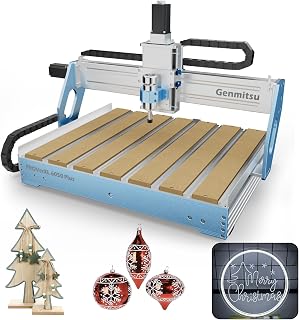 Genmitsu PROVerXL 6050 Plus CNC Router Machine for BigCheck price on Amazon
 Genmitsu Cubiko Desktop CNC Router Machine with Enclosure forCheck price on Amazon
 CNC Router Machine 4030-Evo Ultra 2Check price on Amazon
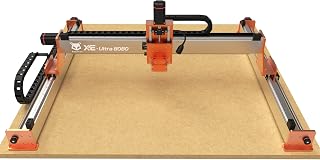 FoxAlien XE-Ultra 8080 CNC Router Machine with NEMA 23Check price on Amazon
 LUNYEE 3020 Nova CNC Router MachineCheck price on Amazon
 SpeTool Tapered Ball Nose Spiral Router Bit 1.0mm Tip DiameterCheck price on Amazon
LaserEngraveHQ earns a commission from purchases made through these links, at no extra cost to you. Read our affiliate disclosure.
Neither machine replaces the other for every workshop task. A CNC router excels at mechanical cutting and dimensional relief in thick stock, while a laser engraver delivers non-contact precision and fine vector detail on flat surfaces.
Step 1: Compare cutting mechanisms and spindle tooling
The technical distinction lies in material removal. A CNC router uses a rotating spindle to drive fluted bits through solid stock. For instance, the Genmitsu 3030-PROVer Ultra listing specifies a 710W spindle, whereas the CNCTOPBAOS 3018-PRO-MAX listing publishes a 120W spindle motor rated at 10000RPM. The AnoleX 4030-Evo Ultra 2 listing specifies an 800W trim router with speed settings from 8000-24000 RPM. Tool holding relies on standard collets, like the ER11 3.175mm collet on the CNCTOPBAOS 3018-PRO-MAX or the Er11-1/8″ collet on the AnoleX 4030-Evo Ultra 2. Read our CNC bits guide for end mill details.
In contrast, a laser engraver uses non-contact optical energy. A diode or CO2 tube directs a focused beam that vaporizes material without cutting force, eliminating tool deflection and heavy clamping. Always separate optical output from electrical input draw, as explained in our optical power guide. For starter systems, explore our laser engraver starter guide.
Step 2: Evaluate material compatibility and safety limits
Material selection determines machine choice. A CNC router cuts dense hardwoods, MDF, plywood and plastics like Delrin, HDPE, acrylic and PVC without combustion fumes. Rigid routers also mill non-ferrous metals: the AnoleX 4030-Evo Ultra 2 listing cites actual cutting accuracy of ±0.02mm in 6061 aluminum, and the FoxAlien XE-Ultra 8080 listing highlights cutting across aluminum, woodworking and carbon fiber.
A laser engraver excels on organic sheets, leather, dark acrylic, coated metals and stone. However, blue diode lasers cannot cut clear acrylic because visible light passes straight through without absorption, and no hobby laser cuts sheet glass. Crucially, never process PVC, vinyl, PVC-based faux leather, polycarbonate or ABS with a laser beam; burning them produces corrosive hydrochloric acid and hazardous fumes. Consult our guide to materials you should never laser cut.
Step 3: Assess carving depth and vertical clearance
Depth capability represents a major functional difference. A CNC router features independent Z-axis motion, carving deep mortises, bowl cavities and dimensional relief. For example, the Genmitsu PROVerXL 4030 V2 listing publishes a working area of 400 x 300 x 110mm, while the FoxAlien XE-Ultra 8080 listing specifies a 33″x33″x4.72″ workspace with a 5.3″ pass height. For bed sizing, read how to choose a desktop CNC router.
Conversely, a laser engraver operates across a shallow focal depth. Diode and desktop lasers cannot cut thick lumber; repeated passes produce heavy charring, severe edge taper and fire hazards. While a laser engraves crisp surface patterns, only a mechanical router can hog out deep flat-bottomed pockets, cut mortises, or slice thick lumber cleanly.
Step 4: Review kerf width, precision and corner geometry
Tool geometry dictates corner sharpness and detail. Profile cutting with a cylindrical end mill leaves an internal corner radius matching the bit radius, requiring CAM relief fillets or hand chiseling for square joints. On precision, the Genmitsu 3030-PROVer Ultra listing claims ±0.03mm precision, and the AnoleX 4030-Evo Ultra 2 listing specifies ±0.005mm repeatability accuracy.
A laser engraver delivers tighter internal corners and intricate vector detail on thin stock. Its ultra-fine kerf cuts delicate fretwork that would break miniature end mills, vaporizing fine lines without mechanical cutting stress. Compare machines in our best laser engraver for beginners roundup.
Step 5: Manage workshop safety, dust extraction and ventilation
Safety and hygiene require distinct preparations. A CNC router produces sawdust, chips and mechanical noise, demanding eye protection, hearing defense and dust extraction. A spindle dust shoe keeps debris off guide rails and out of shop air; see our best dust collector for desktop CNC guide.
Laser engravers operate quietly but present optical and respiratory hazards. Scattered radiation can cause permanent eye damage. Eyewear protects vision only when its listing states an optical density rating and wavelength range matching the laser source; unrated orange plates are not certified protection. Consult our laser safety glasses guide. Laser smoke requires outdoor ducting or certified filtration, as covered in our fume extractor guide. Keep a fire extinguisher nearby and never leave running jobs unattended.
Step 6: Navigate CAD CAM toolpaths and software workflows
The digital workflow represents a distinct learning investment. A laser engraver offers an intuitive path: software imports vectors and bitmaps, assigning speed and power by layer before sending commands to the machine.
A CNC router requires a multi-step pipeline across CAD design, CAM toolpaths and machine control. Makers calculate toolpaths, select bits and export G-code to machine senders. The Genmitsu PROVerXL 4030 V2 listing notes compatibility with Candle and Universal Gcode Sender, while the AnoleX 4030-Evo Ultra 2 listing supports Easel, VCarve and Fusion360. Routers also require secure stock clamping and touch-probe Z-zeroing to avoid spoilboard crashes.
Step 7: Match machine capabilities to workshop production goals
Machine selection depends on your product catalog. If your roadmap centers on furniture parts, dimensional signage, joinery, cutting boards or aluminum brackets, a CNC router is indispensable. For larger projects, the Genmitsu PROVerXL 6050 Plus listing provides a 600 x 500 x 115mm working area with a 300W spindle motor. Explore machines in our best CNC router for small business guide and our best desktop CNC for beginners overview.
If your workshop targets custom drinkware, leather goods, acrylic displays or seasonal ornaments, a laser engraver delivers fast throughput and delicate detail; see our best laser engraver for small business guide. Many shops eventually run both: the router handles structural milling, and the laser applies fine personalization.
Common mistakes to avoid
- Expecting a laser engraver to carve deep relief pockets, mortises or structural joinery.
- Attempting to cut thick hardwood stock with a laser instead of using a mechanical router.
- Neglecting dust collection on a CNC router, allowing airborne particulate and chips to coat the workspace.
- Operating a laser engraver indoors without outdoor exhaust ducting or certified fume filtration.
- Placing hazardous materials such as PVC, vinyl, ABS or polycarbonate under a laser beam.
- Forgetting secure workpiece clamping on a CNC router, causing stock shifting and broken tooling.
CNC router vs laser engraver: the short version
- Select a CNC router for mechanical cutting, deep pockets, contoured relief and thick stock.
- Select a laser engraver for fine vector detail, narrow kerf cutting in thin sheets and rapid surface marking.
- Verify material safety rules, ensuring hazardous sheets like PVC are never processed with a laser beam.
- Equip your workspace with proper extraction, choosing dust collection for chips or fume filtration for smoke.
- Prepare for the software workflow, pairing CAD and CAM toolpaths for routing or vector software for lasering.
- Run practice passes on scrap material to confirm feeds, speeds or focal distance before cutting final work.
Both machines serve valuable roles in a modern workshop, and many makers eventually add both tools to handle complementary tasks.
FAQ: lasers and CNC
Can a CNC router engrave like a laser?
A CNC router carves lettering and decorative motifs using V-groove bits. However, mechanical routing cannot match the microscopic beam waist or fine vector kerf of an optical laser, making ultra-fine text, photographic halftones and delicate filigree impractical on a router.
Can a laser engraver cut through wood as deeply as a CNC router?
No. A laser focuses light across a shallow focal depth, limiting practical cutting to thin sheets. Attempting to cut thick wood with a laser produces heavy charring, severe taper and smoke, whereas a CNC router cuts deep stock cleanly with end mills.
Which machine is easier for beginners to learn?
A laser engraver features a gentler learning curve, converting vector drawings or bitmaps directly into burns. A CNC router requires learning CAD design, CAM toolpaths, speeds, feeds, physical clamping and Z-axis tool offsets.
Is a CNC router louder than a laser engraver?
Yes. A CNC router generates substantial mechanical noise from its high-speed spindle and flutes cutting material. A laser operates silently at the workpiece, with noise coming mainly from exhaust fans, assist air pumps and stepper motors.
Can a hybrid machine perform both CNC routing and laser engraving?
Some desktop machines accept auxiliary laser modules alongside spindles. For example, the CNCTOPBAOS 3018-PRO listing notes support for an optional 12V 3-PIN 0.5W-20W engraver module, and the FoxAlien XE-Ultra 8080 listing notes support for optional FA20W/40W/80W modules. However, hybrid setups require careful management to shield optics from router dust.
Which machine should a small business choose to begin?
Match your machine to your primary product. Choose a CNC router for dimensional wooden signs, furniture parts, relief carvings or cabinet joinery. Choose a laser engraver for personalized drinkware, leather patches, acrylic jewelry or holiday ornaments.
Related: the CNC router hub, how to choose a desktop CNC router and best desktop CNC for beginners. Also see our how to choose a laser engraver. Also see our laser engraver hub.



