Button Maker vs Badge Maker: Which One Should You Buy?
A pin-button press and two plastic card printers compared on what each makes, what comes in the box, software, size and warranty.

On this page
Top picks at a glance
As an Amazon Associate I earn from qualifying purchases.
- 1
 Badgy200 Plastic Card Printer with Badge Studio9.5/10View on Amazon
- 2
 DCBADGE Button Maker Machine9.5/10View on Amazon
- 3
 Badgy100 Plastic Card Printer with Badge Studio9.4/10View on Amazon
Pin badges for a birthday party and printed ID cards for a club look similar on a table, but they come from different machines. Button maker vs badge maker is the question to settle before you buy, because a pin press forms pin badges while a card printer prints on plastic cards. This comparison uses the DCBADGE button maker and the Badgy200 and Badgy100 card printers, going through what each machine makes, what comes in the box, software, size and warranty, using what each listing states.
LaserEngraveHQ earns a commission from purchases made through these links, at no extra cost to you. Read our affiliate disclosure.
Verdict: pick the DCBADGE button maker if you want pin badges for events and gifts; pick a Badgy printer if you need printed plastic ID cards. Between the two Badgy models, the Badgy200 states more in the box and adds database import to its software, while the Badgy100 states a longer warranty term.
Machines on the list
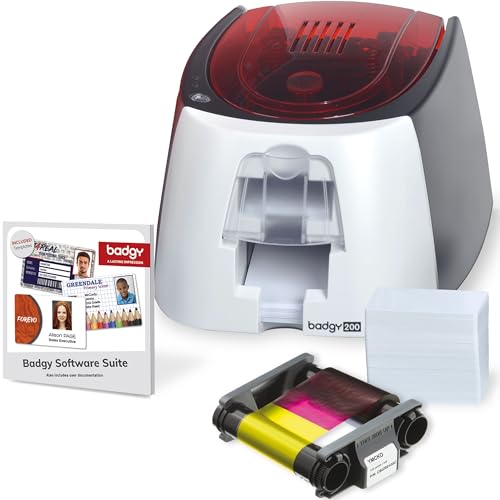
Badgy200 Plastic Card Printer with Badge Studio
A full-color plastic card printer with Badge Studio+ software, database import and a box that includes ribbon and blank cards.
Pros
- Prints full-color, custom, tamper-proof plastic ID badges
- Badge Studio+ software with database import, free templates and a design wizard
- Box includes 100 print color ribbon and 100 blank cards
- 1-year warranty, with optional extended warranty available
Cons
- No build materials stated in the listing
- No safety features stated in the listing
- Prints cards only; it cannot make pin badges
- Replacement ribbon and cards are consumables to keep on hand
DCBADGE Button Maker Machine
An installation-free pin-button press kit in Light Blue that makes 58mm (2.25in) badges with 100 sets of materials included.
Pros
- Makes 58mm (2.25in) pin badges with no assembly needed
- Kit includes 100 sets of badge materials, a circle cutter and a wrench gadget
- Eco-friendly ABS material with rounded edges and a metal pressure lever
- Maker offers after-sales support and round-the-clock customer service
Cons
- No warranty term stated in the listing
- Makes pin badges only; it cannot print ID cards
- No design software stated in the listing
- Only one badge size stated: 58mm (2.25in)
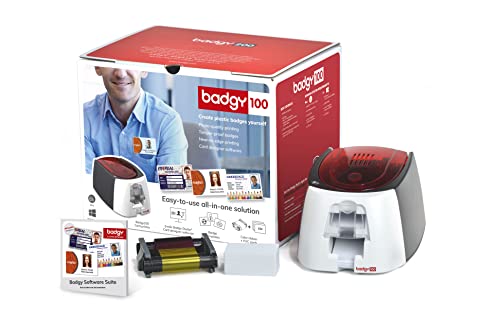
Badgy100 Plastic Card Printer with Badge Studio
A plastic card printer for single, on-demand ID badges with Badge Studio software and a stated 2 Year Manufacturer warranty.
Pros
- Prints high-resolution, full-color ID badges on plastic cards
- Prints on demand, so a lost or stolen card can be replaced at once
- Badge Studio software with an online template library
- 2 Year Manufacturer warranty, the longest term stated here
Cons
- Box contents not stated in the listing
- No build materials stated in the listing
- No safety features stated in the listing
- Prints cards only; it cannot make pin badges
Other machines to compare
 Button Maker Machine 3 SizesCheck price on Amazon
 Button Maker Machine Multiple Sizes 1.25" +2.25" Heart+3" PinCheck price on Amazon
 Happizza Button Maker Machine Multiple SizesCheck price on Amazon
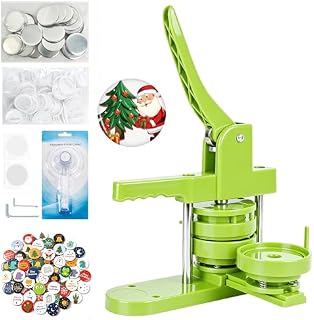 Button Maker Machine 75mmCheck price on Amazon
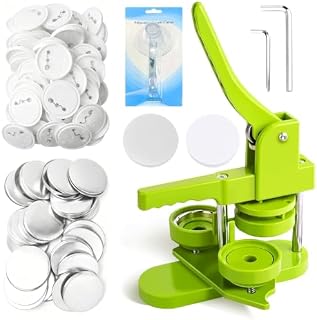 Button Maker Machine 58mmCheck price on Amazon
 Happizza Button Maker Machine Multiple-SizesCheck price on Amazon
Button maker vs badge maker side by side
| Spec | Badgy200 | DCBADGE Button Maker | Badgy100 |
|---|---|---|---|
| HQ Score | 67 | 66 | 63 |
| Type | Plastic card printer | Button maker (pin press) | Plastic card printer |
| What it makes | Full-color plastic ID cards | 58mm (2.25in) pin badges | Full-color plastic ID cards |
| In the box | Printer, 100 print color ribbon, 100 blank cards, software, USB and power cables | Machine, 100 sets of badge materials, circle cutter, wrench gadget | Not stated in the listing |
| Software | Badge Studio+ with database import, templates, design wizard | Not stated in the listing | Badge Studio with online template library |
| Dimensions | 10.86 inches x 7.87 inches x 5.78 inches | 9.25 inches x 2.5 inches x 14.37 inches | 10.86 inches x 7.87 inches x 5.78 inches |
| Warranty | 1-year warranty, with optional extended warranty available | No warranty term stated | 2 Year Manufacturer |
Size and performance figures are the brand’s ratings quoted from listings on 6 November 2026.
What each machine makes
The DCBADGE machine is a button maker: a press that forms pin badges, and the listing states it makes 58mm (2.25in) badges. The kit includes 100 sets of badge materials, a circle cutter and a wrench gadget, so the badge parts and the cutting tool arrive with the press. The Badgy200 and Badgy100 are badge makers of a different kind: plastic card printers that print full-color, custom, tamper-proof ID badges. The Badgy200 listing describes an all-in-one solution for student, employee, gift and loyalty cards, while the Badgy100 listing is aimed at single printing needs and printing on demand.
The split is the whole comparison. A pin press gives you a physical badge to hand out at a birthday party, a family gathering or a school craft project. A card printer gives you a printed plastic card for identification, membership or loyalty. Neither machine does the other job, so the first choice is the kind of badge you need, not the brand.
In the box
The DCBADGE kit states everything needed to start: the listing states the machine, 100 sets of badge materials, plastic films, a circle cutter and a wrench gadget. The maker says the machine body and button model are integrated, so there is nothing to assemble before the first badge. The Badgy200 also states a full box: the printer, 100 print color ribbon, 100 blank cards, Badge Studio+ software, USB and power cables and a quick start guide. The Badgy100 listing does not state what comes in the box, so check the listing before you count on ribbon or cards being included.
Software and design
Both Badgy printers ship with ID design software. The Badgy200 includes the upgraded Badge Studio+ software with database import, free templates, a design wizard and the option to start from scratch. The Badgy100 includes Badge Studio with an online template library of professional-looking designs. The DCBADGE listing states no design software; the circle cutter in the kit sizes the badge face.
Size and build
The DCBADGE press measures 9.25 inches x 2.5 inches x 14.37 inches and comes in Light Blue. The maker lists eco-friendly ABS material, a built-in metal pressure lever and rounded edges. Both Badgy printers state the same dimensions, 10.86 inches x 7.87 inches x 5.78 inches, in white.
For build, the DCBADGE listing is the only one of the three to describe its materials: ABS with a metal pressure lever. Neither Badgy listing describes its build materials, so the comparison leaves that unclear rather than calling either printer better built.
Support and warranty
The Badgy100 listing states a 2 Year Manufacturer warranty. The Badgy200 listing states a 1-year warranty, with optional extended warranty available, and gives support contacts for technical and general questions. The DCBADGE listing states no warranty term, though it offers after-sales support and round-the-clock customer service. A stated term is worth more than a support promise when you compare coverage, so the Badgy100 leads here and the DCBADGE trails.
Choose the DCBADGE Button Maker if
- You want pin badges for birthday parties, family gatherings or school craft projects.
- You want a kit that arrives with 100 sets of badge materials and a circle cutter.
- You do not need printed ID cards or design software.
Choose the Badgy200 if
- You need full-color printed plastic ID cards for students, employees or members.
- You want Badge Studio+ with database import and a design wizard.
- You want the ribbon and blank cards stated in the box.
Choose the Badgy100 if
- You print cards one at a time and on demand.
- A stated 2 Year Manufacturer warranty matters most.
- You are happy to check the listing for what comes in the box.
The DCBADGE press uses a metal pressure lever, so keep fingers clear of the moving parts while you press, and keep the work area clear. The Badgy200 connects by USB and power cable, so keep its cables clear of the work area too.
Project Match
Match the machine to the project:
- Pin badges for a birthday party or school craft project: DCBADGE Button Maker, with its 100 sets of badge materials.
- Student or employee ID cards: Badgy200, with Badge Studio+ and database import.
- One-off replacement cards printed on demand: Badgy100.
- Handcrafted gifts for children and friends: DCBADGE Button Maker, with its 100 sets of badge materials.
FAQ: lasers and CNC
Can a button maker print ID cards?
No. The DCBADGE machine is a press that forms pin badges; printed ID cards need a card printer like the Badgy200 or Badgy100.
What size badges does the DCBADGE button maker make?
The listing states 58mm (2.25in) badges, and the kit includes 100 sets of badge materials.
Do the Badgy printers come with cards and ribbon?
The Badgy200 listing states 100 print color ribbon and 100 blank cards in the box. The Badgy100 listing does not state what comes in the box.
Which badge maker is better for a school or club?
For printed ID cards, the Badgy200, with Badge Studio+ and database import. For pin badges at events, the DCBADGE button maker.
What warranty do these machines have?
The Badgy100 listing states a 2 Year Manufacturer warranty, the Badgy200 listing states a 1-year warranty with optional extended warranty available, and the DCBADGE listing states no warranty term.
Related: best custom badge maker and best button maker multiple size machine.