Longer Ray5 vs Atomstack A10 Pro: Which One Should You Buy?
10W diode engravers compared on power, workspace, materials, software, safety, ventilation and support.

On this page
Top picks at a glance
As an Amazon Associate I earn from qualifying purchases.
- 1
 Longer New Upgrade RAY5 Laser Engraver Cutter9.7/10View on Amazon
- 2
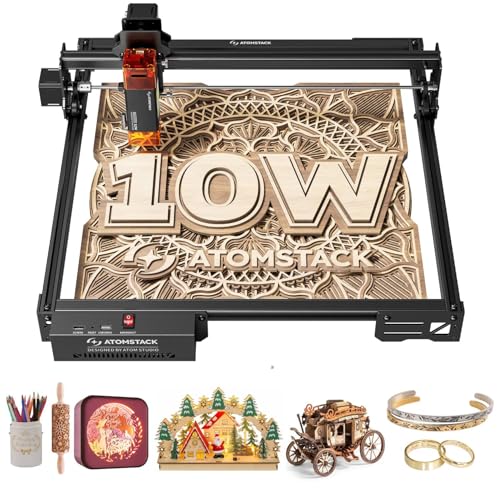 ATOMSTACK A10 PRO V2 10W Laser Engraver9.6/10View on Amazon
- 3
 ATOMSTACK 10W Laser Engraver9.5/10View on Amazon
- 4
 Longer RAY5 20W Laser Engraver with Air Pump and 17.3"x 17.3"View on Amazon
- 5
 Longer Laser RAY5 10W Laser Engraver with Air Pump and 17.3"xView on Amazon
- 6
 LONGER RAY5 10000mW Laser ModuleView on Amazon
- 7
 Longer RAY5 Laser EngraverView on Amazon
- 8
 LONGER Laser EngraverView on Amazon
- 9
 LONGER RAY5 Mini Laser EngraverView on Amazon
A desktop diode laser earns its bench space on signs, patches and cut parts, and the machines here aim at that kind of home and small-shop work. Power figures match on paper, so the real differences sit in control, software, safety and support.
LaserEngraveHQ earns a commission from purchases made through these links, at no extra cost to you. Read our affiliate disclosure.
Verdict: For longer ray5 vs atomstack a10 pro, pick the Atomstack A10 Pro for named software support and a stated warranty term. Pick the Longer RAY5 for a touch screen, offline operation and a 400 x 400mm work area that grows with an extension kit. Optical power and rated speed match, so the choice turns on workflow and support, not wattage.
Machines on the list
ATOMSTACK A10 PRO V2 10W Laser Engraver
A 10W diode engraver with a 410 x 380mm work area, Type-C and USB connections, LightBurn and LaserGRBL support, and a 365-day warranty.
Pros
- 10W output with a 0.06 x 0.08mm spot point size
- Engraving speed up to 400mm/s (24,000mm/min)
- 410 x 380mm engraving area with Type-C or USB connection
- LightBurn and LaserGRBL support, plus a 365-day warranty
Cons
- No laser class stated in the listing
- The 60W machine power figure is input, not optical output
- No touch screen stated in the listing
- No OD or wavelength range stated for the included safety glasses
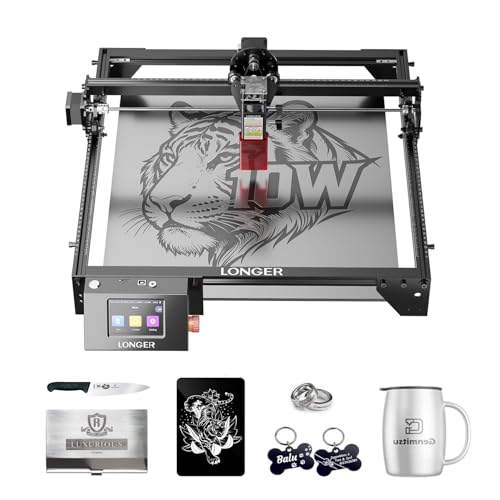
Longer New Upgrade RAY5 Laser Engraver
A 10W diode engraver with a 400 x 400mm work area, Wi-Fi, USB, APP and TF card transfer, offline operation and a 3.5-inch touch screen.
Pros
- 10W output with dual-beam technology and 0.06 x 0.06mm precision
- 24,000 mm/min maximum engraving speed
- 400 x 400mm work area, expandable to 850mm x 400mm with an extension kit
- Wi-Fi, USB cable, APP and TF card transfer with offline operation and a 3.5-inch touch screen
Cons
- No warranty term stated in the listing
- Extension kit available for purchase separately
- No laser class stated in the listing
- Spec table height figure does not fit a desktop frame
Other machines to compare
 Longer RAY5 20W Laser Engraver with Air Pump and 17.3"x 17.3"Check price on Amazon
 Longer Laser RAY5 10W Laser Engraver with Air Pump and 17.3"xCheck price on Amazon
 LONGER RAY5 10000mW Laser ModuleCheck price on Amazon
 Longer RAY5 Laser EngraverCheck price on Amazon
 LONGER Laser EngraverCheck price on Amazon
 LONGER RAY5 Mini Laser EngraverCheck price on Amazon
Side by side
| Spec | Longer RAY5 | Atomstack A10 Pro | Note |
|---|---|---|---|
| HQ Score | 66 | 71 | Raw totals only |
| Laser | 10W output, dual-beam | 10W output, dual-compression spot | Optical output as listed |
| Spot size | 0.06 x 0.06mm precision | 0.06 x 0.08mm spot | As listed |
| Rated speed | 24,000 mm/min | 400mm/s (24,000mm/min) | Same rated speed as listed |
| Work area | 400 x 400mm, 15.75 x 15.76 in | 410 x 380mm | Differently shaped beds |
| Extension | 850mm x 400mm with extension kit | Not stated | Kit sold separately |
| Cutting | 20mm wood boards, 30mm acrylic sheets | 10mm basswood, dark acrylic | Different materials stated |
| Control | Wi-Fi, USB cable, APP, TF card, offline operation, 3.5-inch touch screen | Type-C or USB, app, LightBurn, LaserGRBL | As listed |
| Machine power | Not stated | 60W machine power | Input, not optical output |
| Safety | Protective cover, glasses, abnormal-shaking stop | Magnetic protective cover, safety glasses | No laser class stated |
| Warranty | Not stated | 365-day warranty | From receipt of the product |
| Weight | 8.2 lb | Not stated | As listed |
Specifications are manufacturer rated, as published on each listing and collected 1 November 2026.
Longer Ray5 vs Atomstack A10 Pro: power and cutting
Each listing states 10W optical output, so neither side wins on headline power. The Longer example pairs its 10W output with dual-beam technology and 0.06 x 0.06mm precision, while the Atomstack example pairs its 10W output with dual-compression spot technology and a 0.06 x 0.08mm spot. Rated speed matches: the Longer example lists 24,000 mm/min, and the Atomstack example lists 400mm/s (24,000mm/min).
Cutting claims differ in the materials named. The Longer example states cutting of 20mm wood boards and 30mm acrylic sheets. The Atomstack example states cutting of 10mm basswood and dark acrylic. Those are different materials and thicknesses, so read them as separate listing claims, not a head-to-head result.
Work area
The Longer example lists a 400 x 400mm work area, stated in its title as 15.75 x 15.76 in, with an extension kit expanding the area to 850mm x 400mm, stated as 33.46 x 15.75 in. The Atomstack example lists a 410 x 380mm engraving area. Neither bed is larger on both dimensions: the Atomstack example is longer on one side and shorter on the other, while the Longer example can grow with the extension kit, available for purchase separately.
Materials
Each title names wood, acrylic and metal. The Longer title names those three for DIY engraving, with cutting claims for wood boards and acrylic sheets. The Atomstack title adds glass, and its bullets describe clean, high-contrast marks on metal, wood and glass. Glass is the separator: the Atomstack example names it, and the Longer example leaves it Not stated.
Software and control
Control is where the listings differ sharply. The Longer example transfers data over Wi-Fi, USB cable, APP and TF card, supports offline operation, and adds a 3.5-inch touch screen run from a 32-bit core motherboard. The Atomstack example connects over Type-C or USB and supports LightBurn and LaserGRBL alongside its own app, for PC, Mac or Smartphone. The Longer listing names no LightBurn or LaserGRBL support, so weigh the stated options rather than assuming either side runs every program.
Safety and enclosure
Neither listing states a laser class, so neither side earns a class-based safety claim here. The Longer example states a protective cover and glasses, plus a built-in abnormal-shaking program that stops the machine when shaking is detected. The Atomstack example states a detachable magnetic protective cover that filters 97% of UV rays, plus included safety glasses. No OD or wavelength range is stated for either set of glasses, so they read as included accessories rather than rated protection.
Ventilation
Cutting wood and acrylic makes smoke, so plan ventilation before cutting. Vent outdoors or add a fume extractor, and stay with the machine while it runs. Keep a fire extinguisher nearby, and never laser PVC or vinyl. See our fume extractor guide for extractor options.
Support and warranty
The Atomstack example states a 365-day warranty from receipt of the product, with 24/7 service. The Longer example states ongoing technical support and 24-hour customer service, but no warranty term. That gap is the support difference: a stated term on the Atomstack side, support without a stated term on the Longer side.
Choose the Longer RAY5 if
- You want a 3.5-inch touch screen and offline operation.
- You want a 400 x 400mm work area that grows to 850mm x 400mm with an extension kit.
- You want a stated 20mm wood cutting figure and 0.06 x 0.06mm precision.
Choose the Atomstack A10 Pro if
- You want LightBurn and LaserGRBL support over Type-C or USB.
- You want a stated 365-day warranty term.
- You want a 410 x 380mm work area and glass among the named materials.
See best laser engraver for beginners and how to choose a laser engraver.
Project Match
- Signs and cut parts in wood and acrylic: the Longer example states 20mm wood boards and 30mm acrylic sheets; the Atomstack example states 10mm basswood and dark acrylic.
- Glass projects: the Atomstack example names glass; the Longer example: Not stated.
- Large flat pieces: the Longer example lists 400 x 400mm, expandable to 850mm x 400mm; the Atomstack example lists 410 x 380mm.
- Computer or phone control: the Longer example lists Wi-Fi, USB cable, APP, TF card and offline operation; the Atomstack example lists Type-C or USB with LightBurn, LaserGRBL and its own app.
FAQ: lasers and CNC
Which side has the larger work area?
Neither side is larger on both dimensions. The Longer example lists 400 x 400mm, expandable to 850mm x 400mm with an extension kit, while the Atomstack example lists 410 x 380mm. Compare the shape to the pieces you plan to make.
Do both machines run at 10W?
Each listing states 10W optical output. The Atomstack listing also states 60W machine power, which is input rather than optical output, so do not read it as laser power. The Longer listing states no machine input figure.
Which software runs each machine?
The Atomstack example supports LightBurn and LaserGRBL alongside its own app, over Type-C or USB. The Longer example transfers data over Wi-Fi, USB cable, APP and TF card with offline operation, and names no LightBurn or LaserGRBL support.
Can either machine cut metal?
Each title names metal among its materials. The Atomstack bullets describe marks on metal, wood and glass, and neither listing states a metal cutting thickness. Treat metal work as engraving and marking, not a stated cutting depth.
What warranty does each machine carry?
The Atomstack example carries a 365-day warranty from receipt of the product. The Longer example states ongoing technical support and 24-hour customer service, but no warranty term.
Related: how to choose a laser engraver, best laser engraver for beginners, diode vs CO2 guide and best laser engraver for metal.



