Air Assist vs No Air Assist: Which One Should You Buy?
A practical comparison of air assist vs no air assist: discover how forced airflow prevents charring, protects optics, improves cut depth, and refines workshop results.

On this page
Top picks at a glance
As an Amazon Associate I earn from qualifying purchases.
- 1
 Genmitsu L8 Laser Engraver9.7/10View on Amazon
- 2
 ATOMSTACK F40 Air Assist 10-60 L/min Laser Air Support Pump9.6/10View on Amazon
- 3
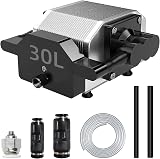 Air Assist for Laser Cutter and Engraver 30L/Min Adjustable9.5/10View on Amazon
- 4
 Longer Air Assist for RAY5 10WView on Amazon
- 5
 Laser Air AssistView on Amazon
- 6
 FoxAlien AP30A Portable Air Assist Pump 30L/min AdjustableView on Amazon
- 7
 Air Assist for La-ser Cutter and EngraverView on Amazon
- 8
 Air Assist for Laser CutterView on Amazon
- 9
 Air Assist PumpView on Amazon
When you cut plywood ornaments, acrylic signs, leather patches, or custom gift boxes on a desktop laser, the choice between air assist vs no air assist determines whether your parts come out with clean edges or dark, scorched charring. Running air assist directs a concentrated stream of pressurized air right at the focal point, blowing away vaporized resin, suppressing flare-ups, and cutting deeper per pass. Running with no air assist leaves smoke trapped in the kerf, causing burned wood surfaces and dirty lenses. While surface engraving on slate, coated metal, or wood often produces clean results with minimal airflow, cutting wood almost always benefits from strong assist air. The sections below explain the differences step by step so you can configure the right airflow for your projects.
Other machines to compare
 Longer Air Assist for RAY5 10WCheck price on Amazon
 Laser Air AssistCheck price on Amazon
 FoxAlien AP30A Portable Air Assist Pump 30L/min AdjustableCheck price on Amazon
 Air Assist for La-ser Cutter and EngraverCheck price on Amazon
 Air Assist for Laser CutterCheck price on Amazon
 Air Assist PumpCheck price on Amazon
LaserEngraveHQ earns a commission from purchases made through these links, at no extra cost to you. Read our affiliate disclosure.
Air assist improves cutting performance by removing vaporized material and preventing flare-ups, but it does not increase the optical wattage of your laser diode or CO2 tube. It helps your existing beam cut cleaner and deeper by clearing the beam path.
Step 1: Understand how forced airflow alters the cutting zone
When an optical beam strikes wood or leather, the material vaporizes. Without assist air, this vapor forms dense smoke and soot that rises into the beam, scattering optical energy and trapping hot combustible gases inside the kerf.
A concentric nozzle directs pressurized air directly into the cut channel, evacuating vaporized resin and keeping the beam path clear. For makers wondering does air assist make a difference on a laser engraver, the difference is visible on cut pieces: reduced heat affected zones, clear optical paths, and improved penetration per pass.
Step 2: Compare cut edge quality, kerf, and charring
Cutting wood without forced air allows radiant heat to bake kerf sidewalls, leaving crumbly black soot that smudges finished assemblies. With air assist running, pressurized air cools the cut channel and blows sparks downward, preventing excessive burning and yielding a crisp, golden-brown edge. Our guide on how to prevent burn marks when laser cutting wood details airflow alongside masking.
Soot evacuation also lets the beam cut deeper per pass. Longer specifies an adjustable airflow of 10 to 30 L/min for its Ray5 air assist kit and recommends a cutting thickness of 3 to 6 mm, noting that airflow reduces surface temperatures to make cutting edges cleaner and smoother. If your machine stalls midway through stock, check airflow alongside our guide on why your laser is not cutting through.
Step 3: Identify when to run with no air assist during engraving
While cutting requires high airflow, surface engraving needs a selective approach. On slate coasters, anodized aluminum, or coated drinkware, high airflow provides little benefit because there is no deep kerf to clear.
On wood or paper, strong airflow can blow vaporized resin across fine raster lines, causing blurry streaks. To keep fine details crisp while maintaining positive pressure to shield your lens, dial the air assist regulator down to a gentle trickle rather than running high flow. On machines with an open shroud rather than a sealed assist nozzle, surface engraving runs naturally with no air assist while your exhaust fan removes smoke.
Step 4: Protect optical lenses from soot and reduce flame flare-ups
Without air assist, vaporized resin swirls beneath the module and bakes onto the optical glass, absorbing beam energy and risking thermal stress. A pressurized nozzle creates downward positive pressure that shields the lens from smoke and debris. Maintaining a low trickle of air through the nozzle preserves this barrier during engraving. For care steps, review how to clean a laser engraver lens.
For fire safety, assist air actively suppresses flames by diluting combustible gases and blowing ember sparks downward into a collection tray. Pairing assist air with a honeycomb bed for laser cutter lets smoke and sparks vent safely below the workpiece.
Step 5: Size airflow volume from listing specifications
Airflow volume is measured in liters per minute (L/min). For compact diode units, Creality lists an adjustable airflow from 0 to 22 L/min on its Falcon air assist kit to blow away smoke and reduce surface temperature. Longer lists an adjustable airflow of 10 to 30 L/min for its Ray5 kits, covering 5W and 10W optical output diode modules with a 60 dB sound figure.
Multiple standalone accessory listings specify 30 L/min. FoxAlien lists an adjustable volume of 0 to 30 L/min for its AP30A pump, which includes 4 rubber vibration-damping feet and plugs into AC 110V at 60 Hz. PYXGLAQ specifies a stable 30 L/min airflow with a sound figure under 36.5 dB for its D1 kit. Woxcker lists an adjustable airflow of 0 to 30 L/min, 4 rubber feet, and a 24 volts operating level for its MD12 pump.
For higher-power diode setups, Ortur lists an adjustable airflow of 0 to 30 L/min with a 1.5 m hose and 4 mounting bases on its universal pump kit, and specifies an airflow of 0 to 50 L/min on its pump kit for 10W and 20W modules. A dial controller lets you tune flow between delicate raster work and heavy cutting. Compare models in our guide to the best laser air assist pumps.
Step 6: Route tubing, nozzle adapters, and compressor lines
Air assist plumbing links the pump, delivery hose, and carriage nozzle. Hose routing must allow full X and Y gantry travel without snagging or pulling loose.
Matching hose diameters prevents pressure drops. Longer includes a 2 m tube with its Ray5 kit for flexible movement. FoxAlien supplies a 2 m hose with a 4 mm inner hose diameter for its AP30A pump. For CO2 machines like K40 cutters, Cloudray specifies an air assist nozzle with a 5.3 mm connector that fits 5 by 8 mm silicone tubing (5 mm inner diameter and 8 mm outer diameter). Fasten air lines along the wiring harness with zip ties or drag chains for smooth travel.
Step 7: Calibrate airflow for different materials and thicknesses
Material response dictates optimal airflow. For birch plywood and basswood, high airflow clears pitch and suppresses charring. For cast acrylic, gentle airflow clears vaporized monomer without frosting molten edges. For leather, moderate airflow removes smoke without drying the grain. Never cut PVC, vinyl, PVC-based faux leather, polycarbonate, or ABS: forced air cannot neutralize hazardous chlorine gas. Review our guide to materials you should never laser cut.
Complete packages like a 10W laser engraver with air assist bundle the pump, tubing, and nozzle together. For platform decisions, consult how to choose a laser engraver.
Common mistakes to avoid
- Running high airflow during fine raster wood engraving, which blows soot across detailed marks.
- Cutting dense plywood or thick hardwood with no air assist, causing heavy edge charring and flare-ups.
- Leaving air tubing unsecured, allowing hoses to snag on gantry extrusions during rapid moves.
- Skipping lens checks, letting condensed smoke residue bake onto the optic and reduce power.
- Attempting to cut vinyl or ABS under the mistaken belief that forced air neutralizes toxic fumes.
Air assist vs no air assist: the short version
- Use air assist for wood cutting: Forced air clears kerf soot, quenches flare-ups, and prevents dark charred edges.
- Dial back air for engraving: Low flow or a gentle trickle preserves fine raster details while keeping positive pressure on the lens.
- Protect optical components: Positive nozzle pressure prevents rising resin and soot from coating the glass optic.
- Reduce fire hazards: Active air evacuation clears trapped combustible gases during cutting passes.
- Choose adjustable hardware: Select a pump with dial control from zero to 30 L/min or higher to handle cutting and engraving.
Running air assist vs no air assist depends on your process: wood cutting requires strong airflow for clean edges, while fine engraving benefits from low flow or open-shroud operation.
FAQ: lasers and CNC
Can you laser cut wood without air assist?
You can cut thin wood without air assist if your laser has enough optical power, but edges will show heavy soot and charring, and fire risk increases from trapped combustible gases.
Does air assist help with laser engraving or only cutting?
Air assist mainly helps cutting. For raster engraving on wood or slate, strong air can blow ash across the surface. Makers use a gentle trickle with a nozzle, or no air assist with an open shroud.
Can an aquarium air pump work for laser air assist?
Small hobby aquarium pumps deliver low pressure that struggles to clear deep kerfs. Dedicated pumps from brands like FoxAlien and Ortur provide up to 30 L/min or 50 L/min to evacuate smoke effectively.
How much airflow volume do you need for laser cutting?
Needs depend on your machine and stock. Longer lists an adjustable airflow of 10 to 30 L/min for 3 to 6 mm cutting on Ray5 setups, while Ortur lists up to 50 L/min for 10W and 20W modules. Start moderate and adjust by edge cleanliness.
Will air assist prevent laser lens damage from smoke?
Yes. Continuous downward air creates positive pressure that stops smoke and sticky resins from reaching the optic, keeping the glass clean and extending lens life.
Related: explore our laser accessories section, compare top options in our guide to best laser air assist pumps, and read our roundup of the best laser engraver for wood. For machine selection advice, visit how to choose a laser engraver and our review of a 10W laser engraver with air assist.