4×4 vs 4×8 CNC Router: Which One Should You Buy?
A practical guide comparing 4x4 and 4x8 CNC router tables: understand sheet handling, workspace requirements, tiling workflows, and cutting capacity.

On this page
Top picks at a glance
As an Amazon Associate I earn from qualifying purchases.
- 1
 CNC Spoilboard Surfacing Router Bit9.6/10View on Amazon
- 2
 CNC Spoilboard Surfacing Router Bit9.6/10View on Amazon
- 3
 CNCTOPBAOS 3018-PRO CNC Router Engraving Machine w/GRBL9.5/10View on Amazon
- 4
 Genmitsu PROVerXL 6050 Plus CNC Router Machine for BigView on Amazon
- 5
 CNC Router Machine 4030-Evo Ultra 2View on Amazon
- 6
 FoxAlien XE-Ultra 8080 CNC Router Machine with NEMA 23View on Amazon
- 7
 CNC Spoilboard Surfacing Router Bit 1/4 Inch ShankView on Amazon
- 8
 CNC Spoilboard Surfacing Router BitsView on Amazon
- 9
 CNC Spoilboard Surfacing Router Bit 1/4" ShanView on Amazon
Makers producing custom cabinetry, architectural signs, furniture, and precision cut parts eventually face a major machinery decision: choosing between a 4×4 vs 4×8 cnc router. A 4×8 machine is the better choice for busy production shops cutting standard full sheet stock in a single job without manual breakdown or indexing. A 4×4 CNC router is the smarter pick for smaller workshops with tight floor space that process partial sheets, smaller furniture parts, or nested signs and can break down larger stock when needed. This guide compares sheet capacity, workshop footprint, tiling workflows, structural rigidity, and drive options to help you choose the right machine size for your shop.
Other machines to compare
 Genmitsu PROVerXL 6050 Plus CNC Router Machine for BigCheck price on Amazon
 CNC Router Machine 4030-Evo Ultra 2Check price on Amazon
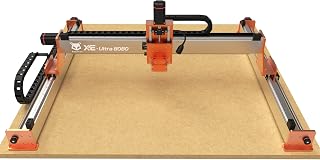 FoxAlien XE-Ultra 8080 CNC Router Machine with NEMA 23Check price on Amazon
 CNC Spoilboard Surfacing Router Bit 1/4 Inch ShankCheck price on Amazon
 CNC Spoilboard Surfacing Router BitsCheck price on Amazon
 CNC Spoilboard Surfacing Router Bit 1/4" ShanCheck price on Amazon
LaserEngraveHQ earns a commission from purchases made through these links, at no extra cost to you. Read our affiliate disclosure.
We do not publish estimated machine prices or operating budgets because manufacturer pricing and freight shipping fees change frequently. Evaluate each machine by its stated cutting area, rigidity, and shop footprint.
Step 1: Compare sheet stock capacity
Sheet capacity is the primary distinction between these machine formats. Standard sheet materials like cabinet-grade plywood, medium-density fiberboard, acrylic, and aluminum composite panels ship in full sheet format. A 4×8 CNC router holds an entire panel flat on the table, executing toolpaths across the full surface without preliminary breakdown cuts.
A 4×4 CNC router provides a square working envelope. Purchasing full sheets requires cutting them into smaller sections on a table saw or track saw before loading the bed. This extra step consumes shop time, demands a dedicated cutting area, and creates blade kerf loss. However, if your work involves smaller signs, acoustic panels, and craft blanks, a 4×4 bed offers ample room. Our best cnc router for small business guide explores how material sizing affects daily production.
The Maker Made M2 listing states a 4x8ft working area covering up to 32sq ft, demonstrating how full sheet equipment accommodates expansive panels in a single setup without sectioning.
Step 2: Measure your workshop floor space
Shop footprint extends well beyond cutting dimensions. Every router requires clearance for its moving gantry, motor mounts, cable drag chains, and control console. A 4×4 machine occupies a compact footprint that sits along a perimeter wall or within a standard garage bay, leaving floor space for workbenches and assembly tables.
A 4×8 CNC router demands a substantial shop commitment. Beyond the machine frame, you need unobstructed perimeter walkways to load heavy sheets, clamp stock, change bits, and perform rail maintenance. You also require an open runway in front of the table to maneuver full panels safely without striking surrounding tools.
Step 3: Evaluate tiling and indexing workflows
Through software tiling, a 4×4 CNC router can process workpieces longer than its bed if the frame includes open front and rear passthrough clearance. Tiling splits a long toolpath into successive segments. You machine the initial segment, slide the stock forward along reference stops, re-secure it, re-zero the coordinates, and run the next segment.
While tiling allows a 4×4 table to cut long signs and furniture rails, indexing requires careful setup. Any slight misalignment creates visible cut seams or dimensional steps. If you cut long components daily, a dedicated 4×8 table eliminates this labor. For occasional long parts, read our practical advice on clamping ideas on a cnc router to maintain accurate alignment.
Step 4: Inspect frame rigidity and motion drives
As axis length increases, structural components must be stiffer to resist deflection and chatter under cutting loads. A 4×4 machine benefits from a shorter gantry beam that experiences less flex during heavy lateral cuts. Long 4×8 axes often rely on rack and pinion drives or large-diameter ball screws to avoid screw whip during high-speed travel. Our comparison of rack and pinion vs ball screw cnc explores how mechanics affect accuracy across long spans.
Reference listings illustrate these motion choices. The AnoleX 4030-Evo Ultra 2 listing specifies 1204 ball screws and HGH-15 dual linear rails on all axes for a rigid compact chassis. For larger spans, the FoxAlien XE-Ultra 8080 listing specifies 16mm ball screws on XY axes and 12mm ball screws on Z paired with HG-15 linear rails to support its 33″x33″x4.72″ workspace.
Step 5: Check spindle power and tooling options
A 4×8 router relies on high-feed nesting with large-diameter spiral bits to cut full-thickness panels efficiently. This demands continuous spindle torque and dependable thermal management. Small compact routers can struggle under prolonged commercial cycles. Listings show distinct power ratings: the Genmitsu PROVerXL 4030S listing states a 710W spindle, whereas the Twotrees TTC450 Ultra listing specifies a 500W spindle upgradeable to 3000W with speeds from 8000 to 30000 RPM. Production sheet routing benefits from dedicated industrial spindles. See our breakdown of air cooled vs water cooled spindle options.
Surfacing a large spoilboard also requires wide-diameter cutters. Review our guide on how to set up a spoilboard on a cnc and our picks for the best surfacing bit for cnc to keep your table flat.
Step 6: Plan dust collection and electrical service
Routing full sheets generates large volumes of debris rapidly. Effective operation requires a dedicated dust collection system with high CFM airflow and a fitted spindle shoe. See our guide on the dust collector shoe for cnc router for clean containment. Long hose runs across a 4×8 table also require strong static pressure to prevent chips from packing into cut channels.
Verify electrical circuits before installation. Reference listings show varied electrical configurations: the Genmitsu PROVerXL 4030S and Genmitsu 4040-PRO MAX list 110 volts requirements, whereas the Genmitsu PROVerXL 4030 V2 specifies 230 volts supply. Confirm your shop panel can support machine power, vacuum pumps, and dust extractors simultaneously.
Step 7: Match machine size to production volume
Choose the format matching your actual output. A 4×8 machine for occasional small crafts ties up capital and shop space. Conversely, processing high-volume cabinetry on a 4×4 bed creates ongoing labor bottlenecks in panel breakdown and indexing.
For carved plaques, signs, and craft blanks, check our best cnc router for sign making roundup. A 4×4 router handles these commercial jobs easily while conserving floor space. If your revenue relies on full sheet cabinetry or architectural panels, review our guide to 4×8 cnc router cost to plan equipment and auxiliary investments.
Common mistakes to avoid
- Purchasing a 4×8 machine without checking doorway clearance, ceiling height, and delivery access.
- Assuming a 4×4 bed cannot cut long workpieces, overlooking software tiling.
- Underestimating dust collector CFM and static pressure needed for long hose runs.
- Overlooking the manual labor required to break down full sheets before using a 4×4 bed.
- Failing to plan perimeter walking clearance for material loading.
4×4 vs 4×8 cnc router: the short version
- Evaluate material size: choose 4×8 for daily full sheets; pick 4×4 for pre-cut stock or smaller parts.
- Measure shop space: ensure perimeter walking clearance around the frame for loading panels.
- Check long part frequency: decide whether occasional tiling on a 4×4 bed fits your schedule.
- Inspect motion hardware: choose heavy linear rails and durable drive systems designed for your axis length.
- Confirm spindle power: ensure continuous torque for your planned panel thicknesses.
- Verify shop utilities: confirm electrical panel capacity and dust collection airflow.
Select the table size that fits your current floor space while handling your daily cutting volume cleanly.
FAQ: lasers and CNC
Can a 4×4 CNC router cut a full sheet of plywood?
A 4×4 CNC router cannot hold a full sheet flat on its bed simultaneously. However, if the machine has open front and rear clearance, you can cut full panels using software tiling. Alternatively, pre-cut sheets with a track saw before machining.
How much floor space does a 4×8 CNC router require?
A 4×8 router requires substantial space beyond its frame. You need clear perimeter access on all sides for loading panels, gantry motion, maintenance, and material maneuvering.
Is a 4×4 CNC router rigid enough for aluminum and hardwood?
Yes. A 4×4 machine features a shorter gantry beam than a 4×8 gantry, experiencing less lateral deflection under cutting loads. With dual linear rails and an all-metal chassis, it cuts hardwoods and non-ferrous metals accurately.
Can I upgrade a 4×4 CNC router to a 4×8 later?
Some modular systems offer axis extension kits, but upgrading requires major mechanical teardown, rail re-alignment, and new spoilboards. Buying your target size upfront is usually more practical.
Which drive system is better for large CNC tables?
Long axes perform best with rack and pinion drives or large-diameter ball screws to avoid whip during rapid travel. Smaller axes often use precision lead screws or standard ball screws.
Do I need a commercial dust collector for a 4×4 or 4×8 CNC router?
Yes. Sheet routing creates high chip volumes that overwhelm standard shop vacuums. A dedicated dust collector with a fitted spindle shoe keeps guide rails clean and protects air quality.
Related: our 4×4 and larger cnc router hub, the best cnc router for small business guide, and our review of the best cnc router for sign making. Also see our comparison on rack and pinion vs ball screw cnc and our guide to 4×8 cnc router cost.