Best Mini Color Sticker Printer (2026): 5 Picks Compared
Five mini color sticker printers compared on print technology, 2x3 inch sticky-back prints, Bluetooth connection, prints per charge and warranty terms.

On this page
Top picks at a glance
As an Amazon Associate I earn from qualifying purchases.
- 1
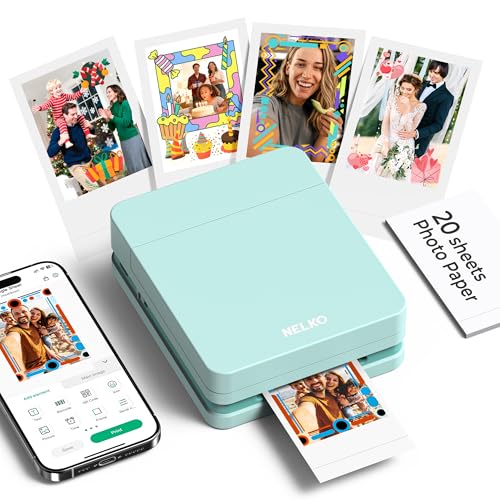 Best OverallNelko PP019.5/10View on Amazon
- 2
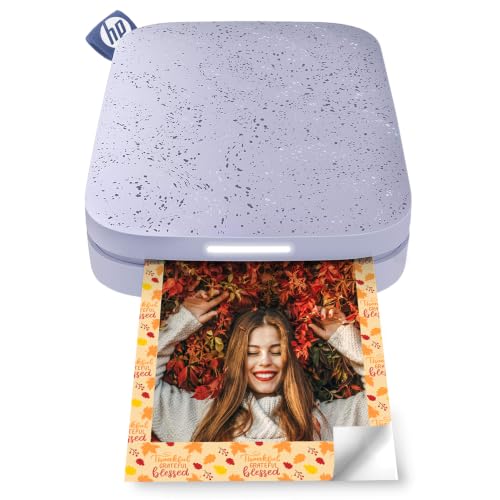 Best for Group PrintingHP Sprocket9.5/10View on Amazon
- 3
 Best Lightweight PickKODAK Step9.4/10View on Amazon
- 4
 Best Paper BundleLiene Pearl K1009.3/10View on Amazon
You want sticky-back color prints for a journal, a product box or a craft table without sitting at a desk printer. That is the job of the best mini color sticker printer: a palm-sized printer that takes a photo from your phone and hands back a small print you can peel and stick. This guide compares five mini printers on what each maker states: print technology, print size, connection, prints per charge and warranty.
LaserEngraveHQ earns a commission from purchases made through these links, at no extra cost to you. Read our affiliate disclosure.
Quick picks
- Best Overall Nelko PP01: Inkjet printing at a stated 600 DPI, with a cartridge rated for up to 80 prints. Check price on Amazon
- Best for Group Printing HP Sprocket: Connects to multiple devices at the same time, with 35 prints per charge stated. Check price on Amazon
- Best Lightweight Pick KODAK Step: Weighs less than a pound, with Bluetooth and NFC connection stated. Check price on Amazon
- Best Paper Bundle Liene Pearl K100: Includes 50 sheets of Zink adhesive paper and prints 30 photos per charge. Check price on Amazon
Machines on the list
Nelko PP01 Photo Printer
A pocket-sized inkjet photo printer for 2x3 inch sticky-back prints, with a stated 600 DPI resolution and Bluetooth connection to iOS and Android phones.
Pros
- Stated 600 DPI resolution for full-color prints
- Ink cartridge rated by the maker for up to 80 prints
- Weighs 308g and fits a pocket, per the maker
- App editing with frames, collages, filters and AI image editing
Cons
- Needs ink cartridges, unlike the ZINK picks here
- USB charging cable included but the adapter is not included
- Paper must load smooth side down, so loading takes care
- Maker rates printing at under 90 seconds per photo, slower than a desk printer
HP Sprocket 2x3 Instant Smartphone Photo Printer
A pocket-sized ZINK printer for 2x3 inch sticky-back photos, with Bluetooth 5.3, multi-device connection and a stated 35 prints per charge.
Pros
- Bluetooth 5.3 for iOS 10-Plus and Android 5-Plus devices
- Connects to multiple devices at the same time, per the maker
- 35 prints per charge stated, with Micro USB charging cable
- ZINK paper needs no toner or ribbon replacements
Cons
- ZINK paper packs are a running cost to keep stocked
- Micro USB charging rather than Type-C
- Prints only through the HP app workflow
- Size is stated as 5 Sheets, so paper runs out fast in a batch
KODAK Step Instant Smartphone Photo Printer
A palm-sized ZINK printer for 2x3 inch sticky-back photos, connecting by Bluetooth or NFC to iOS and Android devices.
Pros
- Connects by Bluetooth or NFC to iOS and Android devices
- Weighs less than a pound, per the maker
- App editing with collages, filters, borders, stickers and text
- Built-in rechargeable battery rated at 25 photos per full charge
Cons
- 25 photos per charge is the lowest stated figure here
- ZINK paper packs are a running cost to keep stocked
- Size is stated as 5 Sheets, so paper runs out fast in a batch
- No resolution figure is stated for its prints

Canon Ivy 2 Mini Photo Printer
A mini ZINK photo printer with peel and stick backing, Bluetooth 5.0 connection and app-based printing from iOS and Android devices.
Pros
- Bluetooth 5.0 connection to compatible smartphones
- Peel and stick backing stated to adhere to surfaces
- No ink needed, with dye crystals embedded in the paper
- Canon Mini Print App for printing and customizing photos
Cons
- No prints-per-charge figure is stated
- No resolution figure is stated for its prints
- ZINK paper packs are a running cost to keep stocked
- At 0.55 pounds it is the heaviest stated weight here
Liene Pearl K100 Photo Printer
A mini ZINK printer with 50 sheets of adhesive paper included, Bluetooth 5.2, Type-C charging and a stated 30 photos per charge.
Pros
- 50 sheets of Zink adhesive paper included in the box
- Bluetooth 5.2 connection to iOS and Android phones
- Type-C charging with 30 photos per single charge stated
- Prints color and black and white photos, per the maker
Cons
- No warranty term is stated
- Photos can only be printed through the Liene app
- Print head cleaning needs a blue calibration card
- Maker rates each photo at 45 seconds, so batches take time
Specs compared
| Model | HQ Score | Print technology | Print size | Connection | Prints per charge | Warranty |
|---|---|---|---|---|---|---|
| Nelko PP01 | 9.5/10 | Inkjet, cartridge | 2×3 inch | Bluetooth | Not stated | 1 year |
| HP Sprocket | 9.5/10 | ZINK | 2×3 inch | Bluetooth 5.3 | 35 prints | 1 year limited warranty |
| KODAK Step | 9.4/10 | ZINK | 2×3 inch | Bluetooth, NFC | 25 photos | 1 year limited warranty |
| Canon IVY 2 | 9.3/10 | ZINK | 2×3 inch | Bluetooth 5.0 | Not stated | 1 Year |
| Liene Pearl K100 | 9.3/10 | ZINK | 2×3 inch | Bluetooth 5.2 | 30 photos | Not stated |
Size and performance figures are the brand’s ratings quoted from listings on 21 November 2026. Print size is the sticky-back photo size each maker states.
What the listings tell you, and what they leave out
Print technology is the clearest split. The Nelko PP01 uses inkjet technology with a cartridge the maker rates for up to 80 full-color prints, and it is the only pick here that states a resolution figure, 600 DPI. The KODAK Step, HP Sprocket, Liene Pearl K100 and Canon IVY 2 use ZINK paper with dye crystals embedded in the paper, so there is no cartridge, toner or ribbon to replace. Prints per charge are stated for four picks and left unstated for the Canon IVY 2, which is why its score sits lower despite the same print size.
Buying guide: choosing the best mini color sticker printer
ZINK paper or an ink cartridge
With ZINK models, the color sits in the paper itself, so running costs follow the paper packs you buy. The Liene Pearl K100 includes 50 sheets of Zink adhesive paper in the box, while the KODAK Step and HP Sprocket state a size of 5 Sheets. The Nelko PP01 takes the other route: an ink cartridge rated by the maker for up to 80 prints, plus sticky-backed photo paper you load smooth side down. Pick based on which consumable you would rather keep on the shelf.
Connection and app
All five connect to iOS and Android phones over Bluetooth, with versions stated on three picks: Bluetooth 5.3 on the HP Sprocket, Bluetooth 5.2 on the Liene Pearl K100 and Bluetooth 5.0 on the Canon IVY 2. The KODAK Step also connects by NFC. Each maker routes printing through its own app, and Liene states photos can only be printed through the Liene app. The HP Sprocket states it can connect to multiple devices at the same time, with a personalized LED light to show who is printing.
Prints per charge and charging
Stated prints per charge run from 25 photos on the KODAK Step to 35 prints on the HP Sprocket, with the Liene Pearl K100 at 30 photos on a single charge. Charging differs too: Micro USB cable on the HP Sprocket, Type-C on the Liene, and a USB charging cable included with the Nelko PP01, though its adapter is not included. If you print in batches at a market stall or party, that per-charge figure decides how often the printer sits on a cable.
Project Match
- Scrapbooks, journals and planners: the Nelko PP01, stated for scrapbooking and journaling with sticky-backed prints.
- Party and group printing: the HP Sprocket, stated to connect to multiple devices at the same time.
- Decorating storage boxes and cases: the Liene Pearl K100, whose prints the maker states can be cut to decorate a storage cabinet, computer case or refrigerator.
- Collages and edited snapshots: the KODAK Step, with an app stated for collages, filters, borders and stickers.
- Peel and stick photo keepsakes: the Canon IVY 2, with a peel and stick backing stated to adhere to surfaces.
How the scores add up
Each printer is scored out of 10 on performance, build, value, safety and warranty, with the weights published on our How We Pick page. A spec the maker does not publish scores nothing. None of the five states a safety certification, so the safety line is empty for each pick, and four of the five state a 1 year warranty term.
| Product | HQ Score | Perf. /35 | Build /25 | Value /25 | Safety /10 | Warranty /5 |
|---|---|---|---|---|---|---|
| Nelko PP01 | 9.5 | 30 | 20 | 21 | 0 | 3 |
| HP Sprocket | 9.5 | 29 | 20 | 20 | 0 | 3 |
| KODAK Step | 9.4 | 27 | 19 | 19 | 0 | 3 |
| Canon IVY 2 | 9.3 | 24 | 19 | 18 | 0 | 3 |
| Liene Pearl K100 | 9.3 | 28 | 19 | 21 | 0 | 0 |
We translate weighted points into a score with 9.2 as its floor and 9.8 as its cap; the straight-line conversion keeps the ranking exactly.
FAQ: lasers and CNC
What is a mini color sticker printer?
It is a small portable printer that prints phone photos onto sticky-back paper you can peel and stick. The five picks here print 2×3 inch sticky-back photos, either with ZINK paper or, on the Nelko PP01, with inkjet technology and a cartridge.
Do these mini printers need ink cartridges?
The KODAK Step, HP Sprocket, Liene Pearl K100 and Canon IVY 2 use ZINK paper with color embedded in the paper, so there is no cartridge to replace. The Nelko PP01 uses an ink cartridge the maker rates for up to 80 full-color prints.
How many prints do you get per charge?
The makers state 25 photos per full charge for the KODAK Step, 30 photos for the Liene Pearl K100 and 35 prints for the HP Sprocket. The Canon IVY 2 does not state a prints-per-charge figure in the figures collected here.
What print size do these sticker printers make?
All five print 2×3 inch photos on sticky-back paper. The Nelko PP01 states 600 DPI resolution for its prints; the ZINK models state the print size and paper type without a DPI figure.
More laser and CNC guides
See every Shipping and Labels guide and all Seller Gear guides. For the wider sticker question, see the best sticker printer and the best printer to print stickers at home.
More picks: best desktop label printer, best printable sticker paper, best thermal label printer for small business.