Best Desktop Label Printer (2026): 5 Picks for Shipping
Five desktop label printers compared by stated resolution, rated speed, connectivity, label width and warranty for shipping and office labeling.

On this page
Top picks at a glance
As an Amazon Associate I earn from qualifying purchases.
- 1
 Best OverallZebra ZD4219.6/10View on Amazon
- 2
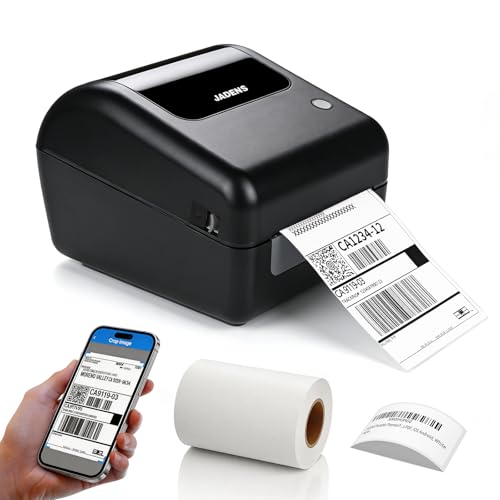 Best for Phone PrintingJADENS 168BT9.5/10View on Amazon
- 3
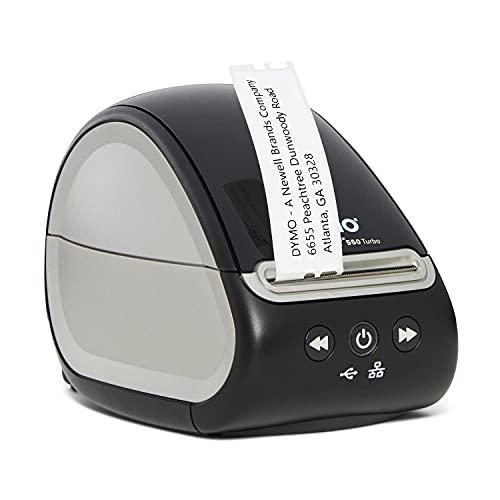 Best for Shared OfficesDYMO 550 Turbo9.4/10View on Amazon
- 4
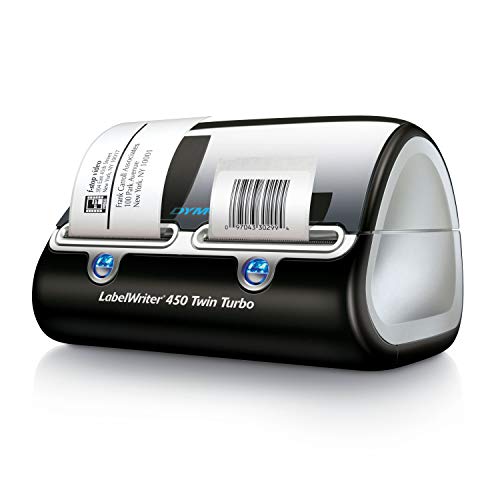 Best for Two Label TypesDYMO 450 Twin Turbo9.3/10View on Amazon
- 5
 Best for Small LabelsBrother QL-6009.2/10View on Amazon
Packing orders at a desk, printing address labels for mail, and keeping shelves and files in order all depend on labels that print cleanly and stick where they belong. A desktop label printer handles that daily work without ink or toner refills, and the right pick depends on label width, connection type and the shipping platforms in use. This guide compares the best desktop label printer options for shipping, mailing and office labeling, using only the specifications each maker publishes for resolution, speed, connectivity and warranty.
LaserEngraveHQ earns a commission from purchases made through these links, at no extra cost to you. Read our affiliate disclosure.
Quick picks
- Best Overall Zebra ZD421: Rated at 203 DPI and 6 ips with Bluetooth, Ethernet and USB, plus a stated 2-Year Warranty. Check price on Amazon
- Best for Phone Printing JADENS 168BT: Bluetooth printing from iPhone and Android, rated at up to 150 mm/s, with 50 pcs 4″ x 6″ labels included. Check price on Amazon
- Best for Shared Offices DYMO 550 Turbo: USB and LAN network connectivity with automatic label recognition for mixed office label types. Check price on Amazon
- Best for Two Label Types DYMO 450 Twin Turbo: Holds 2 rolls at the same time so shipping and mailing labels print without swapping rolls. Check price on Amazon
- Best for Small Labels Brother QL-600: Rated at up to 44 labels per minute for rolls up to 2.4″ (62 mm), with a stated 2-Year Limited Warranty. Check price on Amazon
Machines on the list
Zebra ZD421 Thermal Shipping Label Printer | 4x6
A direct thermal desktop printer rated at 203 DPI and 6 ips, with Bluetooth, Ethernet and USB connection and a stated 2-Year Warranty.
Pros
- Rated at 203 DPI with print speed stated as 6 ips
- Bluetooth, Ethernet and USB connection, plus Print Touch NFC pairing
- Supports EPL and ZPL printer languages for existing label formats
- Stated 2-Year Warranty and ENERGY STAR qualified status
Cons
- Label width range is Not stated, so confirm roll fit before ordering
- No starter labels are stated as included in the box
- Heavier desktop body than the DYMO 550 Turbo at 2.0 pounds
- Stated dimensions of 8.69 inches x 2.98 inches x 5.93 inches need bench room
Bluetooth Thermal Shipping Label Printer
A Bluetooth thermal printer for 4x6 shipping labels, rated at 203 DPI and up to 150 mm/s, with a built-in label holder and 50 labels included.
Pros
- Rated at 203 DPI with print speed up to 150 mm/s
- Supports label widths from 1.57" to 4.1" for shipping labels
- Bluetooth printing from iPhone, iPad and Android, plus USB for Mac
- Includes 50 pcs 4" x 6" thermal shipping labels in the box
Cons
- Mac printing is stated over USB, not over Bluetooth
- Roll labels are supported only up to 350 sheets per roll
- Warranty is stated as 1 year, shorter than the 2-year terms here
- Weight is Not stated, so carrying weight cannot be compared
DYMO LabelWriter 550 Turbo Label Printer
A direct thermal printer with USB and LAN network connectivity and automatic label recognition, for shipping, mailing and postage labels.
Pros
- USB and LAN network connectivity for shared office use
- Automatic label recognition reads size, type and labels remaining
- Prints shipping labels, file folder labels, name badges and barcode labels
- Direct thermal printing with no ink or toner needed
Cons
- Resolution in DPI is Not stated for this model
- Rated print speed is Not stated for this model
- No warranty term is stated for this model
- Label width range is Not stated, so confirm roll fit before ordering
DYMO LabelWriter 450 Twin Turbo Label Printer
A direct thermal printer that holds 2 rolls of labels at the same time, for shipping, mailing and postage work with a stated 1-year limited warranty.
Pros
- Holds 2 rolls so two label types print without swapping rolls
- Direct thermal printing with no ink or toner needed
- Creates labels from Microsoft Word, Excel, Outlook and Google Contacts
- Stated 1-year limited warranty
Cons
- Resolution in DPI is Not stated for this model
- Rated print speed is Not stated for this model
- Connectivity is Not stated, so confirm connection before ordering
- Uses authentic DYMO LabelWriter Labels for stated performance
Brother QL-600 Desktop Monochrome Label Printer
A desktop thermal printer for labels up to 2.4" wide, rated at up to 44 labels per minute, with a stated 2-Year Limited Warranty.
Pros
- Rated at up to 44 labels per minute for small label jobs
- Automatic cutter creates banners up to 3 feet long
- Includes DK-2205 tape and a USB cable in the box
- Stated 2-Year Limited Warranty
Cons
- Label width is limited to up to 2.4" (62 mm)
- Resolution in DPI is Not stated for this model
- Connectivity beyond the included USB cable is Not stated
- At 4.4 pounds it needs sturdy bench space
Specs compared
| Model | HQ Score | Print method | Resolution | Rated speed | Connectivity | Label width | Warranty |
|---|---|---|---|---|---|---|---|
| Zebra ZD421 | 9.6/10 | Direct thermal | 203 DPI | 6 ips | Bluetooth, Ethernet, USB | Not stated | 2-Year Warranty |
| JADENS 168BT | 9.5/10 | Direct thermal | 203 DPI | Up to 150 mm/s | Bluetooth, USB | 1.57″ to 4.1″ | 1 year warranty |
| DYMO 550 Turbo | 9.4/10 | Direct thermal | Not stated | Not stated | USB, LAN | Not stated | Not stated |
| DYMO 450 Twin Turbo | 9.3/10 | Direct thermal | Not stated | Not stated | Not stated | Not stated | 1-year limited warranty |
| Brother QL-600 | 9.2/10 | Thermal | Not stated | Up to 44 labels per minute | USB | Up to 2.4″ (62 mm) | 2-Year Limited Warranty |
Specifications are manufacturer rated, as published by each maker and collected 21 November 2026. Rated speed and resolution are shown only where the maker states them.
What the listings tell you, and what they leave out
Resolution and speed decide how sharp barcodes and address text look, yet only the Zebra ZD421 and the JADENS 168BT state a DPI figure, and both state 203 DPI. The DYMO 550 Turbo, the DYMO 450 Twin Turbo and the Brother QL-600 leave resolution as Not stated. Speed is stated in different units: the Zebra ZD421 is rated at 6 ips, the JADENS 168BT at up to 150 mm/s, and the Brother QL-600 at up to 44 labels per minute, while both DYMO models leave rated speed as Not stated.
Warranty terms also differ. The Zebra ZD421 states a 2-Year Warranty and the Brother QL-600 states a 2-Year Limited Warranty, the JADENS 168BT states a 1 year warranty and the DYMO 450 Twin Turbo states a 1-year limited warranty, and the DYMO 550 Turbo states no warranty term. Label width is stated only for the JADENS 168BT, at 1.57″ to 4.1″, and for the Brother QL-600, at up to 2.4″ (62 mm). Where width, resolution or speed reads Not stated, confirm the figure with the maker before ordering rolls.
Buying guide: choosing the best desktop label printer
Label width decides the job
Shipping labels in the 4×6 size need a printer that accepts wide rolls. The JADENS 168BT states widths from 1.57″ to 4.1″ and includes 50 pcs 4″ x 6″ labels, covering shipping, barcode, address, warehouse, inventory and product labels. The Brother QL-600 is limited to up to 2.4″ (62 mm), which suits address and file labels but not 4×6 shipping labels. The Zebra ZD421, DYMO 550 Turbo and DYMO 450 Twin Turbo leave label width as Not stated, so roll width needs confirmation before matching to a label size. For common sizes, see our shipping label size chart.
Connection: phone, desk or network
Connection type decides where printing happens. The JADENS 168BT prints over Bluetooth from iPhone, iPad and Android devices and over USB from a Mac, and lists USPS, UPS, FedEx, Amazon, Etsy, Shopify, eBay, ShipStation, Pirate Ship and Shippo. The Zebra ZD421 adds Ethernet alongside Bluetooth and USB, plus Print Touch NFC pairing, which suits a shared shipping station. The DYMO 550 Turbo offers USB and LAN network connectivity for shared office use, while the Brother QL-600 includes a USB cable. The DYMO 450 Twin Turbo leaves connectivity as Not stated.
Direct thermal means no ink
Every pick here prints without ink or toner. Direct thermal printing uses heat on coated label stock, so there are no cartridges or ribbons to replace. The Zebra ZD421, JADENS 168BT, DYMO 550 Turbo and DYMO 450 Twin Turbo all state direct thermal printing, and the Brother QL-600 states thermal printing with DK drop-in rolls. Each model still needs compatible thermal rolls matched to the stated width, and the DYMO 450 Twin Turbo states that authentic DYMO LabelWriter Labels give the stated performance. See our direct thermal labels vs thermal transfer guide for the stock difference.
Speed, resolution and desk size
Compare speed only in the units each maker states: 6 ips for the Zebra ZD421, up to 150 mm/s for the JADENS 168BT, and up to 44 labels per minute for the Brother QL-600. Desk size matters on a small packing bench: the DYMO 550 Turbo states 2.0 pounds and 7.4 inches x 5.0 inches x 5.4 inches, the Brother QL-600 states 4.4 pounds and 8.8 inches x 5.1 inches x 6.1 inches, the Zebra ZD421 states 8.69 inches x 2.98 inches x 5.93 inches, and the DYMO 450 Twin Turbo states 11.37 inches x 5.5 inches x 8.37 inches with room for 2 loaded rolls. For setup steps, see our how to print shipping label guide.
Project Match
- 4×6 shipping labels from a phone: JADENS 168BT, with stated widths from 1.57″ to 4.1″ and 50 pcs 4″ x 6″ labels included.
- Shared shipping station on a wired network: Zebra ZD421, with Ethernet, Bluetooth and USB stated.
- Mixed office labels on a shared LAN: DYMO 550 Turbo, with shipping, file folder, name badge and barcode label types stated; label width Not stated.
- Two label types loaded at the same time: DYMO 450 Twin Turbo, with 2 rolls held; label width Not stated.
- Address labels and banners on narrow rolls: Brother QL-600, with width up to 2.4″ (62 mm) and banners up to 3 feet long.
How the scores add up
Each printer is scored out of 10 on performance, build, value, safety and warranty, with the weights published on our How We Pick page. A spec the maker does not publish scores nothing.
| Product | HQ Score | Perf. /35 | Build /25 | Value /25 | Safety /10 | Warranty /5 |
|---|---|---|---|---|---|---|
| Zebra ZD421 | 9.6 | 30 | 21 | 20 | 0 | 4 |
| JADENS 168BT | 9.5 | 29 | 20 | 21 | 0 | 3 |
| DYMO 550 Turbo | 9.4 | 26 | 20 | 19 | 0 | 0 |
| DYMO 450 Twin Turbo | 9.3 | 22 | 18 | 16 | 0 | 2 |
| Brother QL-600 | 9.2 | 18 | 16 | 12 | 0 | 3 |
We translate weighted points into a score with 9.2 as its floor and 9.8 as its cap; the straight-line conversion keeps the ranking exactly.
FAQ: lasers and CNC
What is a thermal label printer?
A thermal label printer prints with heat on coated label stock instead of ink or toner. The Zebra ZD421, JADENS 168BT, DYMO 550 Turbo and DYMO 450 Twin Turbo state direct thermal printing, and the Brother QL-600 states thermal printing with DK drop-in rolls.
Does a thermal label printer need ink?
No. Each pick here states printing without ink or toner, and the JADENS 168BT also states printing without ribbons. Compatible thermal label rolls are still required, matched to the width each maker states.
How to use a thermal printer for shipping labels?
Load a compatible roll, connect by the stated method for the model, and print from a supported shipping platform. The JADENS 168BT lists USPS, UPS, FedEx, Amazon, Etsy, Shopify, eBay, ShipStation, Pirate Ship and Shippo, with 4″ x 6″ labels included for setup.
How to change a printer to label printing?
Select the label printer as the output device and set the label size to the loaded roll before printing. Automatic label recognition on the DYMO 550 Turbo reads label size, type and labels remaining, which reduces manual size settings on that model.
Related: the shipping and labels hub, our best shipping label printer guide, our best 4×6 thermal label printer guide, and our best commercial label printer guide.