Shipping Weight: How to Weigh Packages
Shipping weight is the weight of a packed parcel, and a digital shipping scale gives the figure the carrier charges by.

On this page
Top picks at a glance
As an Amazon Associate I earn from qualifying purchases.
- 1
 Accuteck 8880 High Accuracy Digital Shipping Scale9.6/10View on Amazon
- 2
 Fuzion Digital Shipping Postal Scale 90lb x 0.1oz9.4/10View on Amazon
- 3
 Amazon Basics Digital Shipping Postal Scale9.4/10View on Amazon
- 4
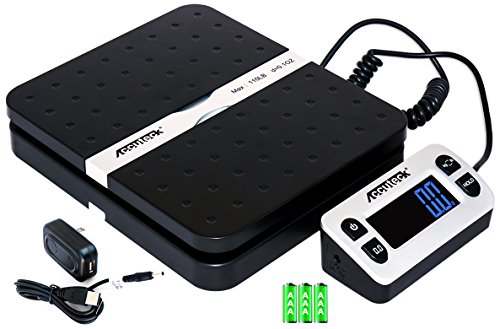 ACCUTECK 8580 High Capacity 110 Lbs High Accuracy9.4/10View on Amazon
A parcel that weighs more than the label says comes back with a surcharge, and a parcel weighed light ships with wrong postage. Shipping weight is the weight of a packed parcel as the carrier measures it, and a digital shipping scale gives that figure in seconds. This guide shows how to weigh a package for shipping and which scale fits a small shop that ships engraved goods.
LaserEngraveHQ earns a commission from purchases made through these links, at no extra cost to you. Read our affiliate disclosure.
Accuteck 8880 High Accuracy Digital Shipping Scale
A 150 lb digital shipping scale with 0.1 oz precision, a stainless steel platform and a detachable touch screen.
Pros
- 150 lb capacity with 0.1 oz precision
- Stainless steel platform for large boxes
- Detachable touch screen on a coiled cable
- Tare, hold and multi-unit conversion
Cons
- No warranty term is stated
- No AC adapter; power is USB or AAA batteries
- Touch screen is tethered by a coiled cable
- No piece-counting function is stated
Fuzion Digital Shipping Postal Scale 90lb x 0.1oz
A 90 lb digital shipping scale with 0.1 oz resolution, piece counting, calibration and a 3-year warranty.
Pros
- 90 lb capacity with 0.1 oz display resolution
- Piece counting for inventory and batch shipping
- Calibration from 3 lb to 80 lb with any known weight
- 3-year warranty with lifetime support
Cons
- 90 lb capacity is the lowest here
- 10 g minimum readability misses very light parcels
- No AC adapter; power is AA batteries or USB
- Display is built in, with no remote display option
Amazon Basics Digital Shipping Postal Scale
A 660 lb digital shipping scale with a separate back-lit display, tare and a 0.1 oz readout for heavy parcels.
Pros
- 660 lb capacity, the highest here
- Separate display reads from up to 2 m away
- Tare function for net weights
- Runs on AAA batteries, USB or AC adapter
Cons
- No warranty term is stated
- Minimum load is 6 ounces, so very light parcels do not register
- 4.0 lb, the heaviest scale here
- No hold function is stated
ACCUTECK 8580 High Capacity 110 Lbs High Accuracy
A 110 lb digital postal scale with 0.1 oz precision, a remote display and tare and hold for parcel work.
Pros
- 110 lb capacity with 0.1 oz graduation
- Remote display with a 90-degree lid
- Tare and hold for multi-package weighing
- Batteries, USB cable and AC adapter included
Cons
- Plastic platform, not stainless steel
- Start weight is 10 g, so very light items do not register
- Auto shut-off after 90 seconds on battery power
- 110 lb capacity is below the 150 lb and 660 lb scales
What shipping weight means
Shipping weight is the weight of the parcel as it leaves your bench: product, packing and box, all together. Carriers charge by weight and size, so the figure on the label has to match the figure on the scale. The scales in this guide read in 0.1 oz increments and hold parcels from 90 lb to 660 lb.
The carrier also looks at the size of the box. A large, light box can cost as much as a small, heavy one, so weigh the sealed parcel and measure the box first. The Fuzion scale here ships with a soft measuring tape for that step, and the shipping box sizes guide shows common box dimensions.
How to weigh a package for shipping
Weigh every parcel the same way.
- Set the scale on a flat, hard surface. A soft bench throws the reading off.
- Turn the scale on and tare the empty platform. Tare zeroes the display, so the sealed parcel reads in full.
- Pack the parcel, seal it and set it on the platform. Weigh the sealed parcel, not the product alone.
- Read the display and note the unit. Switch to the unit the carrier asks for, using the units the scale offers.
- Record the weight with the order. Keep the figure with the order.
Weigh the parcel again if you add packing or tape after the first reading.
Scales for weighing packages
The 4 scales below cover the weighing step: capacities run from 90 lb to 660 lb, and the choice comes down to capacity, display and power.
FAQ: lasers and CNC
What is shipping weight?
Shipping weight is the weight of a packed parcel: product, packing and box. The carrier charges by weight and size, so weigh the sealed parcel and use the figure on the label.
Do I need a shipping scale for a small shop?
Yes, if you ship parcels yourself. The scales here read in 0.1 oz increments and hold parcels from 90 lb to 660 lb, so the label weight matches the carrier’s figure. See the best shipping scale roundup.
Should I weigh the box empty or packed?
Weigh the packed, sealed parcel. Tare the empty platform first, then weigh the sealed parcel and use that figure.
What is the difference between a shipping scale and a postage scale?
Both weigh parcels, and the terms overlap. The shipping scale vs postage scale guide compares the two; the scales here all have tare.
How do I read the display from a distance?
Pick a scale with a separate or remote display. The Amazon Basics display reads from up to 2 m away, the ACCUTECK 8580 has a remote display, and the Accuteck 8880 (on Amazon) has a detachable touch screen on a coiled cable.
Related: best shipping scale, shipping scale vs postage scale, how to print a shipping label, best bubble mailers, small business gear, and how to price laser engraving work.