CNC Router vs Laser Cutter: Which One Should You Buy?
A detailed comparison of CNC routers and laser cutters covering cutting mechanics, material compatibility, dimensional depth, edge finish, and workshop safety.

On this page
Top picks at a glance
As an Amazon Associate I earn from qualifying purchases.
- 1
 SpeTool Carbide Single Flute CNC Router Bits 1/8" Cutting9.7/10View on Amazon
- 2
 HQMaster 10 Pack O Flute CNC Router Bit 1/8” Shank Spiral9.6/10View on Amazon
- 3
 Genmitsu 1/4'' V Grooving Router Bit Set9.2/10View on Amazon
- 4
 Genmitsu PROVerXL 6050 Plus CNC Router Machine for BigView on Amazon
- 5
 Genmitsu Cubiko Desktop CNC Router Machine with Enclosure forView on Amazon
- 6
 CNC Router Machine 4030-Evo Ultra 2View on Amazon
- 7
 FoxAlien XE-Ultra 8080 CNC Router Machine with NEMA 23View on Amazon
- 8
 LUNYEE 3020 Nova CNC Router MachineView on Amazon
- 9
 Yakamoz V-Groove and Round Nose Router Bit SetView on Amazon
When deciding between a cnc router vs laser cutter, the choice depends on whether your workshop projects require deep mechanical carving into thick stock or non-contact precision slicing across thin sheets. A CNC router uses a spindle-driven cutter to carve, drill, and pocket wood, machinable plastics, and soft metals with depth control. A laser cutter focuses light to vaporize or melt narrow kerfs through flat sheets without physical contact. The guide below explains these differences step by step.
Other machines to compare
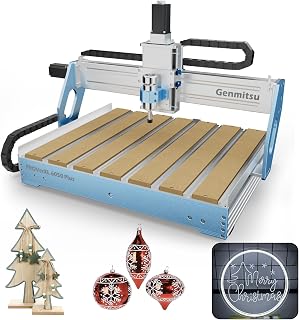 Genmitsu PROVerXL 6050 Plus CNC Router Machine for BigCheck price on Amazon
 Genmitsu Cubiko Desktop CNC Router Machine with Enclosure forCheck price on Amazon
 CNC Router Machine 4030-Evo Ultra 2Check price on Amazon
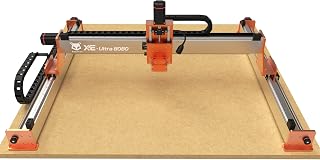 FoxAlien XE-Ultra 8080 CNC Router Machine with NEMA 23Check price on Amazon
 LUNYEE 3020 Nova CNC Router MachineCheck price on Amazon
 Yakamoz V-Groove and Round Nose Router Bit SetCheck price on Amazon
LaserEngraveHQ earns a commission from purchases made through these links, at no extra cost to you. Read our affiliate disclosure.
Choose a CNC router to mill thick slabs, cut joinery, carve relief plaques, or machine aluminum plate. Choose a laser cutter for delicate vector cutting, decorative engraving, paper and fabric crafts, or non-contact processing without hold-down clamps.
Step 1: Compare cutting mechanics and physical tool contact
A CNC router is a subtractive tool that spins a fluted end mill to shear chips from solid stock. Because the rotating bit bites into the material, it exerts lateral cutting force. You must secure every workpiece firmly to the spoilboard using clamps, t-tracks, or fixtures to prevent shifting during machining.
A laser cutter operates without physical contact, directing an optical beam through focus lenses to vaporize or melt a narrow kerf. Because no mechanical tool touches the board, the stock experiences zero lateral tool deflection. While lightweight sheets may need pins or weights to stay flat, workpieces do not require heavy hold-down clamps to resist tool forces.
Step 2: Check material compatibility across woods, plastics and metals
Material choice often settles the decision. CNC routers handle dense stock including hardwoods, softwoods, plywood, and engineering plastics without thermal distortion. A rigid CNC router can also mill non-ferrous metals. Published machine specifications reflect these metal capabilities: Genmitsu specifies aluminum cutting for the 3030-PROVer Ultra, while AnoleX notes actual cutting accuracy of ±0.02mm in 6061 aluminum for the 4030-Evo Ultra 2.
Laser cutters process organic sheets and select synthetics like plywood, MDF, leather, and cast acrylic with polished edges when using a CO2 source. However, never process PVC, vinyl, PVC-based faux leather, polycarbonate, or ABS under a laser cutter. Thermal decomposition of chlorine-based polymers like PVC releases corrosive hydrogen chloride gas that ruins optics. Polycarbonate burns erratically and produces heavy soot. In contrast, a CNC router cuts PVC, polycarbonate, and acrylic mechanically without hazardous thermal fumes. For laser comparisons, see our diode vs CO2 laser guide and our overview on desktop CNC machine for beginners.
Step 3: Evaluate cutting depth and dimensional relief carving
Cutting depth and vertical control represent major differences. A CNC router features motorized multi-axis motion with dedicated Z-axis travel. This allows the spindle to carve pockets to precise depths, cut bevels, and shape relief carvings across thick timber. Published maker specifications show these work clearances: Genmitsu lists work dimensions of 600 x 500 x 115mm on the PROVerXL 6050 Plus, 400 x 300 x 110mm on the PROVerXL 4030 V2, and 11.2” x 7.1” x 1.6” on the 3018-PROVer V2.
A laser cutter is primarily a sheet-profiling tool for flat stock. The focused waist of a laser beam possesses limited focal depth. Slicing thick boards leads to charred, tapered edges. Furthermore, a laser cutter cannot clear a flat-bottomed pocket to a controlled depth like a flat end mill. For dedicated milling picks, see our best desktop CNC for beginners guide.
Step 4: Examine kerf width, inside corner radii and fine detail
A laser beam focuses to a tiny spot diameter, creating an exceptionally narrow kerf width. This slender beam cuts acute inside corners, delicate fretwork, and miniature contours with sharp clarity. Thin sheet parts emerge with crisp edges, and fragile bridges remain intact because no mechanical force pulls at the stock.
A CNC router is restricted by cylindrical tool geometry. Because the bit spins around an axis, it cannot cut a square inside corner; the corner retains the radius of the cutter. To join interlocking parts like slot-together boxes, you must include dogbone or T-bone fillets in your design. Small cut parts also require tabs so they do not dislodge. Published maker specifications show precision limits: Genmitsu lists ±0.03mm precision for the 3030-PROVer Ultra, while AnoleX lists ±0.005mm repeatability accuracy on the 4030-Evo Ultra 2. For tooling advice, review our best CNC router bits guide.
Step 5: Review workspace safety, ventilation and debris management
Environmental demands differ between optical and mechanical tools. A CNC router generates chips, swarf, and sawdust, while motors produce acoustic noise. Published machine specifications highlight these rotational speeds: AnoleX specifies an 800W trim router operating from 8000 rpm to 24000 rpm on the 4030-Evo Ultra 2, while CNCTOPBAOS lists a 120W spindle running at 10000 rpm on the 3018-PRO-MAX, and FoxAlien lists a 400W spindle on the XE-PRO. Operators manage debris with dust shoes, vacuums, and glasses. Some models integrate enclosures: Genmitsu lists an enclosed frame on the Cubiko desktop CNC router that contains chips and pauses operation when opened.
A laser cutter introduces fire risks and fumes instead of loud cutting noise. Vaporizing materials creates smoke that must vent outdoors or pass through a dedicated purifier, as explained in our fume extractor guide. Never operate a laser without eye protection. Eyewear protects only if its listing specifies an optical density and wavelength range matching your laser, as detailed in our laser safety glasses guide. Keep an extinguisher nearby and never leave running jobs unattended.
Step 6: Assess software workflow, tooling wear and operating upkeep
A CNC router requires a multi-stage software chain. After creating vector shapes in CAD, you use CAM software to set cutter diameters, speeds, feeds, and stepovers to generate G-code. Maker listings note software compatibility with platforms like Candle, Universal Gcode Sender, and Easel for Genmitsu machines, as well as VCarve and Fusion360 compatibility for the AnoleX 4030-Evo Ultra 2. Upkeep involves replacing dull end mills and resurfacing spoilboards.
A laser cutter features a direct software workflow. You import graphics into laser software and assign power, rated travel speed, and pass counts by layer. Maintenance involves wiping optical lenses, clearing trays, and replacing filters. Certain CNC platforms offer hybrid expansion: CNCTOPBAOS notes that its 3018-PRO-MAX router supports an add-on engraver module from 0.5W to 20W, and Genmitsu includes a dedicated laser port on the 3020-PRO MAX V2. For setup advice, see our laser engraver for beginners guide.
Step 7: Match the machine to your planned workshop projects
Review your intended materials, stock thickness, and edge finish expectations before buying.
A CNC router is the preferred choice when you plan to:
- Mill hardwood furniture parts, cabinetry components, and joinery.
- Carve dimensional signs and relief plaques.
- Machine structural brackets or plates from solid aluminum.
- Cut rigid plastics like polycarbonate, PVC, and acrylic mechanically.
- Flatten glued slabs and boards with surfacing bits.
A laser cutter is the preferred choice when you plan to:
- Engrave photographic art, text logos, and marks on wood, slate, and leather.
- Cut paper invitations, cardboard prototypes, and architectural models.
- Produce holiday ornaments, puzzles, and craft kits with minimal kerf waste.
- Fabricate polished acrylic displays without hand sanding.
- Personalize flat gift items without mounting clamps.
For machine comparisons, see our guide on how to choose a laser engraver and our central CNC router guide.
Common mistakes to avoid
- Buying a laser cutter expecting to carve deep reliefs, mortises, or structural timber.
- Attempting to process PVC or vinyl on a laser cutter, which releases corrosive chlorine gas, or lasering polycarbonate, which produces heavy soot.
- Forgetting that CNC router bits cannot cut square inside corners without dogbone fillets.
- Operating a CNC router without secure clamping, causing stock to shift during passes.
- Neglecting ventilation or leaving an operating laser cutter unattended.
- Overlooking CAM toolpath preparation time and cutter wear when planning CNC projects.
CNC router vs laser cutter: the short version
- Identify whether your projects need dimensional carving or flat sheet profile cutting.
- Choose a CNC router for thick lumber, joinery, aluminum machining, and relief carving.
- Choose a laser cutter for fine surface engraving, delicate fretwork, and non-contact slicing.
- Observe material safety: rout PVC and polycarbonate mechanically, but never burn them with a laser.
- Equip your workspace for chip collection with a router, or exhaust ventilation with a laser.
- Select your machine based on the finished items you build most often rather than theoretical capabilities.
Each tool offers exceptional utility once matched to appropriate materials and workspace safety.
FAQ: lasers and CNC
How does a CNC router work?
A CNC router directs a motorized cutting spindle along linear axes using computer numerical control. Design software converts vector paths into G-code coordinates. Stepper motors drive lead screws or ball screws to move the spinning cutter through stock, shaving material away layer by layer to form pockets and profiles.
How to use a CNC router?
Using a CNC router begins with creating vector paths or relief models. You generate toolpaths in CAM software by selecting cutter sizes, spindle speeds, feed rates, and cut depths. After securing material to the spoilboard with clamps, you set the workpiece origin and tool height before running G-code through sender software.
How to design for a CNC router?
Designing for a CNC router requires accounting for tool diameter. Because a spinning bit cannot create square inside corners, corners retain the cutter radius unless you add dogbone or T-bone fillets. You must also include holding tabs to prevent cut parts from shifting and leave clamping margins along stock edges.
How to build a CNC router?
Building a CNC router involves assembling an aluminum extrusion or metal frame, mounting linear guide rails or lead screws, and installing stepper motors. You wire the motors, limit switches, and spindle power supply to a control board, configure firmware such as GRBL, and square the gantry across the spoilboard.
How much does a CNC router cost?
Total investment depends on frame rigidity, spindle capacity, motion components, and tooling. We do not list specific purchase prices because setups vary widely. A desktop machine requires budgeting for the frame, safety glasses, clamps, and end mills, while a heavy-duty router with linear rails and a high-wattage trim router requires higher investment for dust extraction and tooling.
Related: our CNC router guide, desktop CNC machine for beginners, and best desktop CNC for beginners. If you are exploring laser options, see how to choose a laser engraver and our guide on diode vs CO2 laser cutters. For tooling and accessories, browse our best CNC router bits guide.



