Best Laser Engraver for Ceramic Tiles (2026)
Five diode engravers compared for tile projects, from a camera-guided enclosed pick to the one listing that states ceramics.

On this page
Top picks at a glance
As an Amazon Associate I earn from qualifying purchases.
- 1
 Best OverallBlazeX M3 10W9.6/10View on Amazon
- 2
 Best PortableOrtur R1 5W9.5/10View on Amazon
- 3
 Best Large BedOrtur Laser Master 29.6/10View on Amazon
- 4
 For Stated CeramicsACMER S1 2500mW9.4/10View on Amazon
- 5
 Acmer S2 20W Laser EngraverView on Amazon
- 6
 5 Pack Black Laser Engraver Marking Paper for Ceramics GlassView on Amazon
- 7
 xTool M2 40W Color Craft Laser Engraver and CutterView on Amazon
- 8
 ORTUR Laser Rotary RollerView on Amazon
- 9
 Twotrees 3.5 Inch IPS Touchscreen Laser Engraver ControllerView on Amazon
Decorative tile work starts with a design that suits a hard, flat surface: a house number plaque, a coaster set, a backsplash accent, or a memorial marker for a garden wall. The maker wants crisp lines that survive handling, a bed that fits the tile, and an enclosure that keeps the workspace calm while the beam moves. This guide names the best laser engraver for ceramic tiles from five listings, compared on the power, bed size, materials and safety features each listing actually states.
LaserEngraveHQ earns a commission from purchases made through these links, at no extra cost to you. Read our affiliate disclosure.
Quick picks
- Best Overall BlazeX M3 10W: 10W in a Class 1 enclosure with a smart camera, a honeycomb bed and 13 engraving materials. Check price on Amazon
- Best Portable Ortur R1 5W: Foldable 5W Class 1 machine with a 365-day warranty and a 100 x 100 mm field. Check price on Amazon
- Best Large Bed Ortur Laser Master 2: 10W with a 390 x 410 mm field, rated to cut 30mm acrylic and 20mm wood. Check price on Amazon
- For Stated Ceramics ACMER S1 2500mW: The only listing here that names ceramics, with a 130 x 130 mm field. Check price on Amazon
Machines on the list
BlazeX M3 10W Laser Engraver Machine with Smart
A 10W enclosed diode engraver with a smart camera, an enclosure, a honeycomb bed and Class 1 safety features, for small tile and gift projects.
Pros
- 10W diode with 0.01mm precision stated for fine patterns
- Smart camera previews the design on the material through a PC
- Class 1 enclosure with fan, tilt sensors and lid-open stop
- Bundle includes an enclosure, a honeycomb bed and 13 engraving materials
Cons
- No warranty term is stated in the listing
- Ceramic tile work is Not stated among its named materials
- Product dimensions of 4.3 x 1.2 x 4.7 inches need a careful bed read
- 14.97 pounds, heavier than the portable picks here

ORTUR Laser Master 2 S2 LU2-10A Laser Engraver
A long-selling 10W optical open frame with a 390 x 410 mm area, tilt sensor, cut-off safety logic and goggles.
Pros
- By far the most ratings in this guide: 1,474
- States 10W optical power and a 390 x 410 mm area
- Stops the laser on tilt, on USB disconnect and after long idle
- Laser cover filters 98% of UV per the listing, and goggles are included
Cons
- Claims 30 mm acrylic and 20 mm wood cuts without saying how many passes
- No warranty term in the listing
- Air assist pump is not included, only the port
- First listed in 2020; newer models are faster

Ortur R1 5000mW Portable Laser Engraver
A 5W foldable portable engraver with a 100 x 100 mm field, Class 1 protection and a 365-day warranty, for small pieces on the move.
Pros
- Foldable design with no installation stated, plus an aluminum alloy base plate
- 100 x 100 mm engraving area with 0.05mm accuracy stated
- Class 1 with watchdog, tilt detection, lid-stop and USB-key start
- 365-day warranty with lifetime technical support stated
Cons
- Ceramic tile work is Not stated among its named materials
- 100 x 100 mm field fits small pieces only
- 5W diode cuts 3mm basswood board in one pass, a modest cutting claim
- 6.84 pounds in a gift-box form that suits small jobs, not large plaques
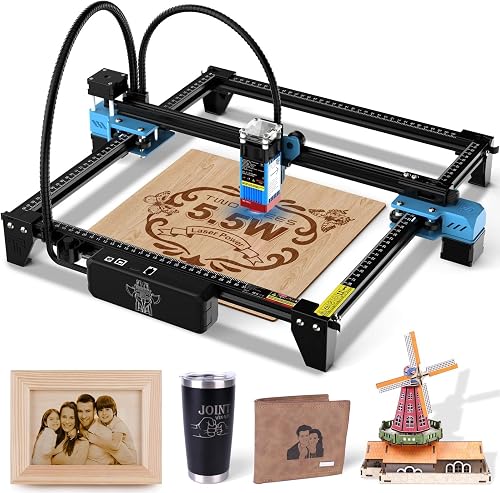
Twotrees TTS-55 Pro Laser Engraver 5500mW Laser
A 5.5W open frame with a 300 x 300 mm area, a metal air nozzle and up to 30,000 mm/min.
Pros
- Metal air-assist nozzle and a red laser shield on the module
- Rated to cut 5 mm plywood, 3 mm acrylic and 0.7 mm leather
- Up to 30,000 mm/min on a 32-bit board, with Wi-Fi and TF card
- Lowest price here
Cons
- Says Class II next to 5,500 mW, which does not fit
- Air pump not included, only the nozzle
- No warranty term in the listing

ACMER S1 Laser Engraver Machine
A 2500 mW compact diode laser with a 130 x 130 mm area, 99% preassembled frame, Class 4 IEC 60825-1 compliance and a 12-month warranty.
Pros
- Class 4 laser certification and IEC 60825-1 compliance stated
- Arrives 99% preassembled with 1-minute laser head installation
- Rated speed up to 10,000 mm/min with 0.01 mm repeatable positioning
- 12-month warranty and 24/7 customer support stated by the maker
Cons
- 130 x 130 mm work area limits projects to small blanks
- 2500 mW optical power is lower than the 5W and 12W models
- Weight is listed as 2 kg in bullets but 3.98 pounds in the spec table
- Open desktop frame lacks an emergency stop button
Other machines to compare
 Acmer S2 20W Laser EngraverCheck price on Amazon
 5 Pack Black Laser Engraver Marking Paper for Ceramics GlassCheck price on Amazon
 xTool M2 40W Color Craft Laser Engraver and CutterCheck price on Amazon
 ORTUR Laser Rotary RollerCheck price on Amazon
 Twotrees 3.5 Inch IPS Touchscreen Laser Engraver ControllerCheck price on Amazon
Specs compared
| Model | HQ Score | Laser | Bed / field | Safety | Warranty |
|---|---|---|---|---|---|
| BlazeX M3 10W | 9.6/10 | 10W diode | 1.2 x 4.7 in | Class 1 enclosure | Not stated |
| Ortur R1 5W | 9.5/10 | 5W diode | 100 x 100 mm | Class 1 enclosed | 365-day |
| Ortur Laser Master 2 | 9.6/10 | 10W diode | 390 x 410 mm | Class 4 | Not stated |
| Twotrees TTS-55 Pro | 9.5/10 | 5500mW diode | 300 x 300 mm | Class II | Not stated |
| ACMER S1 2500mW | 9.4/10 | 2500mW diode | 130 x 130 mm | Not stated | Not stated |
Specifications are manufacturer rated, as published on each listing and collected 29 October 2026.
Best Laser Engraver for Ceramic Tiles: What the Listings State
Tile projects differ from wood signs in one plain way: the surface is hard, smooth and unforgiving of a misplaced design. Placement tools matter here, and so does bed size, because a tile cannot be trimmed to fit a small field. Read each listing for the material it names, not for a general promise about every surface.
Match power to the tile job
The listings here state diode power from 2500mW to 10000mW. The BlazeX M3 10W and the Ortur Laser Master 2 both state 10W optical output, the Twotrees TTS-55 Pro states 5500mW, the Ortur R1 states 5W, and the ACMER S1 states 2500mW. Higher stated power pairs with deeper cutting claims on wood and acrylic in these listings, while tile work itself is an engraving job, so bed fit and placement accuracy deserve equal weight in the choice.
Bed size decides which tiles fit
The Ortur Laser Master 2 states a 390 x 410 mm engraving area, the Twotrees TTS-55 Pro states 300 x 300 mm, the ACMER S1 states a 130 x 130 mm working area, and the Ortur R1 states a 100 x 100 mm engraving area. Measure the tile, including any frame or jig, against the stated field before ordering, and remember that the BlazeX listing states a 1.2 x 4.7 in work area in its extracted facts, so its tile fit needs a careful read of the listing.
Enclosure and placement tools
Two listings state a Class 1 enclosed design: the BlazeX M3 10W, with a smart camera, an enclosure, a honeycomb bed and lid-open stop sensors, and the Ortur R1, with an enclosed transparent cover and lid-stop protection. A camera preview helps place a design on a tile without wasting a piece, and an enclosure with a fan helps manage smoke and odour while the beam runs. Open-frame machines need a separate plan for shielding and ventilation, and the listings for those machines state no enclosure.
Materials each listing actually names
Only the ACMER S1 listing names ceramics among its materials, alongside wood, bamboo, leather, plastic, PCB and aluminum oxide. The BlazeX listing names wood, metal, glass and leather; the Ortur R1 listing names wood, leather, glass and cloth; the Twotrees listing names wood, leather, acrylic, paper and stainless steel; and the Ortur Laser Master 2 listing names metal in its title with cutting claims for acrylic and wood. For a buyer whose whole project list is tile, that single stated material line carries real weight, even though the ACMER machine states the lowest diode power here.
Never leave a running laser unattended, keep an extinguisher at the machine, and vent smoke outdoors. Wear glasses rated for the laser wavelength on any machine without a working enclosure. Never laser PVC or vinyl. Ceramic dust and glaze fumes need ventilation, so run tile jobs with exhaust in place and the workspace clear.
Project Match
- Tile coasters and small plaques: the ACMER S1 states ceramics and a 130 x 130 mm field, suited to coaster-size pieces.
- Tile house numbers and larger plaques: the Ortur Laser Master 2 states a 390 x 410 mm field, and the Twotrees TTS-55 Pro states 300 x 300 mm, though neither listing states ceramics.
- Small tile accents with camera placement: the BlazeX M3 10W pairs a smart camera with an enclosure, though its listing does not state ceramics.
- Portable tile marking at events or in a classroom: the Ortur R1 folds for transport and states Class 1 protection, though its listing does not state ceramics.
- Tile work beside glass and metal projects: the BlazeX listing names glass and metal, and the Twotrees listing names stainless steel, for mixed-material shops.
How the scores add up
Each machine is scored on performance, build, value, safety and warranty, with the weights published on the How We Pick page. A spec the listing does not publish scores nothing.
| Product | HQ Score | Perf. /35 | Build /25 | Value /25 | Safety /10 | Warranty /5 |
|---|---|---|---|---|---|---|
| BlazeX M3 10W | 9.6 | 30 | 21 | 20 | 9 | 0 |
| Ortur R1 5W | 9.5 | 22 | 19 | 18 | 8 | 3 |
Scores run from 9.2 to 9.8: each product’s point total is placed on that range, so more points always means a higher score.
FAQ: lasers and CNC
Can a diode laser engrave ceramic tiles?
Among these five listings, only the ACMER S1 names ceramics as a material. The other listings name wood, glass, metal, leather, acrylic, paper, cloth or stainless steel, and ceramic tile work is Not stated for them. A buyer focused on tile should start from the listing that states the material.
What power suits tile engraving?
These listings state 10W, 5500mW, 5W and 2500mW diode figures. Tile engraving is a surface-marking job rather than a deep cutting job, so power alone does not settle the choice; bed size, placement tools and the stated material list matter as much.
How large a tile fits each machine?
Stated fields run from 100 x 100 mm on the Ortur R1 and 130 x 130 mm on the ACMER S1, through 300 x 300 mm on the Twotrees TTS-55 Pro, to 390 x 410 mm on the Ortur Laser Master 2. Measure the tile and any jig against the stated field before buying.
Do enclosed machines matter for tile work?
Enclosed Class 1 machines suit indoor work: the BlazeX M3 10W states an enclosure with a fan and lid-open stop sensors, and the Ortur R1 states an enclosed transparent cover with lid-stop protection. Open-frame machines state no enclosure, so shielding and ventilation need a separate plan.
Which of these machines state a warranty?
Only the Ortur R1 states a warranty term, a 365-day warranty with lifetime technical support. The other four listings state no warranty term, so warranty scores for them are zero.
Related: wood vs ceramic coasters, best ceramic mug blanks for laser engraving, best laser engraver for wine glasses, open frame vs enclosed laser engraver and the laser engraver hub.



