Best Laser Engraver Under $200 (2026)
Five budget diode laser engravers under $200 compared by optical power, work area, rated speed, safety certifications and manufacturer warranty coverage.

On this page
Top picks at a glance
As an Amazon Associate I earn from qualifying purchases.
- 1
 Best OverallAtomstack Swift 12W9.7/10View on Amazon
- 2
 Best Large AreaCreality Falcon 5W9.6/10View on Amazon
- 3
 Best for Small SpacesACMER S19.4/10View on Amazon
- 4
 Budget Pick CutterKENTOKTOOL LE400PRO9.4/10View on Amazon
- 5
 Best PortableArtilume 3000mW9.3/10View on Amazon
- 6
 ACMER S2 Laser EngraverView on Amazon
- 7
 ACMER S1 Laser Engraver MachineView on Amazon
- 8
 Longer Ray5 Laser Engraver and CutterView on Amazon
- 9
 Laser EngraverView on Amazon
- 10
 Artilume T1 Laser Engraver MachineView on Amazon
Finding the best laser engraver under 200 requires balancing real optical output wattage against workspace dimensions and safety provisions. In this entry price category, diode laser machines range from compact 2500 mW craft engravers to capable 12W units capable of cutting thin lumber and marking coated metals. This guide compares five budget diode laser machines on checkable listing specifications: optical power, work area, motion drive, stated safety features and warranty coverage.
LaserEngraveHQ earns a commission from purchases made through these links, at no extra cost to you. Read our affiliate disclosure.
Quick picks
- Best Overall Atomstack Swift 12W: A 12W optical diode laser with 300 x 300 mm workspace, 400 mm/s rated speed and a 365-day warranty. Check price on Amazon
- Best Large Area Creality Falcon 5W: A 400 x 415 mm work area, 5W optical output, active stop motion sensor and 10,000 mm/min rated speed. Check price on Amazon
- Best for Small Spaces ACMER S1: A 99% preassembled desktop frame with IEC 60825-1 compliance, Class 4 certification and a 12-month warranty. Check price on Amazon
- Budget Pick Cutter KENTOKTOOL LE400PRO: A 5.5W optical diode, 400 x 400 mm workspace, 12.87-pound metal frame and rated wood cutting up to 8 mm. Check price on Amazon
- Best Portable Artilume 3000mW: A 2.99-pound foldable frame with 200 x 150 mm work area, 0.04 mm compressed spot and 10,000 mm/min rated speed. Check price on Amazon
Machines on the list

ATOMSTACK Swift 12W Laser Engraver Cutter for Wood
A 12W optical diode laser with a 300 x 300 mm work area, 400 mm/s rated speed, screw rod drive and a 365-day warranty.
Pros
- 12W optical power (60,000 mW machine power) with double pressure point coupling
- 300 x 300 mm engraving area with a 0.06 x 0.08 mm compressed point size
- Rated speed up to 400 mm/s with a built-in screw rod
- 365-day warranty with 24/7 service stated by the maker
Cons
- Spec table lists dimensions as 3 x 3 x 3 inches, contradicting the 300 x 300 mm area
- No optical density rating or wavelength specified for the included safety glasses
- No emergency stop button or motion tilt sensor named
- Listing states wood material in the spec table despite claiming metal engraving

Creality Falcon 5W Laser Engraver Machine
A 5W optical laser with a 400 x 415 mm work area, 10,000 mm/min rated speed, active stop motion sensor and Laser Class 4 rating.
Pros
- 400 x 415 mm working area, the largest work bed in this guide
- Active stop function stops the machine if movement is detected
- 5W optical output (72W input) with 0.06 x 0.06 mm compressed spot
- Rated speed up to 10,000 mm/min driven by a 32-bit chip
Cons
- No warranty term is stated in the listing
- Rotary roller and risers must be purchased separately
- Open frame design requires dedicated ventilation
- Eye cover filters 97% UV but listing states no optical density rating

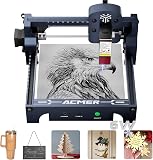
ACMER S1 Laser Engraver Machine
A 2500 mW compact diode laser with a 130 x 130 mm area, 99% preassembled frame, Class 4 IEC 60825-1 compliance and a 12-month warranty.
Pros
- Class 4 laser certification and IEC 60825-1 compliance stated
- Arrives 99% preassembled with 1-minute laser head installation
- Rated speed up to 10,000 mm/min with 0.01 mm repeatable positioning
- 12-month warranty and 24/7 customer support stated by the maker
Cons
- 130 x 130 mm work area limits projects to small blanks
- 2500 mW optical power is lower than the 5W and 12W models
- Weight is listed as 2 kg in bullets but 3.98 pounds in the spec table
- Open desktop frame lacks an emergency stop button

Laser Engraver, LE400PRO 50W Laser Engraving
A 5.5W optical laser with a 400 x 400 mm workspace, all-metal frame, emergency power switch and rated cut depth of 8 mm in wood.
Pros
- 400 x 400 mm work area on a heavy 12.87-pound all-metal frame
- 5.5W optical power (50W input) with 0.08 mm square compressed focus
- Cuts wood up to 8 mm and black acrylic up to 5 mm as stated by the maker
- Equipped with a power switch for emergency shutdown and tick marks on axes
Cons
- No warranty term is stated in the listing
- Title claims Class 1 output despite an open 5500 mW diode configuration
- Rated speed of 6,000 mm/min is slower than competing 10,000 mm/min models
- Requires 10 to 20 minutes of assembly

Artilume Laser Engraver 3000mW Laser Engraving
A 3000 mW foldable diode laser with a 200 x 150 mm work area, 2.99-pound frame and 0.04 mm compressed spot for lightweight portable crafts.
Pros
- Foldable and portable design weighing 2.99 pounds for easy storage
- Arrives almost fully assembled and calibrated for quick setup
- Rated speed up to 10,000 mm/min with 0.04 x 0.04 mm compressed spot
- 200 x 150 mm (6 x 8 inch) working area with laser lifespan over 10,000 hours
Cons
- No safety features, goggles or certifications named in the listing
- No warranty term is stated in the listing
- Cutting capability limited to very thin materials under 2 mm (0.08 inches)
- Cannot connect via mobile application as noted by the maker
Other machines to compare
 ACMER S2 Laser EngraverCheck price on Amazon
 ACMER S1 Laser Engraver MachineCheck price on Amazon
 Longer Ray5 Laser Engraver and CutterCheck price on Amazon
 Laser EngraverCheck price on Amazon
 Artilume T1 Laser Engraver MachineCheck price on Amazon
Specs compared
| Model | HQ Score | Optical power | Work area | Rated speed | Safety named | Warranty |
|---|---|---|---|---|---|---|
| Atomstack Swift 12W | 9.7/10 | 12W (60,000 mW input) | 300 x 300 mm | 400 mm/s | Protective cover, safety glasses | 365 days |
| Creality Falcon 5W | 9.6/10 | 5W (72W input) | 400 x 415 mm | 10,000 mm/min | Active stop motion detection, UV cover, Class 4 | Not stated |
| ACMER S1 | 9.4/10 | 2500 mW (24W input) | 130 x 130 mm | 10,000 mm/min | Class 4 cert, IEC 60825-1 compliance | 12 months |
| KENTOKTOOL LE400PRO | 9.4/10 | 5.5W (50W input) | 400 x 400 mm | 6,000 mm/min | Power switch emergency shutdown, UV cover, Class 1 claim | Not stated |
| Artilume 3000mW | 9.3/10 | 3000 mW | 200 x 150 mm | 10,000 mm/min | Not stated | Not stated |
Specifications are manufacturer rated, as published on each listing and collected 9 October 2026.
What the diode laser listings tell you
We compared five diode laser engraver listings for this guide. Only two stated a written warranty term: Atomstack lists a 365-day warranty and ACMER lists a 12-month term, while the other three listings state no warranty. Specifications also reveal internal contradictions. Atomstack lists overall machine dimensions as 3 x 3 x 3 inches in its spec table while describing a 300 x 300 mm work bed in its bullets. KENTOKTOOL advertises Class 1 output in its title for an open-frame 5500 mW laser that lacks a certified protective housing. Always verify the individual bullet specifications and parts lists rather than relying solely on product titles.
Buying guide: best laser engraver under 200
Optical power versus electrical input
Diode laser listings often state electrical input power prominently to appear more powerful. For example, a machine described as 50W or 72W typically delivers between 5W and 5.5W of actual optical laser output, while a 24W machine delivers 2500 mW. True cutting performance depends on optical output wattage and focal spot compression. Units with 2500 mW or 3000 mW optical power handle surface engraving on wood, leather and dark acrylic, but cutting is restricted to thin materials under 2 mm. Moving to 5W or 12W optical power enables through-cuts on 5 mm to 8 mm wood panels across multiple passes.
Work area and frame build
Bed sizes in this budget range vary significantly. Compact desktop machines such as the ACMER S1 provide a 130 x 130 mm area, while the Artilume offers 200 x 150 mm on a 2.99-pound folding frame. Makers planning larger projects like signs, cutting boards or panels need larger open-frame platforms like the Creality Falcon (400 x 415 mm) or the KENTOKTOOL LE400PRO (400 x 400 mm). Heavier aluminum and steel frames provide greater stability during directional changes at rated engraving speeds up to 10,000 mm/min.
Laser safety and eye protection
Most laser engravers under $200 use open-frame gantries classified as Class 4 laser devices. Uncontained laser reflections can cause permanent eye damage and skin burns. Eyewear protects only if the listing states a certified optical density (OD) rating and an exact wavelength range matching the diode module (such as 455±5 nm). Tinted orange shields or unrated glasses do not guarantee protection. Look for machines with active safety provisions, such as the active stop motion sensor on the Creality Falcon or dedicated emergency cutoff switches.
Software and controls
Budget diode engravers operate primarily through GRBL-compatible control boards. Most machines connect via USB to open-source LaserGRBL on Windows or the cross-platform LightBurn software on Windows and macOS. Check software compatibility before purchasing, particularly if you run macOS or plan to execute jobs from offline storage cards without an attached computer.
Diode laser or CO2?
Diode lasers are compact, affordable and well suited for engraving organic materials and thin wood stock. However, a blue diode beam passes directly through clear acrylic and cannot mark bare metals without specialized coatings. If you need to cut thick acrylic or require enclosed high-speed production, compare diode vs CO2 laser capabilities. To evaluate your workshop requirements before purchasing, see how to choose a laser engraver, and browse our category overview of diode laser engravers.
Always operate an open diode laser in a dedicated, well-ventilated space with appropriate eye protection. Never leave an active laser unattended, and keep an accessible fire extinguisher in the room. Never engrave or cut PVC, vinyl, faux leather containing PVC, polycarbonate or ABS; heating these materials releases corrosive, toxic fumes that damage equipment and pose severe respiratory hazards. Refer to OSHA and FDA CDRH guidelines for workplace radiation safety.
How the scores add up
Each machine is scored out of 10 on performance, build, value, safety and warranty, following the methodology detailed on our site. For diode laser engravers, safety points require checkable safety features such as active stop motion detection, emergency power cutoff switches, protective shielding and formal laser class or IEC compliance certifications.
| Product | HQ Score | Perf. /35 | Build /25 | Value /25 | Safety /10 | Warranty /5 |
|---|---|---|---|---|---|---|
| Atomstack Swift 12W | 9.7 | 33 | 20 | 22 | 4 | 4 |
| Creality Falcon 5W | 9.6 | 29 | 22 | 21 | 7 | 0 |
| ACMER S1 | 9.4 | 22 | 20 | 18 | 6 | 4 |
| KENTOKTOOL LE400PRO | 9.4 | 27 | 21 | 20 | 5 | 0 |
| Artilume 3000mW | 9.3 | 22 | 19 | 18 | 0 | 0 |
Scores run from 9.2 to 9.8: each product’s point total is placed on that range, so more points always means a higher score.
FAQ: lasers and CNC
Can a laser engraver under 200 cut wood?
Yes, depending on optical power and material thickness. A 5W or 5.5W optical laser can cut soft wood panels up to 8 mm across multiple passes. Lower-power 2500 mW or 3000 mW modules are designed primarily for surface engraving, with cutting limited to thin stock under 2 mm.
What is the difference between optical power and machine wattage?
Optical power is the actual light energy emitted by the laser diode to engrave and cut materials, typically between 2500 mW and 12W in this price tier. Machine wattage (such as 24W, 50W, 72W or 60000 mW) measures the total electrical power consumed by the entire machine, including the mainboard, cooling fans and stepper motors.
What software works with budget diode laser engravers?
Most budget diode engravers run on open-source GRBL firmware and work with LaserGRBL on Windows and LightBurn on Windows and macOS. Some makers also supply proprietary basic programs, such as Acmerstudio or the Atomstack app.
Can you engrave metal with a budget laser engraver?
A blue diode laser cannot engrave bare reflective metals like aluminum or brass. However, 5W and 12W diodes can mark stainless steel, ceramics and dark anodized aluminum coatings directly by heating the surface.
Which budget laser engraver under 200 includes safety features?
The Creality Falcon 5W features an active stop motion detection sensor that shuts down the laser if the frame is moved or tilted. The KENTOKTOOL LE400PRO includes an emergency power switch, while the ACMER S1 listing claims formal IEC 60825-1 compliance.
Related: best laser engraver for beginners, laser engraving projects for beginners, the laser safety hub and the laser engravers directory.