Best Beginner Soldering Kit (2026): 5 Picks for New Makers
A full 60W station and 4 practice boards for a new bench, compared on what each one includes.

On this page
Top picks at a glance
As an Amazon Associate I earn from qualifying purchases.
- 1
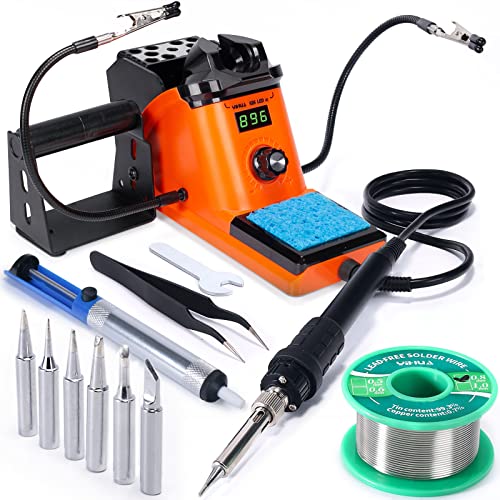 Best OverallYIHUA 926 III9.7/10View on Amazon
- 2
 Best Practice KitEGSCST SMD Kit 2-Pack9.4/10View on Amazon
- 3
 Best Finished ProjectMiOYOOW Clock Kit9.4/10View on Amazon
- 4
 Best Sound ProjectMUXWELL Speaker Kit9.3/10View on Amazon
Soldering is the skill that turns a bag of parts into a working gadget: a clock that keeps time, a speaker that plays, a board that lights up. A best beginner soldering kit gives a newcomer the iron, the solder and the practice to make those joints with confidence. This guide compares 5 kits, from a full station to practice boards, on what each one actually includes and what it leaves out.
LaserEngraveHQ earns a commission from purchases made through these links, at no extra cost to you. Read our affiliate disclosure.
Quick picks
- Best Overall YIHUA 926 III: The only full iron station here: 60W, a digital display, 6 extra tips and a 12-month coverage term. Check price on Amazon
- Best Practice Kit EGSCST SMD Kit 2-Pack: 2 boards with 0805 and 0603 parts for learning surface-mount soldering. Check price on Amazon
- Best Finished Project MiOYOOW Clock Kit: Builds a 4-digit LED clock with date, time, temperature and 4 alarm melodies. Check price on Amazon
- Best Sound Project MUXWELL Speaker Kit: A speaker kit with USB player and FM receiver in an enclosure. Check price on Amazon
Machines on the list
YIHUA 926 III 60W LED Display Soldering Iron
A 60W soldering station with a digital display, adjustable heat from 90 to 480 °C, 2 helping hands and 6 extra tips, plus a roll of lead-free solder.
Pros
- 60W station with heat from 90 to 480 °C on a clear digital display
- Sleep mode with a timer of 0, 5, 10 or 30 minutes, plus calibration support
- 2 helping hands, 6 extra tips, a roll of lead-free solder, a solder sucker and tweezers in the box
- Mesh protector on the back guards against accidental contact with the iron
Cons
- At 1.96 pounds and 7.3 by 4.5 by 2.8 inches it takes real bench space
- Made for 110-127V power, so check the plug and supply before ordering
- The single knob handles both heat and menus, so settings take a few turns to learn
- The helping hands detach with a spanner, so setup needs the included tool
EGSCST [2 Pack] SMD Soldering Practice Kit
A 2-pack of surface-mount practice boards with 0805 and 0603 parts, diodes, transistors and IC chips on a labeled green PCB.
Pros
- 2 complete kits, so one board can be practice and the other the finished piece
- 0805 and 0603 parts, plus diodes, transistors and IC chips, cover real surface-mount work
- Clearly labeled footprints on a green PCB guide part placement
- Suits adults, hobbyists and students learning surface-mount soldering
Cons
- No iron, solder or hand tools are listed among the contents
- No warranty term is stated
- Surface-mount parts are small, so steady hands and good light matter
- The pack repeats the same project, so there is no variety across the boards
MiOYOOW Soldering Practice Kit
A 4-digit DIY digital clock kit with an LED display, date, time, temperature, 4 alarm melodies and adjustable brightness.
Pros
- Builds a working 4-digit LED clock with date, time and temperature
- 4 alarm melodies with adjustable alarm settings and power-off memory
- Display brightness adjusts automatically with ambient light or by hand
- A paper manual is included, plus a QR code for a PDF guide
Cons
- No iron or solder is listed among the contents
- The maker asks for a temperature calibration before first use
- A small board, so part placement needs care
- The finished clock needs a plug, so it is a desk piece rather than a portable one
DIY Stereo Speaker Soldering Practice kit
A DIY stereo speaker kit with BT, USB player and FM receiver, a PCB, parts and an enclosure for a finished look.
Pros
- Builds a working speaker with BT, USB player and FM receiver
- An enclosure is included for a finished look
- Detailed assembly instructions guide the build
- Covers component identification, board assembly and basic electronics
Cons
- No iron or solder is listed among the contents
- No warranty term is stated
- The finished speaker suits a desk, not a room, at 3.0 by 5.0 by 2.5 inches
- A single project, so the learning stops when the speaker is done

EGSCST 2PCS Soldering Practice Kit CD4017 NE555
A 2-piece lucky wheel LED kit built on CD4017 and NE555 chips, on a 51 mm by 51 mm board with video guides.
Pros
- 2 boards in the pack, so a spare board is there if a joint goes wrong
- CD4017 and NE555 chips introduce real circuit logic to a beginner
- Color-coded wiring diagrams and video guides walk through the build
- A 51 mm by 51 mm board at 20g keeps the project small and light
Cons
- No iron or solder is listed among the contents
- Needs a +3V to +5V supply, and no supply is listed among the contents
- The board is small at 51 mm by 51 mm, so part placement needs care
- The finished piece is a light display, so it suits practice more than daily use
Other machines to compare
 MiOYOOW Line Following Robot Car KitCheck price on Amazon
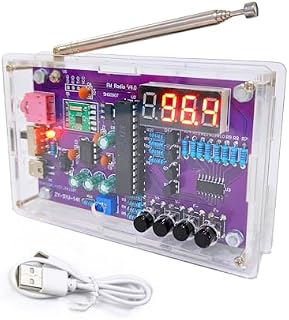 Gikfun FM Radio Kit Soldering Practice Kit DIY School ProjectCheck price on Amazon
 amomii Testudo Soldering Practice KitCheck price on Amazon
 Soldering Practice Kit Learning Electronics Training BoardCheck price on Amazon
 Soldering Practice KitCheck price on Amazon
Specs compared
| Model | HQ Score | Type | Power or size | In the box | Warranty |
|---|---|---|---|---|---|
| YIHUA 926 III | 9.7/10 | Iron station | 60W, 90 to 480 °C | 6 tips, solder, helping hands | 12 months |
| EGSCST SMD Kit 2-Pack | 9.4/10 | Practice kit | 0805 and 0603 parts | 2 boards and parts | Not stated |
| MiOYOOW Clock Kit | 9.4/10 | Practice kit | 4-digit LED clock | Board, parts, manual | Not stated |
| MUXWELL Speaker Kit | 9.3/10 | Practice kit | 3.0 x 5.0 x 2.5 in | Board, parts, enclosure | Not stated |
| EGSCST Lucky Wheel Kit | 9.3/10 | Practice kit | 51 x 51 mm | 2 boards and parts | Not stated |
Specs are what each manufacturer publishes as its rating on the listing, collected 14 November 2026. A practice kit lists a board and parts; only the YIHUA lists an iron.
What the listings tell you, and what they leave out
5 listings went into this guide, and they split into 2 kinds: a single full iron station and 4 practice kits. Only the YIHUA states a heat range, a warranty term and a safety standard, and only it lists an iron, solder and hand tools in the box. The 4 practice kits list boards, parts and instructions, and none of them lists an iron or a power supply. That split is the whole buying decision.
Buying guide: what makes a best beginner soldering kit
Station or practice kit first
A station is the buy for a beginner with no gear: the YIHUA lists the iron, the stand, 6 extra tips, solder and hand tools. A practice kit is the buy for a beginner who already owns an iron and wants a board to learn on. For irons on their own, see our best soldering iron for electronics guide.
Heat range and control
Heat control is what separates a station from a fixed-heat iron. The YIHUA lists heat from 90 to 480 °C on a digital display, with PID control that holds the set heat and a sleep timer. A practice kit lists no heat figures, because the heat comes from the iron the buyer already owns.
What comes in the box
Count the extras, not just the iron. The YIHUA lists 2 helping hands, 6 extra tips, a roll of lead-free solder at 35g, a solder sucker, tweezers, a solder wire bracket, a sponge and a spanner. The practice kits list a board, parts and a manual. If a part matters to a project, confirm it is listed before ordering.
Safety habits
Soldering means a hot iron, molten solder and fumes, so the habits matter as much as the gear. Work in a ventilated space, wear eye protection, rest the iron in its stand, and keep the work on a heat-proof surface. The YIHUA lists a mesh protector that guards against accidental contact, and its solder is lead-free. Lead solder is not for food-contact items.
Solder with ventilation, eye protection and a heat-proof surface under the work. Rest the iron in its stand whenever it is not in hand, and wash hands after handling solder. Lead solder is not for food-contact items. See our best soldering station guide for stations with stands and protection built in.
Project Match
- Learning surface-mount parts: EGSCST SMD Kit 2-Pack, with 0805 and 0603 parts on a labeled board.
- A finished clock on the desk: MiOYOOW Clock Kit, a 4-digit LED clock with date, time and temperature.
- A finished speaker with sound: MUXWELL Speaker Kit, a speaker with BT, USB player and FM receiver in an enclosure.
- Bench work with a full station: YIHUA 926 III, a 60W station with a digital display and 2 helping hands.
How the scores add up
Each kit is scored out of 10 on performance, build, value, safety and warranty. A spec the listing does not publish scores nothing, and a kit without an iron scores lower on performance for a buyer who needs one.
| Product | HQ Score | Perf. /35 | Build /25 | Value /25 | Safety /10 | Warranty /5 |
|---|---|---|---|---|---|---|
| YIHUA 926 III | 9.7 | 32 | 21 | 21 | 5 | 3 |
| EGSCST SMD Kit 2-Pack | 9.4 | 27 | 19 | 20 | 0 | 0 |
| MiOYOOW Clock Kit | 9.4 | 27 | 19 | 19 | 0 | 0 |
| MUXWELL Speaker Kit | 9.3 | 26 | 19 | 19 | 0 | 0 |
| EGSCST Lucky Wheel Kit | 9.3 | 26 | 18 | 19 | 0 | 0 |
HQ Scores live on a 9.2 to 9.8 band: each machine’s weighted point total is projected onto it proportionally, and higher totals always show higher.
FAQ: lasers and CNC
What should a beginner soldering kit include?
At minimum, an iron, solder and a stand. The YIHUA station lists all of those plus 6 extra tips, 2 helping hands, a solder sucker and tweezers. A practice kit lists a board, parts and a manual instead, so it suits a beginner who already owns an iron.
Do I need a soldering station or will a practice kit do?
A station is the buy when no iron is on the bench yet, because it covers iron, stand and tips. A practice kit is the buy when the iron is already there and the goal is learning joints on a real board. See our soldering iron vs soldering station guide for the difference.
What is lead-free solder?
Lead-free solder is solder made without lead. The YIHUA station includes a roll of lead-free solder at 35g. Wash hands after handling any solder, and keep solder away from food-contact items.
Can a beginner solder surface-mount parts?
Yes, with a practice board built for it. The EGSCST kit carries 0805 and 0603 parts, diodes, transistors and IC chips on a labeled board, and the pack holds 2 boards. Steady hands and good light help with parts this small.
How hot does a beginner soldering iron get?
It depends on the iron. The YIHUA station lists heat from 90 to 480 °C, or 194 to 896 °F, on a digital display. Begin low, and raise the heat only until joints flow cleanly.
Related: the soldering hub, best soldering iron and best soldering station. Also see our soldering iron vs soldering station. Also see our electronics making.