3018 vs 4040 CNC Router: Which One Should You Buy?
A 3018 CNC router fits small parts on a desk, while a 4040 adds work area and rigidity for bigger projects; this guide compares the two classes so you pick the right machine.

On this page
Top picks at a glance
As an Amazon Associate I earn from qualifying purchases.
- 1
 Genmitsu CNC 3018-PRO Router Kit9.5/10View on Amazon
- 2
 SainSmart Genmitsu 4040-PRO MAX CNC Router with 710W Trimmer9.6/10View on Amazon
- 3
 Genmitsu Power Supply Adapter for Upgraded 20000RPM Spindle9.4/10View on Amazon
- 4
 TTC3018 Pro CNC Router MachineView on Amazon
- 5
 Genmitsu Cubiko Desktop CNC Router Machine with Enclosure forView on Amazon
- 6
 LUNYEE 3020 Nova CNC Router MachineView on Amazon
- 7
 CNC MDF Spoilboard for LUNYEE 3018 CNC Router MachineView on Amazon
- 8
 CNC Spoilboard Surfacing Router Bit 1/4 Inch ShankView on Amazon
- 9
 CNC Spoilboard Surfacing Router BitsView on Amazon
3018 vs 4040 CNC router comes down to work area and rigidity: the 3018 class fits small parts on a desk, while the 4040 class gives you a bigger cutting area and a stiffer frame for larger projects. If your parts are small and your bench space is tight, the 3018 class fits the work. If you cut bigger panels, want stiffer cuts, or plan to run longer jobs, the 4040 class fits the work. The sections below compare what changes between the classes, then rank four machines from current listings, all in the 3018 to 3030 size range, so you can see what the small-class side offers before deciding whether to step up.
Other machines to compare
 TTC3018 Pro CNC Router MachineCheck price on Amazon
 Genmitsu Cubiko Desktop CNC Router Machine with Enclosure forCheck price on Amazon
 LUNYEE 3020 Nova CNC Router MachineCheck price on Amazon
 CNC MDF Spoilboard for LUNYEE 3018 CNC Router MachineCheck price on Amazon
 CNC Spoilboard Surfacing Router Bit 1/4 Inch ShankCheck price on Amazon
 CNC Spoilboard Surfacing Router BitsCheck price on Amazon
LaserEngraveHQ earns a commission from purchases made through these links, at no extra cost to you. Read our affiliate disclosure.
3018 vs 4040 CNC Router: What Changes Between Classes
The 3018 listings state 300x180x40mm and 300x180x45mm working areas, which covers small parts, nameplates and PCBs. The step up inside this group is the 3030-PROVer, the heaviest machine here at 23 kg, with dual linear rails and ball screws on every axis, which is what lets you take deeper cuts without chatter. If your designs fit inside the 3018 envelope, the smaller class saves desk space and money. If they do not, no 3018 workaround replaces the bigger bed.
Rigidity is the other change. The 3018 listings describe lead screws and standard steppers, while the 3030-PROVer listing below names dual linear rails and ball screws on every axis. Stiffer motion means cleaner edges in aluminum and acrylic, and less time re-running jobs that chattered. For wood signs and plastic parts, the difference is smaller. For metal sheet and tight-tolerance work, it decides the purchase.
Spindle power varies across the listings, from a 775 spindle motor at 7000 to 9000 RPM up to a 710W digital spindle with a real-time display. More spindle power means the machine keeps its speed under load instead of bogging down mid-cut.
The Gear: Four Machines Ranked
The four listings below are ranked by what each one states: work area, spindle, motion parts, setup effort and safety features. All four are 3018 or 3030-class machines; no 4040-class machine is reviewed below.
1. Genmitsu 3030-PROVer Ultra. The listing states a 710W digital spindle with a real-time display, plus minus 0.03mm precision from HG15 dual linear rails and 1204 ball screws on every axis. The maker claims 2.4 times stronger than old 300W spindles. Control runs through the Genmitsu app with Candle, UGS and Easel compatibility, and a large side-mounted emergency stop is listed. It ships as 2 pre-assembled modules with simple Y-axis alignment, weighs 23 kg and runs on 230 volts.
2. Genmitsu Cubiko. The listing states an enclosed desktop machine that ships pre-assembled, with auto Z-probing and WiFi plus app control alongside PC software and offline control. The integrated enclosure contains chips and debris while reducing noise, and opening the cover pauses operation. Smart surface mapping measures multiple points across the work surface for consistent engraving depth on PCBs. Materials listed are wood, acrylic, PCB, plastics and suitable soft metals with plus minus 0.1 mm positioning accuracy. The spindle is 96W with a 9000 rpm maximum, and the machine weighs 11.06 kg.
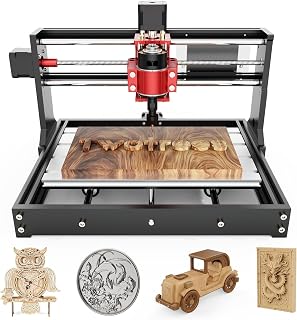
3. Twotrees TTC3018 Pro. The listing states a 300x180x40mm working area with 0.1mm positioning accuracy, an all-metal Z-axis with T8 backlash-eliminating lead screws, and support for aluminum and brass sheet processing. It weighs 15 pounds in a 420x355x280mm footprint that fits a desk corner. Control is GRBL over a wired USB connection only: no TF card slot, no Bluetooth and no WiFi. The kit includes 10 cutters, an ER11 collet from 0.5 to 7mm and a 775 spindle motor at 7000 to 9000 RPM, with compatibility listed for Windows XP, 7, 8 and 10.
4. RATTMMOTOR 3018PRO. The title states a 300x180x45mm working area with a 775 spindle motor running 10000 r per minute at 24V. The updated GRBL board adds an emergency stop button and X, Y and Z axis limit switches, with a silent cooling fan. Materials listed include wood, plastic, acrylic, PVC, PCB, carbon fiber and density board, plus soft metals like copper and aluminum; glass, hard metal and jade are excluded. It weighs 6.64 kg on 24 volts. A contradiction: the bullets state 18x10x4.5CM, which conflicts with the title’s 300x180x45mm, and the inch figures beside it do not match their own centimeter figures, so trust the title.
Setup and Workflow
Assembly ranges from full kits to ready machines. The 3030-PROVer ships as 2 pre-assembled modules with a 10-minute setup claim, the Cubiko ships pre-assembled, and the Twotrees kit claims a first project in 10 minutes. If you buy a kit to learn motion principles, assembly is the lesson. If you buy to make parts, pre-assembled saves the weekend.
The Twotrees and RATTMMOTOR list GRBL control; the 3030-PROVer lists Candle, UGS and Easel compatibility, and the Cubiko lists app, WiFi, PC software and offline control. ArtCam and Fusion360 are named on the Twotrees listing. Connectivity splits the group: the Twotrees is USB-wired only, the Cubiko adds WiFi, app and offline control, and the 3030-PROVer lists app control with remote adjust and troubleshooting. Pick the connection you will actually use, since a feature you never open adds nothing.
Which One Should You Buy?
Buy the 3018 class if your parts fit its bed and your bench is small: nameplates, PCBs, small signs and detail work. If your designs outgrow the 3018 bed or you want more rigidity for aluminum sheet and longer runs, step up to a larger class like the 4040; the machines ranked above are all 3018 or 3030-class, so use their beds and frames as your baseline. If you mill PCBs or need the lowest-noise home setup, the enclosed machine with surface mapping earns its place. Browse the CNC router hub and the desktop CNC routers page to compare more models before you spend.
FAQ: lasers and CNC
Can a 3018 cut aluminum?
The listings state soft metals, not hard ones. The Twotrees lists aluminum and brass sheet processing, the RATTMMOTOR lists soft metals like copper and aluminum, and the Cubiko lists suitable soft metals. Glass, hard metal and jade are excluded on the RATTMMOTOR. Take light passes and let the spindle do the work.
Do I need WiFi on a CNC router?
Not necessarily. The Twotrees runs GRBL over a wired USB connection only, with no wireless functions at all. The Cubiko adds WiFi, app and offline control. If your machine sits next to your computer, USB is enough. If you want to check jobs from across the shop, wireless earns its keep.
How much assembly do these machines need?
It varies by listing. The Cubiko ships pre-assembled, the 3030-PROVer ships as 2 pre-assembled modules with a 10-minute setup claim, and the Twotrees kit claims a first project in 10 minutes. The RATTMMOTOR is a DIY kit with a paper manual and a USB flash drive of files.
Can a 3018 engrave PCBs?
The listings say yes with care. The Cubiko lists smart surface mapping that measures multiple points across the board for consistent engraving depth on PCB traces, and the RATTMMOTOR lists PCB among its materials. A flat, well-probed board matters more than the machine class.
Is an enclosure worth it on a desktop CNC?
The Cubiko listing makes the case: the enclosure contains chips and debris, reduces operating noise, and opening the cover pauses the machine. For a home workshop or a shared maker space, that is a real quality-of-life difference over an open-frame machine.
Related: the CNC router hub, desktop CNC routers and laser engraver hub.



