3018 vs 3040 Cnc Router: Which One Should You Buy?
An entry-size comparison of 3018-class and 3040-class desktop CNC routers: work area, spindle, build and software, with four machines ranked for signs, PCBs and small parts.

On this page
Top picks at a glance
As an Amazon Associate I earn from qualifying purchases.
- 1
 Genmitsu CNC 3018-PRO Router Kit9.5/10View on Amazon
- 2
 SpeTool Carbide Single Flute CNC Router Bits 1/8" Cutting9.7/10View on Amazon
- 3
 CNCTOPBAOS 3018-PRO CNC Router Engraving Machine w/GRBL9.5/10View on Amazon
- 4
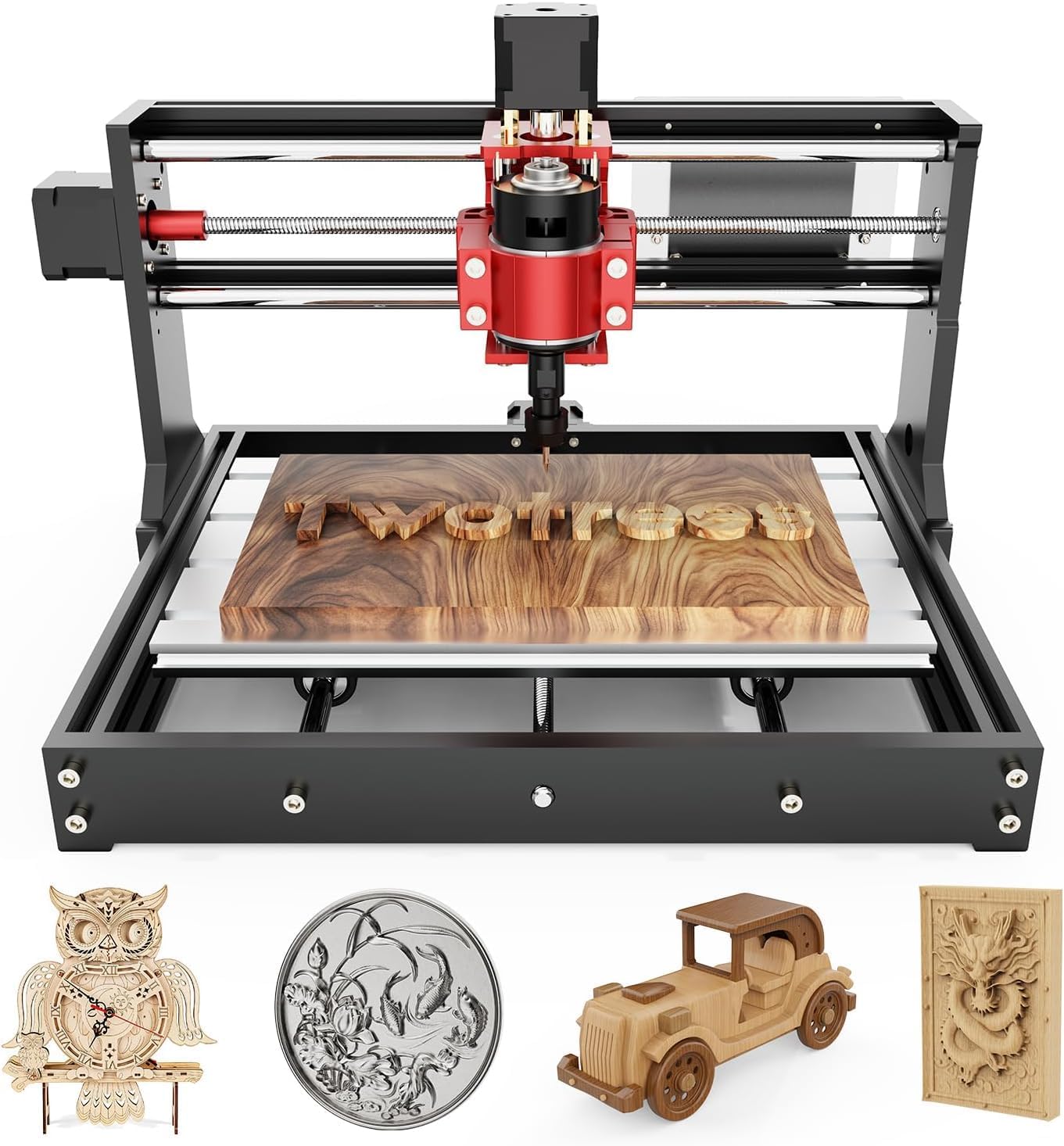 TTC3018 Pro CNC Router MachineView on Amazon
- 5
 Genmitsu Cubiko Desktop CNC Router Machine with Enclosure forView on Amazon
- 6
 LUNYEE 3020 Nova CNC Router MachineView on Amazon
- 7
 CNC MDF Spoilboard for LUNYEE 3018 CNC Router MachineView on Amazon
- 8
 CNC Spoilboard Surfacing Router Bit 1/4 Inch ShankView on Amazon
- 9
 CNC Spoilboard Surfacing Router BitsView on Amazon
3018 vs 3040 cnc router is the first fork in the road for anyone shopping an entry desktop CNC: signs and small-batch parts for a side business, personalized nameplates, PCB milling, or a first machine for learning the design-to-part workflow. The short answer is that a 3018-class machine covers any project that fits its 300x180mm work area, while a 3040-class frame is the pick when your work needs more room on the long axis. This guide explains what actually changes between the two sizes, then ranks four entry machines by what their listings state, so you can match the machine to the projects you want to make.
Other machines to compare
 TTC3018 Pro CNC Router MachineCheck price on Amazon
 Genmitsu Cubiko Desktop CNC Router Machine with Enclosure forCheck price on Amazon
 LUNYEE 3020 Nova CNC Router MachineCheck price on Amazon
 CNC MDF Spoilboard for LUNYEE 3018 CNC Router MachineCheck price on Amazon
 CNC Spoilboard Surfacing Router Bit 1/4 Inch ShankCheck price on Amazon
 CNC Spoilboard Surfacing Router BitsCheck price on Amazon
LaserEngraveHQ earns a commission from purchases made through these links, at no extra cost to you. Read our affiliate disclosure.
We have not run these machines ourselves. Every comparison below comes from what each Amazon listing publishes: work area, spindle, stated precision, build and software. Where a listing stays silent, we say so rather than guess.
3018 vs 3040 cnc router: the short answer
The numbers name the frame-size class of the machine. The 3018-class machines in this guide state a 300x180mm work area (the Twotrees lists 300mmX180mmX40mm, the RATTMMOTOR lists 300x180x45mm), which suits nameplates, small signs, PCB milling and learning cuts. A 3040-class frame keeps the same entry-level character but stretches the long axis, so longer sign blanks and bigger panels fit without re-clamping the workpiece mid-job.
Everything else about the choice matters as much as size. The stated spindle power is the figure to compare when cutting aluminum versus wood and acrylic. The stated motion hardware is the figure behind cleaner edges and pockets. And the software path decides how fast you go from a drawing to a finished part. The four machines below sit in the same entry tier, so the ranking comes down to which listing publishes the strongest combination of those things.
What actually changes with the bigger frame
Work area is the headline change. A 3018-class bed takes projects around 300mm on the long axis; the 3040-class gives more travel for longer blanks. Footprint grows with it: the Twotrees measures 420x355x280mm and weighs 15 pounds, while the RATTMMOTOR lists a 42x35x27cm frame at 6.64 kg, so a bigger frame asks for a bigger bench. Heavier machines in this class, like the Genmitsu 3030-PROVer at a stated 23 kg, tend to list sturdier frames and higher-torque steppers, which the listing connects to less wobble during cutting.
What does not change: the workflow. Three of the four state GRBL toolpaths; the Cubiko states app, WiFi and offline control instead. The listings state wood, acrylic and plastics in various combinations, and all four ask you to learn the same sequence of design, toolpath, workholding and finishing. A bigger bed alone does not change the stated precision figures; the stated rails, screws and spindle are the figures that do. If your project list fits 300mm, the frame-size question is settled and the build comparison decides. Read the ball screw versus lead screw guide if you want to understand why some listings charge more for their motion hardware.
The gear: four entry machines ranked
The four listings below are ranked by our scoring of performance, build, value, safety and warranty from what each listing states. Number one takes it on stated spindle power and motion hardware; the rest trade size, enclosure and beginner-friendliness.
1. Genmitsu 3030-PROVer Ultra
Who it is for: makers who want the strongest stated cutting hardware in this group, including aluminum and acrylic engraving. Who should skip it: anyone who needs a stated work area before buying, since the listing does not state one.
The listing states a 710W digital spindle with a real-time display, which it compares to older 300W spindles, plus a stated ±0.03mm precision figure, an all-metal chassis, high-torque stepper motors, and HG15 dual linear rails with 1204 ball screws on every axis. The X and Y axes are dust-protected, the cables are hidden, and a large side-mounted emergency stop is part of the design. Control runs through the Genmitsu app with remote adjust and troubleshoot, or through Candle, UGS and Easel on a PC. It ships as two pre-assembled modules, which the listing says cuts assembly by 80 percent.
Spec notes from the listing: 710 watts, ±0.03mm precision, 23 kg, corded electric at 230 volts, aluminum construction. Warranty: no term is stated.
2. Genmitsu Cubiko
Who it is for: beginners and PCB millers who want an enclosed, guided first machine. Who should skip it: anyone chasing maximum stated spindle power, since the listing states 96 watts.
The Cubiko comes pre-assembled in an integrated enclosure that the listing says contains chips and debris while reducing operating noise, and opening the cover pauses operation automatically. Auto Z-probing sets tool height from the material thickness you enter, and smart surface mapping measures multiple points across the work surface to compensate for small height variations during PCB milling. The listing states ±0.1 mm positioning accuracy and support for wood, acrylic, PCB, plastics and suitable soft metals. Control runs through the Genmitsu app, WiFi, compatible PC software or offline control. Warranty: no term is stated.
3. RATTMMOTOR 3018PRO
Who it is for: DIY beginners who want a classic 3018 kit with offline control. Who should skip it: anyone who needs a stated precision figure or a full-metal frame, since the listing states neither.
The listing states a 300x180x45mm working area, a 775 spindle motor rated 10000 rpm at 24V, and 42 stepper motors with 1.3A phase current. One detail needs care: a bullet lists the working area as 18x10x4.5CM while the title states 300x180x45mm and the same bullet gives 11.8 x 7.1 x 1.8 inches, which matches the title, so we trust the title and treat the 18cm figure as a typo. The frame combines black injection molding with an aluminum alloy work table and stainless steel screw rods. The updated GRBL board adds an emergency stop button and X, Y and Z axis limit support, a silent cooling fan, PWM support and automatic offline-controller detection. The listing names wood, plastic, acrylic, PCB, carbon fiber and density board plus soft metals such as copper and aluminum as workable, and states that harder materials such as glass and hard metal cannot be engraved. It ships with a paper manual and a USB flash drive of files. Warranty: no term is stated.
4. Twotrees TTC3018 Pro
Who it is for: nameplate and small-business production runs on a stated 300x180mm bed. Who should skip it: anyone who wants wireless control, since the listing rules it out explicitly.
The listing states a 300mmX180mmX40mm working area, an upgraded all-metal Z-axis with T8 backlash-eliminating lead screws, and 0.1mm positioning accuracy. The 775 spindle motor is rated 7000 to 9000 rpm, and the kit includes 10 standard cutters, an ER11 collet spanning 0.5 to 7mm, and the spindle motor, which the listing says lets you start a first project in 10 minutes. Connectivity is USB wired only: the listing states there is no built-in TF card slot, no Bluetooth and no 2.4G or 5G WiFi, and files transfer as .nc or G-code over the attached USB cable. It is compatible with GRBL, ArtCam and Fusion360 on Windows and Mac OS, and the 40-plus component disassembly kit is positioned for STEM learning. The machine weighs 15 pounds in a 420x355x280mm footprint. Warranty: no term is stated.
How to choose for your projects
Start from the longest blank you will cut, not from the machine. If every project fits 300mm, a 3018-class machine leaves nothing on the table and you should compare spindles and motion hardware instead. If signs and panels keep pushing past that, the 3040-class frame earns its bench space.
- Signs and nameplates: the Twotrees and RATTMMOTOR both state 300x180mm-class beds with 775 spindles, which the listings position for wood, acrylic and MDF-style work. Our CNC router for sign making guide compares machines aimed at this exact job.
- PCB milling: the Cubiko lists smart surface mapping for keeping engraving depth consistent on uneven boards, plus auto Z-probing for setup.
- Aluminum and acrylic: the 3030-PROVer lists the strongest stated spindle here at 710W with ball screws and dual linear rails, aimed at metal-capable cutting.
- First machine: the Cubiko arrives pre-assembled with an enclosure, the 3030-PROVer ships as two modules, and the RATTMMOTOR ships with a paper manual and setup files. Compare them in our best desktop CNC for beginners roundup, and see the 3018 setup guide for what the first day looks like.
If the goal is paid work rather than hobby projects, the best CNC router for small business guide weighs throughput and reliability the way a shop owner would.
Dust, noise and shop safety
CNC routing makes chips and fine dust, and wood dust belongs in a collector rather than in the room. A dust collector for a desktop CNC fitted at the spindle keeps the work area visible and the bench cleaner, and an enclosed machine like the Cubiko adds a second layer of containment with lower stated noise. Keep a fire extinguisher rated for the shop within reach, and never leave a running job unattended: a dull bit rubbing instead of cutting is the classic start of a bad afternoon. Wear hearing protection if your machine runs loud, and confirm that any eyewear you use is rated for the task rather than relying on tinted shields.
FAQ: lasers and CNC
What does 3018 vs 3040 mean on a CNC router?
The numbers name the frame-size class of the machine. The 3018-class machines in this guide state a 300x180mm work area; a 3040-class frame is the larger sibling with more travel on the long axis for longer blanks.
Can a 3018-class machine cut aluminum?
The listings say yes within limits. The Twotrees lists aluminum and brass sheet processing, the RATTMMOTOR lists soft metals such as copper and aluminum, and the 3030-PROVer is positioned for aluminum and acrylic engraving. The RATTMMOTOR listing states that harder materials such as glass and hard metal cannot be engraved.
Which software works with these machines?
Three of the four state GRBL compatibility; the Cubiko states app, WiFi and offline control instead. The Genmitsu listings add Candle, UGS and Easel plus the Genmitsu app, while the Twotrees lists ArtCam and Fusion360 compatibility. Design in whatever CAD or CAM you prefer, then send standard G-code.
Is a 3018 good for PCB milling?
The listings suggest it. The Cubiko lists smart surface mapping that compensates for small height variations across the board, which matters for consistent trace depth, and the RATTMMOTOR names PCB among its materials.
Do I need an enclosed machine?
An enclosure is not required, but the Cubiko listing states two real benefits: chips and debris stay inside, and operating noise drops. Opening the cover pauses the job automatically, which is a useful guard in a shared or home workspace.
Related: our best desktop CNC for beginners roundup and the best CNC router for small business guide.



